Python Engine
This article mainly introduces the installation, use and configuration of the Python engine plugin in Linkis.
1. Preliminary work#
1.1 Environment Installation#
If you want to use the python engine on your server, you need to ensure that the user's PATH has the python execution directory and execution permissions.
1.2 Environment verification#
python --versionNormal output of Python version information means Python environment is available
Python 3.6.02. Engine plugin installation default engine#
The binary installation package released by linkis includes the Python engine plug-in by default, and users do not need to install it additionally.
EngineConnPlugin Engine Plugin Installation
3. Engine usage#
3.1 Submitting tasks via Linkis-cli#
sh ./bin/linkis-cli -engineType python-python2 \-codeType python -code "print(\"hello\")" \-submitUser hadoop -proxyUser hadoopMore Linkis-Cli command parameter reference: Linkis-Cli usage
3.2 Submit tasks through Linkis SDK#
Linkis provides SDK of Java and Scala to submit tasks to Linkis server. For details, please refer to JAVA SDK Manual. For For Python tasks, you only need to modify EngineConnType and CodeType parameters.
Map<String, Object> labels = new HashMap<String, Object>();labels.put(LabelKeyConstant.ENGINE_TYPE_KEY, "python-python2"); // required engineType Labellabels.put(LabelKeyConstant.USER_CREATOR_TYPE_KEY, "hadoop-IDE");// required execute user and creatorlabels.put(LabelKeyConstant.CODE_TYPE_KEY, "python"); // required codeType 4. Engine configuration instructions#
4.1 Configuration modification#
The Python engine plug-in supports python2 and python3, you can simply change the configuration to complete the switch of Python version without recompiling the python engine version. The Python engine supports a variety of configuration modification methods, the specific operations are as follows.
4.1.1 Display designation through command parameters (only the current command takes effect)#
#1: Submit tasks via cli to switch versions, and set the version python.version=python3 at the end of the command (python3: the name of the file generated when creating a soft link, which can be customized)sh ./bin/linkis-cli -engineType python-python2 \-codeType python -code "print(\"hello\")"  \-submitUser hadoop -proxyUser hadoop  \-confMap  python.version=python3
#2: The cli method is used to submit tasks for version switching, and the command is set to add the version path python.version=/usr/bin/python (/usr/bin/python: the path to the file generated when creating a soft link)sh ./bin/linkis-cli -engineType python-python2 \-codeType python -code "print(\"hello\")"  \-submitUser hadoop -proxyUser hadoop  \-confMap  python.version=/usr/bin/python
4.1.2 Management console configuration#
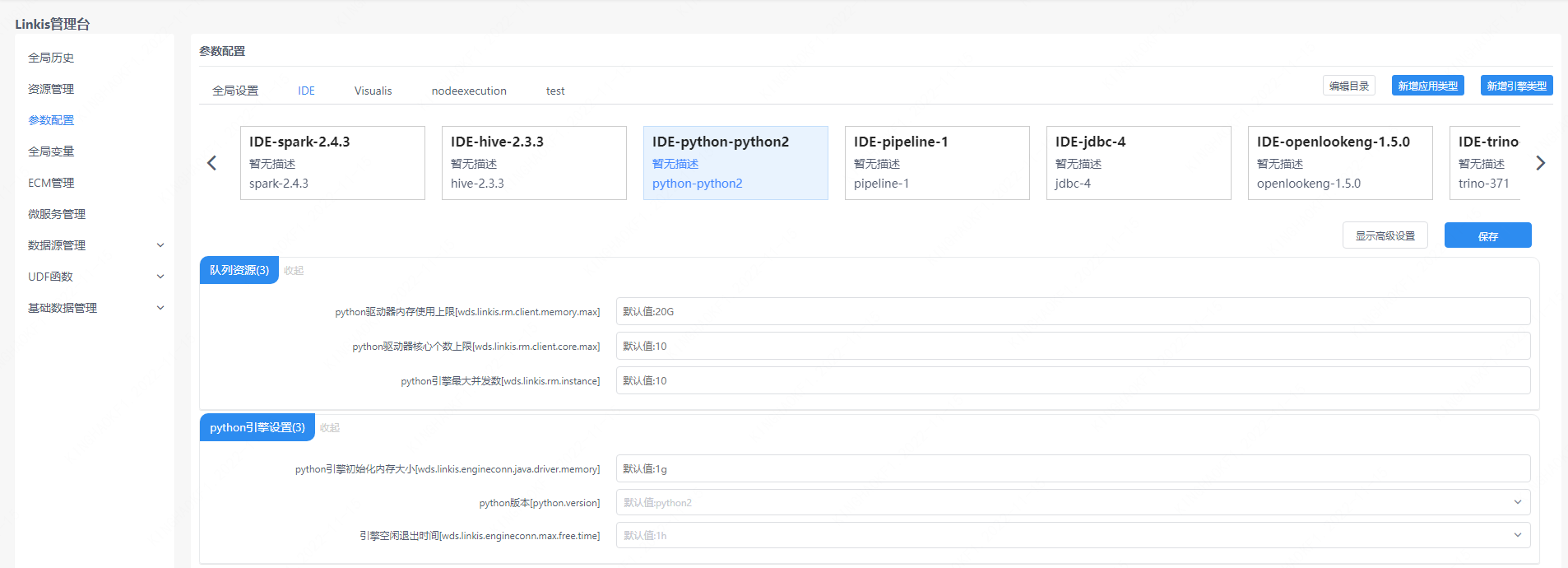
Note: After modifying the configuration under the IDE tag, you need to specify -creator IDE to take effect (other tags are similar), such as:
sh ./bin/linkis-cli -creator IDE -engineType \python-python2 -codeType python -code "print(\"hello\")" \-submitUser hadoop -proxyUser hadoop \-confMap python.version=python34.2.2 Task interface configuration#
Submit the task interface, configure it through the parameter params.configuration.runtime
Example of http request parameters{ "executionContent": {"code": "print(\"hello\")", "runType": "python"}, "params": { "variable": {}, "configuration": { "runtime": { "python.version":"python2", "wds.linkis.engineconn.max.free.time":"1h" } } }, "labels": { "engineType": "python-python2", "userCreator": "IDE" }}4.2.3 File Configuration#
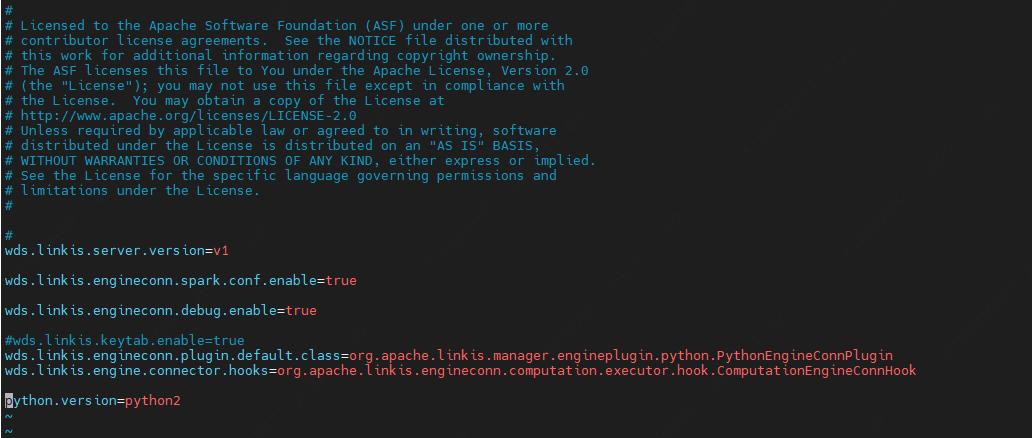
Configure by modifying the linkis-engineconn.properties file in the directory ${LINKIS_HOME}/lib/linkis-engineconn-plugins/python/dist/vpython2/conf/, as shown below:
4.3 Engine related data sheet#
Linkis is managed through engine tags, and the data table information involved is as follows.
linkis_ps_configuration_config_key: Insert the key and default values of the configuration parameters of the enginelinkis_cg_manager_label: Insert engine label such as: python-python2linkis_ps_configuration_category: Insert the directory association of the enginelinkis_ps_configuration_config_value: The configuration that the insertion engine needs to displaylinkis_ps_configuration_key_engine_relation: The relationship between the configuration item and the engineThe initial data related to the engine in the table is as follows
-- set variableSET @PYTHON_LABEL="python-python2";SET @PYTHON_ALL=CONCAT('*-*,',@PYTHON_LABEL);SET @PYTHON_IDE=CONCAT('*-IDE,',@PYTHON_LABEL);
-- engine labelinsert into `linkis_cg_manager_label` (`label_key`, `label_value`, `label_feature`, `label_value_size`, `update_time`, `create_time`) VALUES ('combined_userCreator_engineType', @PYTHON_ALL, 'OPTIONAL', 2, now(), now());insert into `linkis_cg_manager_label` (`label_key`, `label_value`, `label_feature`, `label_value_size`, `update_time`, `create_time`) VALUES ('combined_userCreator_engineType', @PYTHON_IDE, 'OPTIONAL', 2, now(), now());
select @label_id := id from linkis_cg_manager_label where `label_value` = @PYTHON_IDE;insert into linkis_ps_configuration_category (`label_id`, `level`) VALUES (@label_id, 2);
-- configuration keyINSERT INTO `linkis_ps_configuration_config_key` (`key`, `description`, `name`, `default_value`, `validate_type`, `validate_range`, `is_hidden`, `is_advanced`, `level`, `treeName`, `engine_conn_type`) VALUES ('wds.linkis.rm.client.memory.max', 'Value range: 1-100, unit: G', 'Python driver memory upper limit', '20G', 'Regex', '^([ 1-9]\\d{0,1}|100)(G|g)$', '0', '0', '1', 'queue resource', 'python');INSERT INTO `linkis_ps_configuration_config_key` (`key`, `description`, `name`, `default_value`, `validate_type`, `validate_range`, `is_hidden`, `is_advanced`, `level`, `treeName`, `engine_conn_type`) VALUES ('wds.linkis.rm.client.core.max', 'Value range: 1-128, unit: a', 'Python drive core number upper limit', '10', 'Regex', '^( ?:[1-9]\\d?|[1234]\\d{2}|128)$', '0', '0', '1', 'queue resource', 'python');INSERT INTO `linkis_ps_configuration_config_key` (`key`, `description`, `name`, `default_value`, `validate_type`, `validate_range`, `is_hidden`, `is_advanced`, `level`, `treeName`, `engine_conn_type`) VALUES ('wds.linkis.rm.instance', 'Range: 1-20, unit: a', 'Python engine maximum concurrent number', '10', 'NumInterval', '[1,20]', '0 ', '0', '1', 'queue resource', 'python');INSERT INTO `linkis_ps_configuration_config_key` (`key`, `description`, `name`, `default_value`, `validate_type`, `validate_range`, `is_hidden`, `is_advanced`, `level`, `treeName`, `engine_conn_type`) VALUES ('wds.linkis.engineconn.java.driver.memory', 'value range: 1-2, unit: G', 'python engine initialization memory size', '1g', 'Regex', '^([ 1-2])(G|g)$', '0', '0', '1', 'python engine settings', 'python');INSERT INTO `linkis_ps_configuration_config_key` (`key`, `description`, `name`, `default_value`, `validate_type`, `validate_range`, `is_hidden`, `is_advanced`, `level`, `treeName`, `engine_conn_type`) VALUES ('python.version', 'Value range: python2,python3', 'python version','python2', 'OFT', '[\"python3\",\"python2\"]', '0' , '0', '1', 'python engine settings', 'python');INSERT INTO `linkis_ps_configuration_config_key` (`key`, `description`, `name`, `default_value`, `validate_type`, `validate_range`, `is_hidden`, `is_advanced`, `level`, `treeName`, `engine_conn_type`) VALUES ('wds.linkis.engineconn.max.free.time', 'Value range: 3m,15m,30m,1h,2h', 'Engine idle exit time','1h', 'OFT', '[\ "1h\",\"2h\",\"30m\",\"15m\",\"3m\"]', '0', '0', '1', 'python engine settings', ' python');
-- key engine relationinsert into `linkis_ps_configuration_key_engine_relation` (`config_key_id`, `engine_type_label_id`)(select config.id as `config_key_id`, label.id AS `engine_type_label_id` FROM linkis_ps_configuration_config_key configINNER JOIN linkis_cg_manager_label label ON config.engine_conn_type = 'python' and label_value = @PYTHON_ALL);
-- engine default configurationinsert into `linkis_ps_configuration_config_value` (`config_key_id`, `config_value`, `config_label_id`)(select `relation`.`config_key_id` AS `config_key_id`, '' AS `config_value`, `relation`.`engine_type_label_id` AS `config_label_id` FROM linkis_ps_configuration_key_engine_relation relationINNER JOIN linkis_cg_manager_label label ON relation.engine_type_label_id = label.id AND label.label_value = @PYTHON_ALL);