Pipeline Engine
Pipeline is mainly used to import and export files. This article mainly introduces the installation, use and configuration of the Hive engine plugin in Linkis.
1. Engine plugin installation#
1.1 Engine plugin preparation (choose one) non-default engine#
Method 1: Download the engine plug-in package directly
Method 2: Compile the engine plug-in separately (maven environment is required)
# compilecd ${linkis_code_dir}/linkis-engineconn-plugins/pipeline/mvn clean install# The compiled engine plug-in package is located in the following directory${linkis_code_dir}/linkis-engineconn-plugins/pipeline/target/out/EngineConnPlugin engine plugin installation
1.2 Uploading and loading of engine plugins#
Upload the engine plug-in package in 1.1 to the engine directory of the server
${LINKIS_HOME}/lib/linkis-enginepluginsThe directory structure after uploading is as follows
linkis-engineconn-plugins/├── pipeline│ ├── dist│ │ └── v1│ │ ├── conf│ │ └── lib│ └── plugin│ └── 11.3 Engine refresh#
1.3.1 Restart and refresh#
Refresh the engine by restarting the linkis-cg-linkismanager service
cd ${LINKIS_HOME}/sbinsh linkis-daemon.sh restart cg-linkismanager1.3.2 Check if the engine is refreshed successfully#
You can check whether the last_update_time of the linkis_engine_conn_plugin_bml_resources table in the database is the time to trigger the refresh.
#Log in to the linkis databaseselect * from linkis_cg_engine_conn_plugin_bml_resources;2 Engine usage#
Because the pipeline engine is mainly used to import and export files, now we assume that importing files from A to B is an introduction case
2.1 Submit tasks through Linkis-cli#
sh bin/linkis-cli -submitUser Hadoop \-engineType pipeline-1 -codeType pipeline \-code "from hdfs:///000/000/000/A.dolphin to file:///000/000/000/B.csv"from hdfs:///000/000/000/A.dolphin to file:///000/000/000/B.csv This content is explained in 2.3
More Linkis-Cli command parameter reference: Linkis-Cli usage
3. Engine configuration instructions#
3.1 Default configuration description#
| Configuration | Default | Required | Description |
|---|---|---|---|
| pipeline.output.mold | csv | no | result set export type |
| pipeline.field.split | , | no | csv separator |
| pipeline.output.charset | gbk | no | result set export character set |
| pipeline.output.isoverwrite | true | no | overwrite |
| wds.linkis.rm.instance | 3 | No | Maximum concurrent number of pipeline engines |
| pipeline.output.shuffle.null.type | NULL | No | Null replacement |
| wds.linkis.engineconn.java.driver.memory | 2g | no | pipeline engine initialization memory size |
4.2 Configuration modification#
If the default parameters are not satisfied, there are the following ways to configure some basic parameters
4.2.1 Management console configuration#
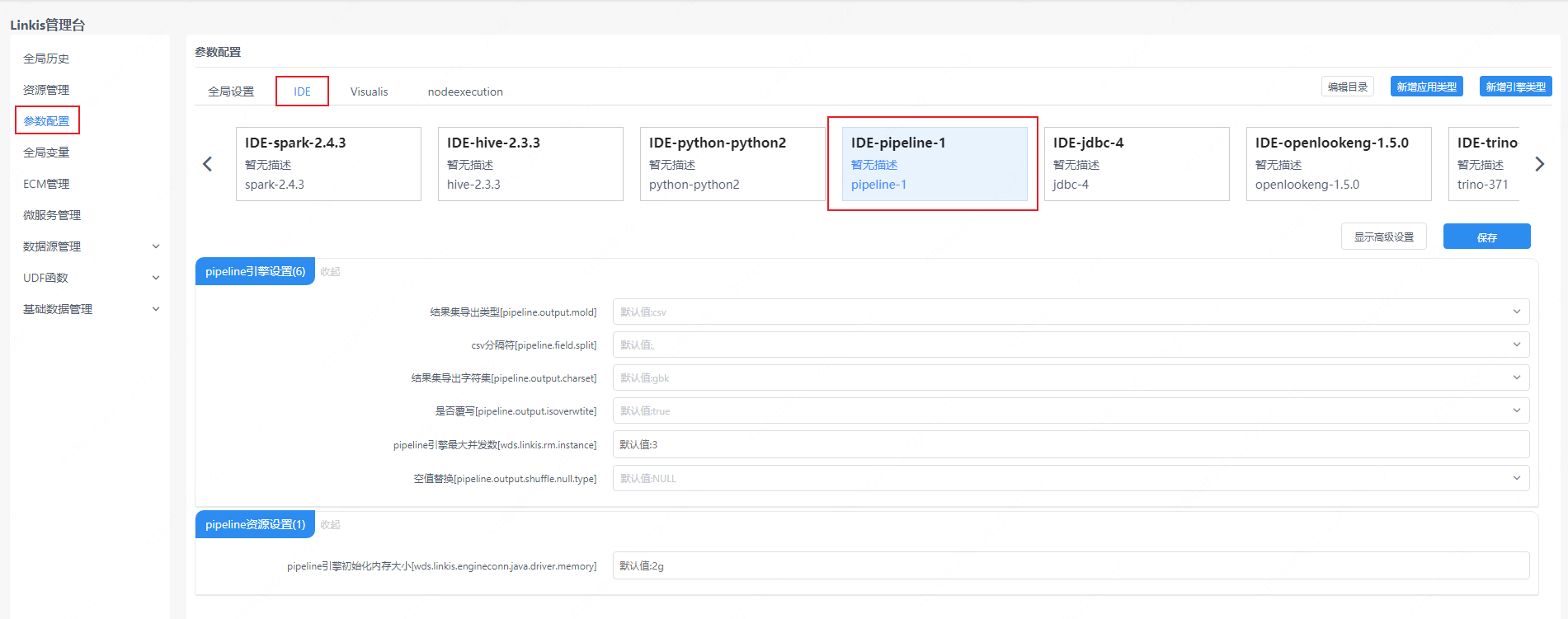
Note: After modifying the configuration under the IDE tag, you need to specify -creator IDE to take effect (other tags are similar), such as:
sh bin/linkis-cli -creator IDE \-submitUser hadoop \-engineType pipeline-1 \-codeType pipeline \-code "from hdfs:///000/000/000/A.dolphin to file:///000/000/000/B.csv"4.2.2 Task interface configuration#
Submit the task interface, configure it through the parameter params.configuration.runtime
Example of http request parameters{ "executionContent": {"code": "from hdfs:///000/000/000/A.dolphin to file:///000/000/000/B.csv", "runType": "pipeline"}, "params": { "variable": {}, "configuration": { "runtime": { "pipeline.output.mold":"csv", "pipeline.output.charset":"gbk" } } }, "labels": { "engineType": "pipeline-1", "userCreator": "hadoop-IDE" }}4.3 Engine related data sheet#
Linkis is managed through engine tags, and the data table information involved is as follows.
linkis_ps_configuration_config_key: key and default values of configuration parameters inserted into the enginelinkis_cg_manager_label: insert engine label such as: pipeline-1linkis_ps_configuration_category: The directory association relationship of the insertion enginelinkis_ps_configuration_config_value: Insert the configuration that the engine needs to displaylinkis_ps_configuration_key_engine_relation: The relationship between the configuration item and the engineThe initial data related to the engine in the table is as follows
-- set variableSET @PIPELINE_LABEL="pipeline-1";SET @PIPELINE_ALL=CONCAT('*-*,',@PIPELINE_LABEL);SET @PIPELINE_IDE=CONCAT('*-IDE,',@PIPELINE_LABEL);
-- engine labelinsert into `linkis_cg_manager_label` (`label_key`, `label_value`, `label_feature`, `label_value_size`, `update_time`, `create_time`) VALUES ('combined_userCreator_engineType', @PIPELINE_ALL, 'OPTIONAL', 2, now(), now());insert into `linkis_cg_manager_label` (`label_key`, `label_value`, `label_feature`, `label_value_size`, `update_time`, `create_time`) VALUES ('combined_userCreator_engineType', @PIPELINE_IDE, 'OPTIONAL', 2, now(), now());
select @label_id := id from linkis_cg_manager_label where `label_value` = @PIPELINE_IDE;insert into linkis_ps_configuration_category (`label_id`, `level`) VALUES (@label_id, 2);
-- configuration keyINSERT INTO `linkis_ps_configuration_config_key` (`key`, `description`, `name`, `default_value`, `validate_type`, `validate_range`, `is_hidden`, `is_advanced`, `level`, `treeName`, `engine_conn_type`) VALUES ('pipeline.output.mold', 'Value range: csv or excel', 'Result set export type','csv', 'OFT', '[\"csv\",\"excel\"]' , '0', '0', '1', 'pipeline engine settings', 'pipeline');INSERT INTO `linkis_ps_configuration_config_key` (`key`, `description`, `name`, `default_value`, `validate_type`, `validate_range`, `is_hidden`, `is_advanced`, `level`, `treeName`, `engine_conn_type`) VALUES ('pipeline.field.split', 'value range:, or \\t', 'csv delimiter',',', 'OFT', '[\",\",\"\\\\ t\"]', '0', '0', '1', 'pipeline engine settings', 'pipeline');INSERT INTO `linkis_ps_configuration_config_key` (`key`, `description`, `name`, `default_value`, `validate_type`, `validate_range`, `is_hidden`, `is_advanced`, `level`, `treeName`, `engine_conn_type`) VALUES ('pipeline.output.charset', 'value range: utf-8 or gbk', 'result set export character set','gbk', 'OFT', '[\"utf-8\",\" gbk\"]', '0', '0', '1', 'pipeline engine settings', 'pipeline');INSERT INTO `linkis_ps_configuration_config_key` (`key`, `description`, `name`, `default_value`, `validate_type`, `validate_range`, `is_hidden`, `is_advanced`, `level`, `treeName`, `engine_conn_type`) VALUES ('pipeline.output.isoverwrite', 'Value range: true or false', 'Whether to overwrite','true', 'OFT', '[\"true\",\"false\"]', '0', '0', '1', 'pipeline engine settings', 'pipeline');INSERT INTO `linkis_ps_configuration_config_key` (`key`, `description`, `name`, `default_value`, `validate_type`, `validate_range`, `is_hidden`, `is_advanced`, `level`, `treeName`, `engine_conn_type`) VALUES ('wds.linkis.rm.instance', 'Range: 1-3, Unit: Piece', 'Maximum concurrent number of pipeline engines','3', 'NumInterval', '[1,3]', '0 ', '0', '1', 'pipeline engine settings', 'pipeline');INSERT INTO `linkis_ps_configuration_config_key` (`key`, `description`, `name`, `default_value`, `validate_type`, `validate_range`, `is_hidden`, `is_advanced`, `level`, `treeName`, `engine_conn_type`) VALUES ('wds.linkis.engineconn.java.driver.memory', 'value range: 1-10, unit: G', 'pipeline engine initialization memory size','2g', 'Regex', '^([ 1-9]|10)(G|g)$', '0', '0', '1', 'pipeline resource settings', 'pipeline');INSERT INTO `linkis_ps_configuration_config_key` (`key`, `description`, `name`, `default_value`, `validate_type`, `validate_range`, `is_hidden`, `is_advanced`, `level`, `treeName`, `engine_conn_type`) VALUES ('pipeline.output.shuffle.null.type', 'Value range: NULL or BLANK', 'Null value replacement','NULL', 'OFT', '[\"NULL\",\"BLANK\ "]', '0', '0', '1', 'pipeline engine settings', 'pipeline');
-- key engine relationinsert into `linkis_ps_configuration_key_engine_relation` (`config_key_id`, `engine_type_label_id`)(select config.id as `config_key_id`, label.id AS `engine_type_label_id` FROM linkis_ps_configuration_config_key configINNER JOIN linkis_cg_manager_label label ON config.engine_conn_type = 'pipeline' and label_value = @PIPELINE_ALL);
-- engine default configurationinsert into `linkis_ps_configuration_config_value` (`config_key_id`, `config_value`, `config_label_id`)(select `relation`.`config_key_id` AS `config_key_id`, '' AS `config_value`, `relation`.`engine_type_label_id` AS `config_label_id` FROM linkis_ps_configuration_key_engine_relation relationINNER JOIN linkis_cg_manager_label label ON relation.engine_type_label_id = label.id AND label.label_value = @PIPELINE_ALL);