ElasticSearch Engine
This article mainly introduces the installation, usage and configuration of the ElasticSearch engine plugin in Linkis.
1. Preliminary work#
1.1 Engine installation#
If you want to use the ElasticSearch engine on your Linkis service, you need to install the ElasticSearch service and make sure the service is available.
1.2 Service Authentication#
Use the following command to verify whether the ElasticSearch engine service is available. If the service has enabled user authentication, you need to add --user username:password
curl [--user username:password] http://ip:port/_cluster/healty?prettyThe following output means that the ElasticSearch service is available, note that the cluster status is green
{ "cluster_name" : "docker-cluster", "status" : "green", "timed_out" : false, "number_of_nodes" : 1, "number_of_data_nodes" : 1, "active_primary_shards" : 7, "active_shards" : 7, "relocating_shards" : 0, "initializing_shards" : 0, "unassigned_shards" : 0, "delayed_unassigned_shards" : 0, "number_of_pending_tasks" : 0, "number_of_in_flight_fetch" : 0, "task_max_waiting_in_queue_millis" : 0, "active_shards_percent_as_number" : 100.0}2. Engine plugin installation#
2.1 Engine plugin preparation (choose one) non-default engine#
Method 1: Download the engine plug-in package directly
Method 2: Compile the engine plug-in separately (maven environment is required)
# compilecd ${linkis_code_dir}/linkis-engineconn-plugins/elasticsearch/mvn clean install# The compiled engine plug-in package is located in the following directory${linkis_code_dir}/linkis-engineconn-plugins/elasticsearch/target/out/EngineConnPlugin Engine Plugin Installation
2.2 Upload and load engine plugins#
Upload the engine plug-in package in 2.1 to the engine directory of the server
${LINKIS_HOME}/lib/linkis-enginepluginsThe directory structure after uploading is as follows
linkis-engineconn-plugins/├── elasticsearch│ ├── dist│ │ └── v7.6.2│ │ ├── conf│ │ └── lib│ └── plugin│ └── 7.6.22.3 Engine refresh#
2.3.1 Restart and refresh#
Refresh the engine by restarting the linkis-cg-linkismanager service
cd ${LINKIS_HOME}/sbinsh linkis-daemon.sh restart cg-linkismanager2.3.2 Check if the engine is refreshed successfully#
You can check whether the last_update_time of this table in the linkis_engine_conn_plugin_bml_resources in the database is the time when the refresh is triggered.
#Login to the linkis databaseselect * from linkis_cg_engine_conn_plugin_bml_resources;3. Engine usage#
3.1 Submit tasks through Linkis-cli#
-codeType parameter description
essql: ExecuteElasticSearchengine tasks throughSQLscriptsesjson: ExecuteElasticSearchengine tasks throughJSONscript
essql method example
Note: Using this form, the ElasticSearch service must install the SQL plug-in, please refer to the installation method: https://github.com/NLPchina/elasticsearch-sql#elasticsearch-762
sh ./bin/linkis-cli -submitUser Hadoop \ -engineType elasticsearch-7.6.2 -codeType essql \ -code '{"sql": "select * from kibana_sample_data_ecommerce limit 10' \ -runtimeMap linkis.es.http.method=GET \ -runtimeMap linkis.es.http.endpoint=/_sql \ -runtimeMap linkis.es.datasource=hadoop \ -runtimeMap linkis.es.cluster=127.0.0.1:9200esjson style example
sh ./bin/linkis-cli -submitUser Hadoop \-engineType elasticsearch-7.6.2 -codeType esjson \-code '{"query": {"match": {"order_id": "584677"}}}' \-runtimeMap linkis.es.http.method=GET \-runtimeMap linkis.es.http.endpoint=/kibana_sample_data_ecommerce/_search \-runtimeMap linkis.es.datasource=hadoop \-runtimeMap linkis.es.cluster=127.0.0.1:9200More Linkis-Cli command parameter reference: Linkis-Cli usage
4. Engine configuration instructions#
4.1 Default Configuration Description#
| Configuration | Default | Required | Description |
|---|---|---|---|
| linkis.es.cluster | 127.0.0.1:9200 | yes | ElasticSearch cluster, multiple nodes separated by commas |
| linkis.es.datasource | hadoop | 是 | ElasticSearch datasource |
| linkis.es.username | none | no | ElasticSearch cluster username |
| linkis.es.password | none | no | ElasticSearch cluster password |
| linkis.es.auth.cache | false | No | Whether the client caches authentication |
| linkis.es.sniffer.enable | false | No | Whether the client enables sniffer |
| linkis.es.http.method | GET | No | Call method |
| linkis.es.http.endpoint | /_search | No | Endpoint called by JSON script |
| linkis.es.sql.endpoint | /_sql | No | Endpoint called by SQL script |
| linkis.es.sql.format | {"query":"%s"} | No | Template called by SQL script, %s is replaced with SQL as the request body to request Es cluster |
| linkis.es.headers.* | None | No | Client Headers Configuration |
| linkis.engineconn.concurrent.limit | 100 | No | Maximum concurrent engine |
4.2 Configuration modification#
If the default parameters are not satisfied, there are the following ways to configure some basic parameters
4.2.1 Management console configuration#
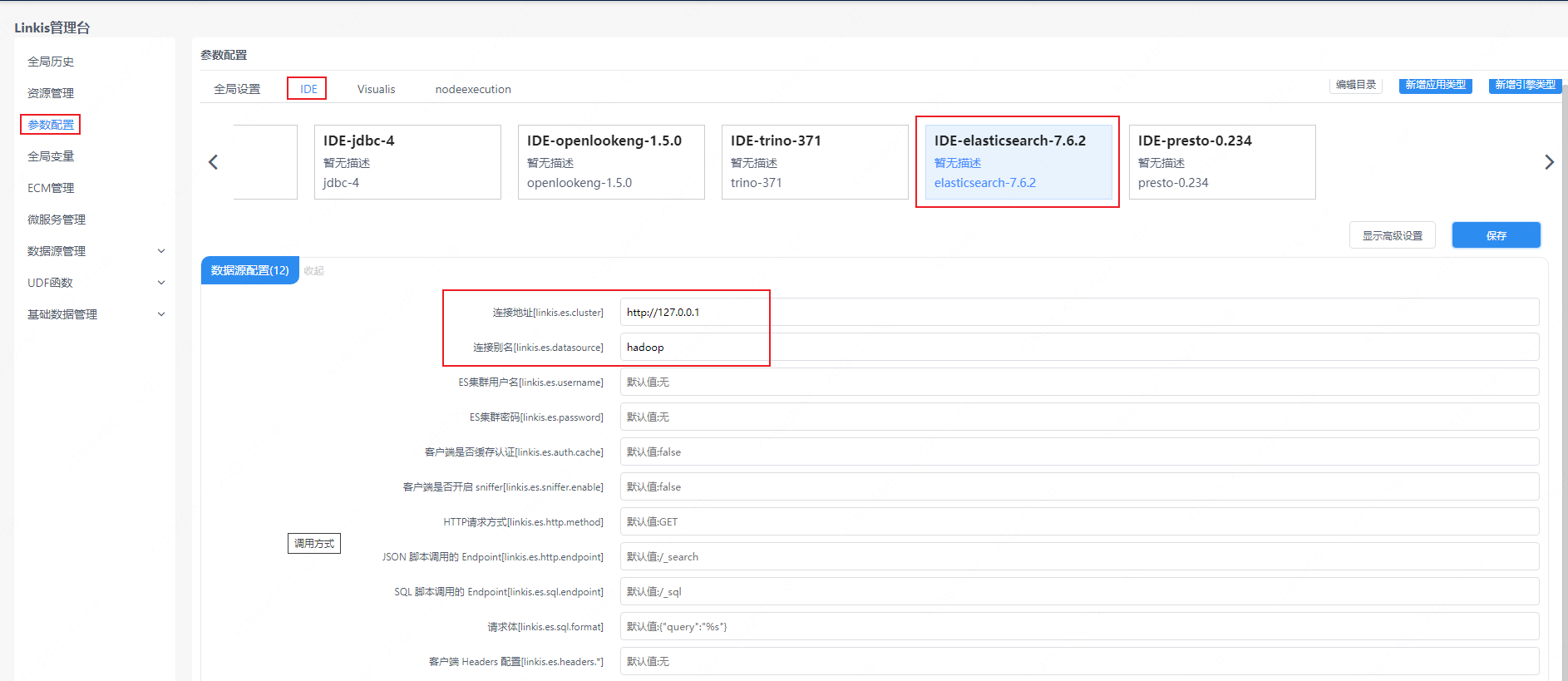
Note: After modifying the configuration under the IDE tag, you need to specify -creator IDE to take effect (other tags are similar), such as:
sh ./bin/linkis-cli -creator IDE -submitUser hadoop \-engineType elasticsearch-7.6.2 -codeType esjson \-code '{"query": {"match": {"order_id": "584677"}}}' \-runtimeMap linkis.es.http.method=GET \-runtimeMap linkis.es.http.endpoint=/kibana_sample_data_ecommerce/_search 4.2.2 Task interface configuration#
Submit the task interface, configure it through the parameter params.configuration.runtime
Example of http request parameters{ "executionContent": {"code": "select * from kibana_sample_data_ecommerce limit 10;", "runType": "essql"}, "params": { "variable": {}, "configuration": { "runtime": { "linkis.es.cluster":"http://127.0.0.1:9200", "linkis.es.datasource":"hadoop", "linkis.es.username":"", "linkis.es.password":"" } } }, "labels": { "engineType": "elasticsearch-7.6.2", "userCreator": "hadoop-IDE" }}4.2.3 File Configuration#
Configure by modifying the linkis-engineconn.properties file in the directory ${LINKIS_HOME}/lib/linkis-engineconn-plugins/elasticsearch/dist/v7.6.2/conf/, as shown below:
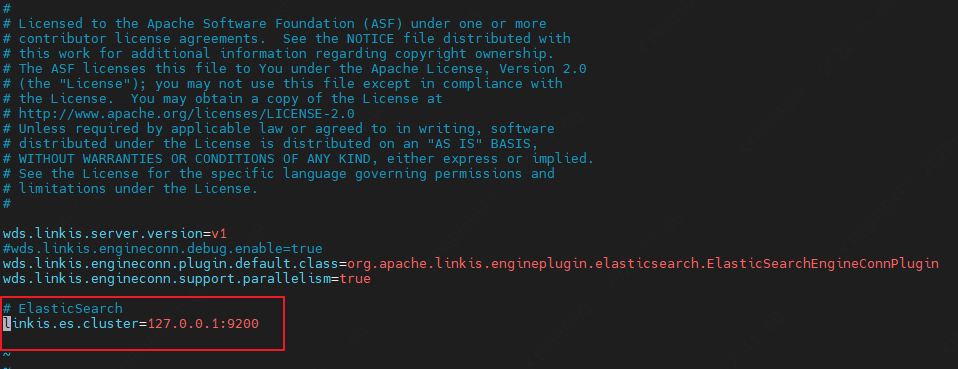
4.3 Engine related data sheet#
Linkis is managed through the engine tag, and the data table information involved is shown below.
linkis_ps_configuration_config_key: key and default values of configuration parameters inserted into the enginelinkis_cg_manager_label: Insert engine label such as: elasticsearch-7.6.2linkis_ps_configuration_category: Insert the directory association of the enginelinkis_ps_configuration_config_value: The configuration that the insertion engine needs to displaylinkis_ps_configuration_key_engine_relation: The relationship between the configuration item and the engineThe initial data related to the engine in the table is as follows
-- set variableSET @ENGINE_LABEL="elasticsearch-7.6.2";SET @ENGINE_ALL=CONCAT('*-*,',@ENGINE_LABEL);SET @ENGINE_IDE=CONCAT('*-IDE,',@ENGINE_LABEL);SET @ENGINE_NAME="elasticsearch";
-- engine labelinsert into `linkis_cg_manager_label` (`label_key`, `label_value`, `label_feature`, `label_value_size`, `update_time`, `create_time`) VALUES ('combined_userCreator_engineType', @ENGINE_ALL, 'OPTIONAL', 2, now(), now());insert into `linkis_cg_manager_label` (`label_key`, `label_value`, `label_feature`, `label_value_size`, `update_time`, `create_time`) VALUES ('combined_userCreator_engineType', @ENGINE_IDE, 'OPTIONAL', 2, now(), now());
select @label_id := id from `linkis_cg_manager_label` where label_value = @ENGINE_IDE;insert into `linkis_ps_configuration_category` (`label_id`, `level`) VALUES (@label_id, 2);
-- configuration keyINSERT INTO `linkis_ps_configuration_config_key` (`key`, `description`, `name`, `default_value`, `validate_type`, `validate_range`, `engine_conn_type`, `is_hidden`, `is_advanced`, `level`, `treeName`) VALUES ('linkis.es.cluster', 'eg: http://127.0.0.1:9200', 'connection address', 'http://127.0.0.1:9200', 'None', '', @ENGINE_NAME , 0, 0, 1, 'data source conf');INSERT INTO `linkis_ps_configuration_config_key` (`key`, `description`, `name`, `default_value`, `validate_type`, `validate_range`, `engine_conn_type`, `is_hidden`, `is_advanced`, `level`, `treeName`) VALUES ('linkis.es.datasource', 'Connection Alias', 'Connection Alias', 'hadoop', 'None', '', @ENGINE_NAME, 0, 0, 1, 'Datasource Configuration');INSERT INTO `linkis_ps_configuration_config_key` (`key`, `description`, `name`, `default_value`, `validate_type`, `validate_range`, `engine_conn_type`, `is_hidden`, `is_advanced`, `level`, `treeName`) VALUES ('linkis.es.username', 'username', 'ES cluster username', 'No', 'None', '', @ENGINE_NAME, 0, 0, 1, 'data source conf');INSERT INTO `linkis_ps_configuration_config_key` (`key`, `description`, `name`, `default_value`, `validate_type`, `validate_range`, `engine_conn_type`, `is_hidden`, `is_advanced`, `level`, `treeName`) VALUES ('linkis.es.password', 'password', 'ES cluster password', 'None', 'None', '', @ENGINE_NAME, 0, 0, 1, 'data source conf');INSERT INTO `linkis_ps_configuration_config_key` (`key`, `description`, `name`, `default_value`, `validate_type`, `validate_range`, `engine_conn_type`, `is_hidden`, `is_advanced`, `level`, `treeName`) VALUES ('linkis.es.auth.cache', 'Does the client cache authentication', 'Does the client cache authentication', 'false', 'None', '', @ENGINE_NAME, 0, 0, 1, 'data source conf');INSERT INTO `linkis_ps_configuration_config_key` (`key`, `description`, `name`, `default_value`, `validate_type`, `validate_range`, `engine_conn_type`, `is_hidden`, `is_advanced`, `level`, `treeName`) VALUES ('linkis.es.sniffer.enable', 'Whether the client enables sniffer', 'Whether the client enables sniffer', 'false', 'None', '', @ENGINE_NAME, 0, 0, 1, 'data source conf');INSERT INTO `linkis_ps_configuration_config_key` (`key`, `description`, `name`, `default_value`, `validate_type`, `validate_range`, `engine_conn_type`, `is_hidden`, `is_advanced`, `level`, `treeName`) VALUES ('linkis.es.http.method', 'call method', 'HTTP request method', 'GET', 'None', '', @ENGINE_NAME, 0, 0, 1, 'data source conf');INSERT INTO `linkis_ps_configuration_config_key` (`key`, `description`, `name`, `default_value`, `validate_type`, `validate_range`, `engine_conn_type`, `is_hidden`, `is_advanced`, `level`, `treeName`) VALUES ('linkis.es.http.endpoint', '/_search', 'JSON script Endpoint', '/_search', 'None', '', @ENGINE_NAME, 0, 0, 1, 'data source conf');INSERT INTO `linkis_ps_configuration_config_key` (`key`, `description`, `name`, `default_value`, `validate_type`, `validate_range`, `engine_conn_type`, `is_hidden`, `is_advanced`, `level`, `treeName`) VALUES ('linkis.es.sql.endpoint', '/_sql', 'SQL script Endpoint', '/_sql', 'None', '', @ENGINE_NAME, 0, 0, 1, 'data source conf');INSERT INTO `linkis_ps_configuration_config_key` (`key`, `description`, `name`, `default_value`, `validate_type`, `validate_range`, `engine_conn_type`, `is_hidden`, `is_advanced`, `level`, `treeName`) VALUES ('linkis.es.sql.format', 'The template called by the SQL script, replace %s with SQL as the request body to request the Es cluster', 'request body', '{"query":"%s"}', 'None', '', @ENGINE_NAME, 0, 0, 1, 'data source conf');INSERT INTO `linkis_ps_configuration_config_key` (`key`, `description`, `name`, `default_value`, `validate_type`, `validate_range`, `engine_conn_type`, `is_hidden`, `is_advanced`, `level`, `treeName`) VALUES ('linkis.es.headers.*', 'Client Headers Configuration', 'Client Headers Configuration', 'None', 'None', '', @ENGINE_NAME, 0, 0, 1, 'data source conf');INSERT INTO `linkis_ps_configuration_config_key` (`key`, `description`, `name`, `default_value`, `validate_type`, `validate_range`, `engine_conn_type`, `is_hidden`, `is_advanced`, `level`, `treeName`) VALUES ('linkis.engineconn.concurrent.limit', 'engine max concurrency', 'engine max concurrency', '100', 'None', '', @ENGINE_NAME, 0, 0, 1, 'data source conf') ;
-- key engine relationinsert into `linkis_ps_configuration_key_engine_relation` (`config_key_id`, `engine_type_label_id`)(select config.id as config_key_id, label.id AS engine_type_label_id FROM `linkis_ps_configuration_config_key` configINNER JOIN `linkis_cg_manager_label` label ON config.engine_conn_type = @ENGINE_NAME and label_value = @ENGINE_ALL);
-- engine default configurationinsert into `linkis_ps_configuration_config_value` (`config_key_id`, `config_value`, `config_label_id`)(select relation.config_key_id AS config_key_id, '' AS config_value, relation.engine_type_label_id AS config_label_id FROM `linkis_ps_configuration_key_engine_relation` relationINNER JOIN `linkis_cg_manager_label` label ON relation.engine_type_label_id = label.id AND label.label_value = @ENGINE_ALL);