JDBC Engine
This article mainly introduces the installation, use and configuration of the JDBC engine plugin in Linkis.
1. Preliminary work#
1.1 Environment Installation#
If you want to use JDBC engine on your server, you need to prepare JDBC connection information, such as MySQL database connection address, username and password, etc.
1.2 Environment verification (take Mysql as an example)#
mysql -uroot -P 3306 -h 127.0.0.1 -p 123456The output of the following information means that the JDBC connection information is available
mysql: [Warning] Using a password on the command line interface can be insecure.Welcome to the MySQL monitor.  Commands end with ; or \g.Your MySQL connection id is 9Server version: 5.7.39 MySQL Community Server (GPL)
Copyright (c) 2000, 2022, Oracle and/or its affiliates.
Oracle is a registered trademark of Oracle Corporation and/or itsaffiliates. Other names may be trademarks of their respectiveowners.
Type 'help;' or '\h' for help. Type '\c' to clear the current input statement.
mysql>2. Engine plugin installation#
2.1 Engine plugin preparation (choose one) non-default engine#
Method 1: Download the engine plug-in package directly
Method 2: Compile the engine plug-in separately (requires a maven environment)
# compilecd ${linkis_code_dir}/linkis-engineconn-plugins/jdbc/mvn clean install# The compiled engine plug-in package is located in the following directory${linkis_code_dir}/linkis-engineconn-plugins/jdbc/target/out/EngineConnPlugin engine plugin installation
2.2 Upload and load engine plugins#
Upload the engine plug-in package in 2.1 to the engine directory of the server
${LINKIS_HOME}/lib/linkis-enginepluginsThe directory structure after uploading is as follows
linkis-engineconn-plugins/├── jdbc│ ├── dist│ │ └── v4│ │ ├── conf│ │ └── lib│ └── plugin│ └── 42.3 Engine refresh#
2.3.1 Restart and refresh#
Refresh the engine by restarting the linkis-cg-linkismanager service
cd ${LINKIS_HOME}/sbinsh linkis-daemon.sh restart cg-linkismanager2.3.2 Check whether the engine is refreshed successfully#
You can check whether the last_update_time of the linkis_engine_conn_plugin_bml_resources table in the database is the time to trigger the refresh.
#Login to the `linkis` databaseselect * from linkis_cg_engine_conn_plugin_bml_resources;3. Engine usage#
3.1 Submit tasks through Linkis-cli#
sh ./bin/linkis-cli -engineType jdbc-4 \-codeType jdbc -code "show tables" \-submitUser hadoop -proxyUser hadoopMore Linkis-Cli command parameter reference: Linkis-Cli usage
3.2 Submitting tasks through Linkis SDK#
Linkis provides SDK of Java and Scala to submit tasks to Linkis server. For details, please refer to JAVA SDK Manual. For the JDBC task, you only need to modify EngineConnType and CodeType parameters in Demo:
Map<String, Object> labels = new HashMap<String, Object>();labels.put(LabelKeyConstant.ENGINE_TYPE_KEY, "jdbc-4"); // required engineType Labellabels.put(LabelKeyConstant.USER_CREATOR_TYPE_KEY, "hadoop-IDE");// required execute user and creatorlabels.put(LabelKeyConstant.CODE_TYPE_KEY, "jdbc"); // required codeType3.3 Multiple data source support#
Starting from Linkis 1.2.0, it provides support for multiple data sources in the JDBC engine. First, we can manage different data sources in the console. Address: Log in to the management console-->Data source management-->Add data source
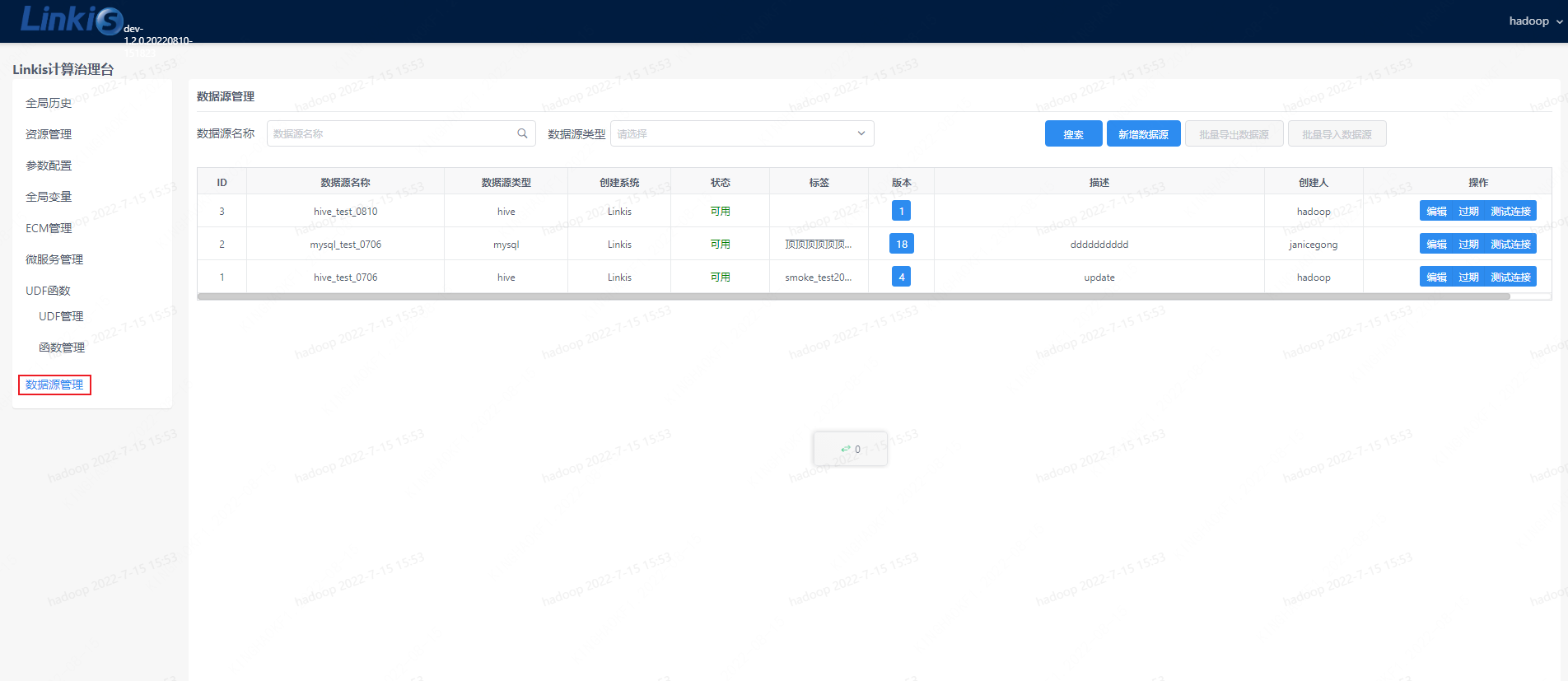
Figure 3-3 Data source management
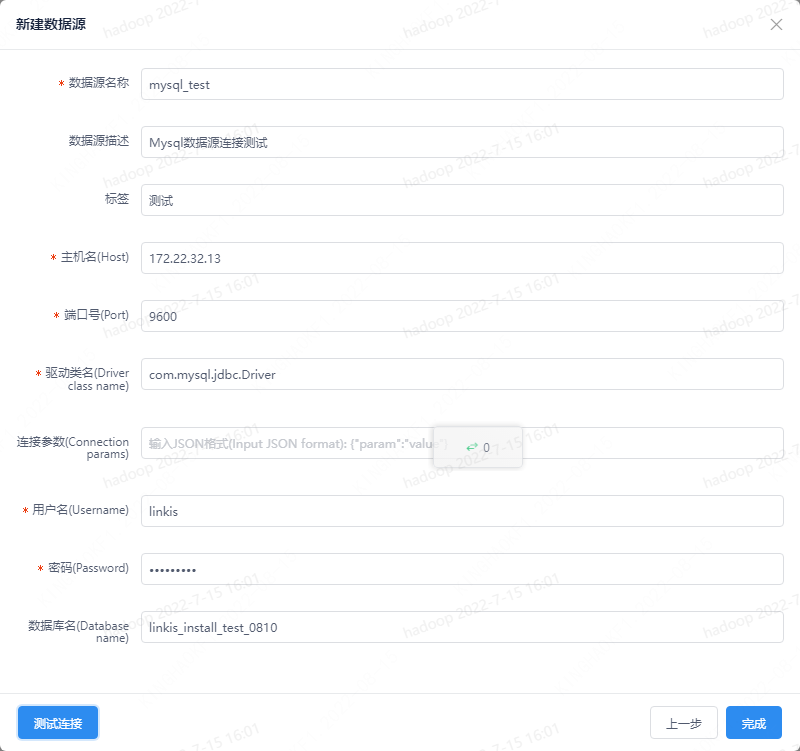
Figure 3-4 Data source connection test
After the data source is added, you can use the multi-data source switching function of the JDBC engine. There are two ways:
- Specify the data source name parameter through the interface parameter, as shown below:
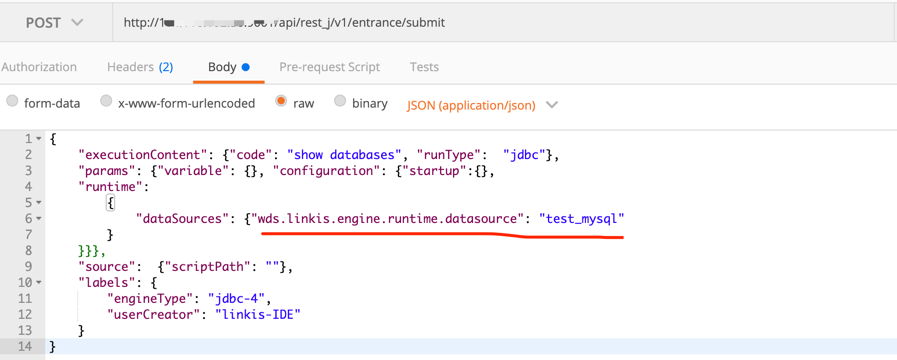
Example parameters:
{ "executionContent": {"code": "show databases", "runType": "jdbc"}, "params": {"variable": {}, "configuration": {"startup":{}, "runtime": { "dataSources": {"wds.linkis.engine.runtime.datasource": "test_mysql" } }}}, "source": {"scriptPath": ""}, "labels": { "engineType": "jdbc-4", "userCreator": "hadoop-IDE" }}Parameter: wds.linkis.engine.runtime.datasource is a configuration with a fixed name, do not modify the name definition at will
- Use the
Scriptscode ofDSSto submit the entry drop-down to filter the data sources that need to be submitted, as shown in the figure below: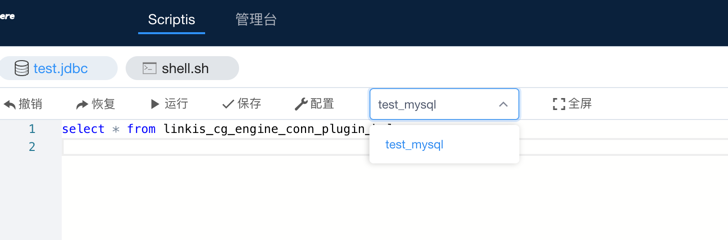 Currently
 dss-1.1.0does not support drop-down selection of data source name,PRis under development, you can wait for the subsequent release or pay attention to relatedPR: (https://github.com/WeBankFinTech/DataSphereStudio/issues/940)
Function description of multiple data sources:
1) In the previous version, the JDBC engine's support for data sources was not perfect, especially when used with Scripts, the JDBC script type can only bind a set of JDBC engine parameters of the console.
When we need to switch multiple data sources, we can only modify the connection parameters of the JDBC engine, which is troublesome.
2) To cooperate with data source management, we introduce the multi-data source switching function of JDBC engine, which can realize that only setting the data source name can submit jobs to different JDBC services, and ordinary users do not need to
It maintains the connection information of the data source, avoids the complicated configuration, and also meets the security requirements of the data source connection password and other configurations.
3) The data sources set in the multi-data source management can be loaded by the JDBC engine only after they have been released and have not expired, otherwise different types of exception prompts will be fed back to the user.
4) The loading priority of JDBC engine parameters is: task submission parameters > data source selection parameters > console JDBC engine parameters
4. Engine configuration instructions#
4.1 Default Configuration Description#
| Configuration | Default | Required | Description |
|---|---|---|---|
| wds.linkis.jdbc.connect.url | jdbc:mysql://127.0.0.1:10000 | yes | jdbc connection address |
| wds.linkis.jdbc.driver | no | yes | jdbc connection driver |
| wds.linkis.jdbc.username | no | yes | database connection username |
| wds.linknis.jdbc.password | no | yes | database link password |
| wds.linkis.jdbc.connect.max | 10 | No | The maximum number of jdbc engine connections |
| wds.linkis.jdbc.version | jdbc4 | no | jdbc version |
4.2 Configuration modification#
If the default parameters are not satisfied, there are the following ways to configure some basic parameters
4.2.1 Management console configuration#
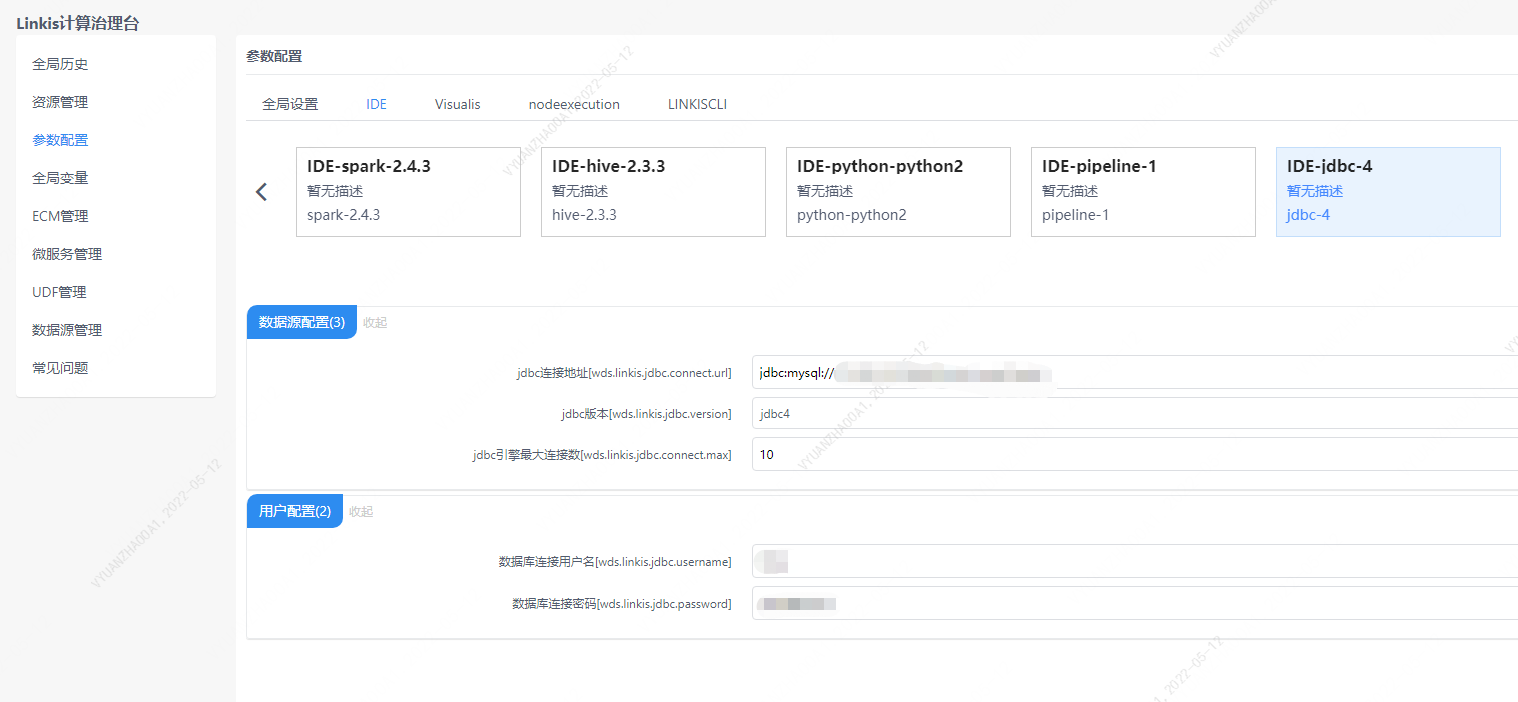
Note: After modifying the configuration under the IDE tag, you need to specify -creator IDE to take effect (other tags are similar), such as:
sh ./bin/linkis-cli -creator IDE \-engineType jdbc-4 -codeType jdbc \-code "show tables" \-submitUser hadoop -proxyUser hadoop \-runtimeMap wds.linkis.jdbc.connect.url=jdbc:mysql://127.0.0.1:3306 \-runtimeMap wds.linkis.jdbc.driver=com.mysql.jdbc.Driver \-runtimeMap wds.linkis.jdbc.username=root \-runtimeMap wds.linkis.jdbc.password=123456 \4.2.2 Task interface configuration#
Submit the task interface, configure it through the parameter params.configuration.runtime
Example of http request parameters{ "executionContent": {"code": "show databases;", "runType": "jdbc"}, "params": { "variable": {}, "configuration": { "runtime": { "wds.linkis.jdbc.connect.url":"jdbc:mysql://127.0.0.1:3306/test", "wds.linkis.jdbc.driver":"com.mysql.jdbc.Driver", "wds.linkis.jdbc.username":"test", "wds.linkis.jdbc.password":"test23" } } }, "labels": { "engineType": "jdbc-4", "userCreator": "hadoop-IDE" }}4.3 Engine related data sheet#
Linkis is managed through engine tags, and the data table information involved is as follows.
linkis_ps_configuration_config_key: key and default values of configuration parameters inserted into the enginelinkis_cg_manager_label: Insert engine label such as: jdbc-4linkis_ps_configuration_category: The directory association relationship of the insertion enginelinkis_ps_configuration_config_value: The configuration that the insertion engine needs to displaylinkis_ps_configuration_key_engine_relation: The relationship between the configuration item and the engineThe initial data related to the engine in the table is as follows
-- set variableSET @JDBC_LABEL="jdbc-4";SET @JDBC_ALL=CONCAT('*-*,',@JDBC_LABEL);SET @JDBC_IDE=CONCAT('*-IDE,',@JDBC_LABEL);
-- engine labelinsert into `linkis_cg_manager_label` (`label_key`, `label_value`, `label_feature`, `label_value_size`, `update_time`, `create_time`) VALUES ('combined_userCreator_engineType', @JDBC_ALL, 'OPTIONAL', 2, now(), now());insert into `linkis_cg_manager_label` (`label_key`, `label_value`, `label_feature`, `label_value_size`, `update_time`, `create_time`) VALUES ('combined_userCreator_engineType', @JDBC_IDE, 'OPTIONAL', 2, now(), now());
select @label_id := id from linkis_cg_manager_label where `label_value` = @JDBC_IDE;insert into linkis_ps_configuration_category (`label_id`, `level`) VALUES (@label_id, 2);
-- configuration keyinsert into `linkis_ps_configuration_config_key` (`key`, `description`, `name`, `default_value`, `validate_type`, `validate_range`, `is_hidden`, `is_advanced`, `level`, `treeName`, `engine_conn_type`) VALUES ('wds.linkis.jdbc.connect.url', 'For example: jdbc:mysql://127.0.0.1:10000', 'jdbc connection address', 'jdbc:mysql://127.0.0.1:10000', 'Regex', '^\\s*jdbc:\\w+://([^:]+)(:\\d+)(/[^\\?]+)?(\\?\\S* )?$', '0', '0', '1', 'Datasource configuration', 'jdbc');insert into `linkis_ps_configuration_config_key` (`key`, `description`, `name`, `default_value`, `validate_type`, `validate_range`, `is_hidden`, `is_advanced`, `level`, `treeName`, `engine_conn_type`) VALUES ('wds.linkis.jdbc.driver', 'For example: com.mysql.jdbc.Driver', 'jdbc connection driver', '', 'None', '', '0', '0', '1 ', 'User Configuration', 'jdbc');insert into `linkis_ps_configuration_config_key` (`key`, `description`, `name`, `default_value`, `validate_type`, `validate_range`, `is_hidden`, `is_advanced`, `level`, `treeName`, `engine_conn_type`) VALUES ('wds.linkis.jdbc.version', 'Value range: jdbc3,jdbc4', 'jdbc version','jdbc4', 'OFT', '[\"jdbc3\",\"jdbc4\"]' , '0', '0', '1', 'userconfig', 'jdbc');insert into `linkis_ps_configuration_config_key` (`key`, `description`, `name`, `default_value`, `validate_type`, `validate_range`, `is_hidden`, `is_advanced`, `level`, `treeName`, `engine_conn_type`) VALUES ('wds.linkis.jdbc.username', 'username', 'Database connection username', '', 'None', '', '0', '0', '1', 'User configuration', 'jdbc');insert into `linkis_ps_configuration_config_key` (`key`, `description`, `name`, `default_value`, `validate_type`, `validate_range`, `is_hidden`, `is_advanced`, `level`, `treeName`, `engine_conn_type`) VALUES ('wds.linkis.jdbc.password', 'password', 'Database connection password', '', 'None', '', '0', '0', '1', 'User configuration', ' jdbc');insert into `linkis_ps_configuration_config_key` (`key`, `description`, `name`, `default_value`, `validate_type`, `validate_range`, `is_hidden`, `is_advanced`, `level`, `treeName`, `engine_conn_type`) VALUES ('wds.linkis.jdbc.connect.max', 'range: 1-20, unit: piece', 'jdbc engine maximum number of connections', '10', 'NumInterval', '[1,20]', '0', '0', '1', 'Datasource configuration', 'jdbc');
-- key engine relationinsert into `linkis_ps_configuration_key_engine_relation` (`config_key_id`, `engine_type_label_id`)(select config.id as `config_key_id`, label.id AS `engine_type_label_id` FROM linkis_ps_configuration_config_key configINNER JOIN linkis_cg_manager_label label ON config.engine_conn_type = 'jdbc' and label_value = @JDBC_ALL);
insert into `linkis_ps_configuration_config_value` (`config_key_id`, `config_value`, `config_label_id`)(select `relation`.`config_key_id` AS `config_key_id`, '' AS `config_value`, `relation`.`engine_type_label_id` AS `config_label_id` FROM linkis_ps_configuration_key_engine_relation relationINNER JOIN linkis_cg_manager_label label ON relation.engine_type_label_id = label.id AND label.label_value = @JDBC_ALL);