Hive Engine
This article mainly introduces the installation, usage and configuration of the Hive engine plugin in Linkis.
1. Preliminary work#
1.1 Environment configuration before engine use#
If you want to use the hive engine on your server, you need to ensure that the following environment variables have been set correctly and the engine startup user has these environment variables.
It is strongly recommended that you check these environment variables for the executing user before executing hive tasks.
| Environment variable name | Environment variable content | Remarks |
|---|---|---|
| JAVA_HOME | JDK installation path | Required |
| HADOOP_HOME | Hadoop installation path | Required |
| HADOOP_CONF_DIR | Hadoop configuration path | required |
| HIVE_CONF_DIR | Hive configuration path | required |
1.1 Environment verification#
# link hivebin/hive
# test commandshow databases;
# Being able to link successfully and output database information normally means that the environment configuration is successfulhive (default)> show databases;OKdatabases_namedefault2. Engine plugin installation default engine#
The binary installation package released by linkis includes the Hive engine plug-in by default, and users do not need to install it additionally.
The version of Hive supports hive1.x and hive2.x. The default is to support hive on MapReduce. If you want to change to Hive on Tez, you need to modify it according to this pr.
https://github.com/apache/incubator-linkis/pull/541
The hive version supported by default is 2.3.3, if you want to modify the hive version, you can find the linkis-engineplugin-hive module, modify the \<hive.version> tag, and then compile this module separately Can
EngineConnPlugin engine plugin installation
3. Engine usage#
3.1 Submitting tasks via Linkis-cli#
sh ./bin/linkis-cli -engineType hive-2.3.3 \-codeType hql -code "show databases" \-submitUser hadoop -proxyUser hadoopMore Linkis-Cli command parameter reference: Linkis-Cli usage
3.2 Submit tasks through Linkis SDK#
Linkis provides SDK of Java and Scala to submit tasks to Linkis server. For details, please refer to JAVA SDK Manual.
For the Hive task, you only need to modify EngineConnType and CodeType parameters in Demo:
Map<String, Object> labels = new HashMap<String, Object>();labels.put(LabelKeyConstant.ENGINE_TYPE_KEY, "hive-2.3.3"); // required engineType Labellabels.put(LabelKeyConstant.USER_CREATOR_TYPE_KEY, "hadoop-IDE");// required execute user and creatorlabels.put(LabelKeyConstant.CODE_TYPE_KEY, "hql"); // required codeType4. Engine configuration instructions#
4.1 Default Configuration Description#
| Configuration | Default | Required | Description |
|---|---|---|---|
| wds.linkis.rm.instance | 10 | no | engine maximum concurrency |
| wds.linkis.engineconn.java.driver.memory | 1g | No | engine initialization memory size |
| wds.linkis.engineconn.max.free.time | 1h | no | engine idle exit time |
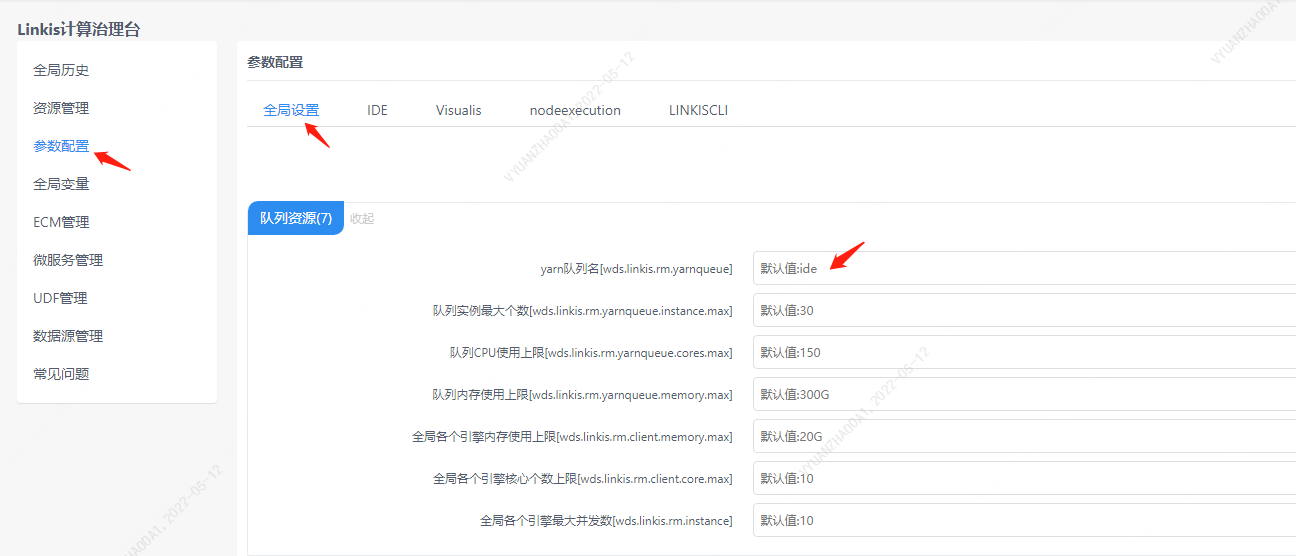
4.2 Queue resource configuration#
The MapReduce task of hive needs to use yarn resources, so a queue needs to be set
4.3 Configuration modification#
If the default parameters are not satisfied, there are the following ways to configure some basic parameters
4.3.1 Management Console Configuration#
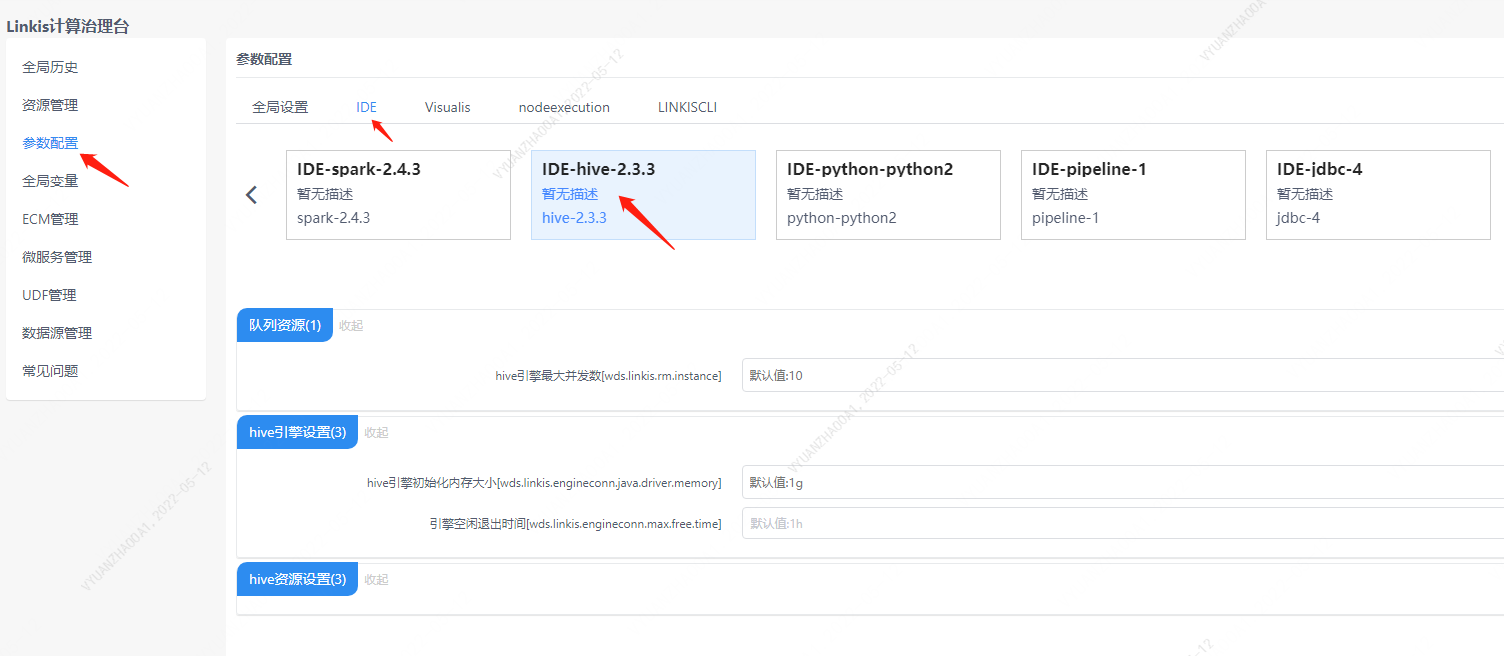
Note: After modifying the configuration under the IDE tag, you need to specify -creator IDE to take effect (other tags are similar), such as:
sh ./bin/linkis-cli -creator IDE \-engineType hive-2.3.3 -codeType hql \-code "show databases" \-submitUser hadoop -proxyUser hadoop4.3.2 Task interface configuration#
Submit the task interface, configure it through the parameter params.configuration.runtime
Example of http request parameters{ "executionContent": {"code": "show databases;", "runType": "sql"}, "params": { "variable": {}, "configuration": { "runtime": { "wds.linkis.rm.instance":"10" } } }, "labels": { "engineType": "hive-2.3.3", "userCreator": "hadoop-IDE" }}4.4 Engine related data table#
Linkis is managed through engine tags, and the data table information involved is as follows.
linkis_ps_configuration_config_key: Insert the key and default values of the configuration parameters of the enginelinkis_cg_manager_label: insert engine label such as: hive-2.3.3linkis_ps_configuration_category: Insert the directory association of the enginelinkis_ps_configuration_config_value: The configuration that the insertion engine needs to displaylinkis_ps_configuration_key_engine_relation: The relationship between the configuration item and the engineThe initial data related to the engine in the table is as follows
-- set variableSET @HIVE_LABEL="hive-2.3.3";SET @HIVE_ALL=CONCAT('*-*,',@HIVE_LABEL);SET @HIVE_IDE=CONCAT('*-IDE,',@HIVE_LABEL);
-- engine labelinsert into `linkis_cg_manager_label` (`label_key`, `label_value`, `label_feature`, `label_value_size`, `update_time`, `create_time`) VALUES ('combined_userCreator_engineType', @HIVE_ALL, 'OPTIONAL', 2, now(), now());insert into `linkis_cg_manager_label` (`label_key`, `label_value`, `label_feature`, `label_value_size`, `update_time`, `create_time`) VALUES ('combined_userCreator_engineType', @HIVE_IDE, 'OPTIONAL', 2, now(), now());
select @label_id := id from linkis_cg_manager_label where `label_value` = @HIVE_IDE;insert into linkis_ps_configuration_category (`label_id`, `level`) VALUES (@label_id, 2);
-- configuration keyINSERT INTO `linkis_ps_configuration_config_key` (`key`, `description`, `name`, `default_value`, `validate_type`, `validate_range`, `is_hidden`, `is_advanced`, `level`, `treeName`, `engine_conn_type`) VALUES ('wds.linkis.rm.instance', 'range: 1-20, unit: piece', 'hive engine maximum concurrent number', '10', 'NumInterval', '[1,20]', '0 ', '0', '1', 'Queue resource', 'hive');INSERT INTO `linkis_ps_configuration_config_key` (`key`, `description`, `name`, `default_value`, `validate_type`, `validate_range`, `is_hidden`, `is_advanced`, `level`, `treeName`, `engine_conn_type`) VALUES ('wds.linkis.engineconn.java.driver.memory', 'Value range: 1-10, unit: G', 'hive engine initialization memory size', '1g', 'Regex', '^([ 1-9]|10)(G|g)$', '0', '0', '1', 'hive engine settings', 'hive');INSERT INTO `linkis_ps_configuration_config_key` (`key`, `description`, `name`, `default_value`, `validate_type`, `validate_range`, `is_hidden`, `is_advanced`, `level`, `treeName`, `engine_conn_type`) VALUES ('hive.client.java.opts', 'hive client process parameters', 'jvm parameters when the hive engine starts','', 'None', NULL, '1', '1', '1', 'hive engine settings', 'hive');INSERT INTO `linkis_ps_configuration_config_key` (`key`, `description`, `name`, `default_value`, `validate_type`, `validate_range`, `is_hidden`, `is_advanced`, `level`, `treeName`, `engine_conn_type`) VALUES ('mapred.reduce.tasks', 'Range: -1-10000, unit: number', 'reduce number', '-1', 'NumInterval', '[-1,10000]', '0', '1', '1', 'hive resource settings', 'hive');INSERT INTO `linkis_ps_configuration_config_key` (`key`, `description`, `name`, `default_value`, `validate_type`, `validate_range`, `is_hidden`, `is_advanced`, `level`, `treeName`, `engine_conn_type`) VALUES ('wds.linkis.engineconn.max.free.time', 'Value range: 3m,15m,30m,1h,2h', 'Engine idle exit time','1h', 'OFT', '[\ "1h\",\"2h\",\"30m\",\"15m\",\"3m\"]', '0', '0', '1', 'hive engine settings', ' hive');
-- key engine relationinsert into `linkis_ps_configuration_key_engine_relation` (`config_key_id`, `engine_type_label_id`)(select config.id as `config_key_id`, label.id AS `engine_type_label_id` FROM linkis_ps_configuration_config_key configINNER JOIN linkis_cg_manager_label label ON config.engine_conn_type = 'hive' and label_value = @HIVE_ALL);
-- engine default configurationinsert into `linkis_ps_configuration_config_value` (`config_key_id`, `config_value`, `config_label_id`)(select `relation`.`config_key_id` AS `config_key_id`, '' AS `config_value`, `relation`.`engine_type_label_id` AS `config_label_id` FROM linkis_ps_configuration_key_engine_relation relationINNER JOIN linkis_cg_manager_label label ON relation.engine_type_label_id = label.id AND label.label_value = @HIVE_ALL);5. Hive modification log display#
The default log interface does not display application_id and the number of task completed, users can output the log according to their needs
The code blocks that need to be modified in the log4j2-engineconn.xml/log4j2.xml configuration file in the engine are as follows
- Need to add under the
appenderscomponent
<Send name="SendPackage" > <PatternLayout pattern="%d{yyyy-MM-dd HH:mm:ss.SSS} %-5level [%t] %logger{36} %L %M - %msg%xEx%n"/> </Send>- Need to add under
rootcomponent
<appender-ref ref="SendPackage"/>- Need to add under
loggerscomponent
<logger name="org.apache.hadoop.hive.ql.exec.StatsTask" level="info" additivity="true"> <appender-ref ref="SendPackage"/> </logger>After making the above related modifications, the log can add task task progress information, which is displayed in the following style
2022-04-08 11:06:50.228 INFO [Linkis-Default-Scheduler-Thread-3] SessionState 1111 printInfo - Status: Running (Executing on YARN cluster with App id application_1631114297082_432445)2022-04-08 11:06:50.248 INFO [Linkis-Default-Scheduler-Thread-3] SessionState 1111 printInfo - Map 1: -/- Reducer 2: 0/1 2022-04-08 11:06:52.417 INFO [Linkis-Default-Scheduler-Thread-3] SessionState 1111 printInfo - Map 1: 0/1 Reducer 2: 0/1 2022-04-08 11:06:55.060 INFO [Linkis-Default-Scheduler-Thread-3] SessionState 1111 printInfo - Map 1: 0(+1)/1 Reducer 2: 0/1 2022-04-08 11:06:57.495 INFO [Linkis-Default-Scheduler-Thread-3] SessionState 1111 printInfo - Map 1: 1/1 Reducer 2: 0(+1)/1 2022-04-08 11:06:57.899 INFO [Linkis-Default-Scheduler-Thread-3] SessionState 1111 printInfo - Map 1: 1/1 Reducer 2: 1/1 An example of a complete xml configuration file is as follows:
<!--  ~ Copyright 2019 WeBank  ~  ~ Licensed under the Apache License, Version 2.0 (the "License");  ~ you may not use this file except in compliance with the License.  ~ You may obtain a copy of the License at  ~  ~ http://www.apache.org/licenses/LICENSE-2.0  ~  ~ Unless required by applicable law or agreed to in writing, software  ~ distributed under the License is distributed on an "AS IS" BASIS,  ~ WITHOUT WARRANTIES OR CONDITIONS OF ANY KIND, either express or implied.  ~ See the License for the specific language governing permissions and  ~ limitations under the License.  -->  <configuration status="error" monitorInterval="30">    <appenders>        <Console name="Console" target="SYSTEM_OUT">            <ThresholdFilter level="INFO" onMatch="ACCEPT" onMismatch="DENY"/>            <PatternLayout pattern="%d{yyyy-MM-dd HH:mm:ss.SSS} %-5level [%t] %logger{36} %L %M - %msg%xEx%n"/>        </Console>
        <Send name="Send" >            <Filters>                <ThresholdFilter level="WARN" onMatch="ACCEPT" onMismatch="DENY" />            </Filters>            <PatternLayout pattern="%d{yyyy-MM-dd HH:mm:ss.SSS} %-5level [%t] %logger{36} %L %M - %msg%xEx%n"/>        </Send>
        <Send name="SendPackage" >            <PatternLayout pattern="%d{yyyy-MM-dd HH:mm:ss.SSS} %-5level [%t] %logger{36} %L %M - %msg%xEx%n"/>        </Send>
        <Console name="stderr" target="SYSTEM_ERR">            <ThresholdFilter level="ERROR" onMatch="ACCEPT" onMismatch="DENY" />            <PatternLayout pattern="%d{HH:mm:ss.SSS} %-5level %class{36} %L %M - %msg%xEx%n"/>        </Console>    </appenders>
    <loggers>      <root level="INFO">            <appender-ref ref="stderr"/>            <appender-ref ref="Console"/>            <appender-ref ref="Send"/>            <appender-ref ref="SendPackage"/>        </root>        <logger name="org.apache.hadoop.hive.ql.exec.StatsTask" level="info" additivity="true">            <appender-ref ref="SendPackage"/>        </logger>        <logger name="org.springframework.boot.diagnostics.LoggingFailureAnalysisReporter" level="error" additivity="true">            <appender-ref ref="stderr"/>        </logger>        <logger name="com.netflix.discovery" level="warn" additivity="true">            <appender-ref ref="Send"/>        </logger>        <logger name="org.apache.hadoop.yarn" level="warn" additivity="true">            <appender-ref ref="Send"/>        </logger>        <logger name="org.springframework" level="warn" additivity="true">            <appender-ref ref="Send"/>        </logger>        <logger name="org.apache.linkis.server.security" level="warn" additivity="true">            <appender-ref ref="Send"/>        </logger>        <logger name="org.apache.hadoop.hive.ql.exec.mr.ExecDriver" level="fatal" additivity="true">            <appender-ref ref="Send"/>        </logger>        <logger name="org.apache.hadoop.hdfs.KeyProviderCache" level="fatal" additivity="true">            <appender-ref ref="Send"/>        </logger>        <logger name="org.spark_project.jetty" level="ERROR" additivity="true">            <appender-ref ref="Send"/>        </logger>        <logger name="org.eclipse.jetty" level="ERROR" additivity="true">            <appender-ref ref="Send"/>        </logger>        <logger name="org.springframework" level="ERROR" additivity="true">            <appender-ref ref="Send"/>        </logger>        <logger name="org.reflections.Reflections" level="ERROR" additivity="true">            <appender-ref ref="Send"/>        </logger>
        <logger name="org.apache.hadoop.ipc.Client" level="ERROR" additivity="true">            <appender-ref ref="Send"/>        </logger>
   </loggers></configuration>