· 6 min read
aiceflower

Foreword#

With the development of business and the update and iteration of community products, we found that Linkis1 There are too many .X services, and services can be merged appropriately to reduce the number of services and facilitate deployment and debugging. At present, Linkis services are mainly divided into three categories, including computing governance services (CG: entrance/ecp/ecm/linkismanager), public enhancement services (PS: publicservice/datasource/cs) and microservice governance services (MG: Gateway/Eureka) . There are too many sub-services extended by these three types of services, and services can be merged, so that all PS services can be merged, CG services can be merged, and ecm services can be separated out.

Service merge changes#

The main changes of this service merge are as follows:

  • Support Restful service forwarding: The modification point is mainly the forwarding logic of Gateway, similar to the current publicservice service merge parameter: wds.linkis.gateway.conf.publicservice.list
  • Support Change the remote call of the RPC service to a local call, similar to LocalMessageSender, and now it is possible to complete the return of the local call by changing the Sender
  • Configuration file changes
  • Service start and stop script changes

To be achieved#

  • Basic goal: merge PS services into one service
  • Basic goal: merge CG service into CG-Service and ECM
  • Advanced goal: merge CG services into one server
  • Final goal: remove eureka, gateway into single service

Specific changes#

Gateway changes (org.apache.linkis.gateway.ujes.route.HaContextGatewayRouter)#

//Override before changing def route(gatewayContext: GatewayContext): ServiceInstance = { 
    if (gatewayContext.getGatewayRoute.getRequestURI.contains(HaContextGatewayRouter.CONTEXT_SERVICE_STR) ||         gatewayContext.getGatewayRoute.getRequestURI.contains(HaContextGatewayRouter.OLD_CONTEXT_SERVICE_PREFIX)){       val params: util.HashMap[String, String] = gatewayContext.getGatewayRoute.getParams       if (!gatewayContext.getRequest.getQueryParams.isEmpty) {         for ((k, vArr) <- gatewayContext.getRequest.getQueryParams) {          if (vArr.nonEmpty) {            params.putIfAbsent(k, vArr.head)          }        }      }      if (gatewayContext.getRequest.getHeaders.containsKey(ContextHTTPConstant.CONTEXT_ID_STR)) {        params.putIfAbsent(ContextHTTPConstant.CONTEXT_ID_STR, gatewayContext.getRequest.getHeaders.get(ContextHTTPConstant.CONTEXT_ID_STR)(0))      }      if (null == params || params.isEmpty) {        dealContextCreate(gatewayContext)      } else {        var contextId : String = null        for ((key, value) <- params) {          if (key.equalsIgnoreCase(ContextHTTPConstant.CONTEXT_ID_STR)) {            contextId = value            }        }        if (StringUtils.isNotBlank(contextId)) {          dealContextAccess(contextId.toString, gatewayContext)        } else {          dealContextCreate(gatewayContext)        }      }    }else{      null    }  }  //after modification  override def route(gatewayContext: GatewayContext): ServiceInstance = {
    if (        gatewayContext.getGatewayRoute.getRequestURI.contains(          RPCConfiguration.CONTEXT_SERVICE_REQUEST_PREFIX        )    ) {      val params: util.HashMap[String, String] = gatewayContext.getGatewayRoute.getParams      if (!gatewayContext.getRequest.getQueryParams.isEmpty) {        for ((k, vArr) <- gatewayContext.getRequest.getQueryParams.asScala) {          if (vArr.nonEmpty) {            params.putIfAbsent(k, vArr.head)          }        }      }      if (gatewayContext.getRequest.getHeaders.containsKey(ContextHTTPConstant.CONTEXT_ID_STR)) {        params.putIfAbsent(          ContextHTTPConstant.CONTEXT_ID_STR,          gatewayContext.getRequest.getHeaders.get(ContextHTTPConstant.CONTEXT_ID_STR)(0)        )      }      if (null == params || params.isEmpty) {        dealContextCreate(gatewayContext)      } else {        var contextId: String = null        for ((key, value) <- params.asScala) {          if (key.equalsIgnoreCase(ContextHTTPConstant.CONTEXT_ID_STR)) {            contextId = value          }        }        if (StringUtils.isNotBlank(contextId)) {          dealContextAccess(contextId, gatewayContext)        } else {          dealContextCreate(gatewayContext)        }      }    } else {      null    }  }

  // before modification  def dealContextCreate(gatewayContext:GatewayContext):ServiceInstance = {    val serviceId =  findService(HaContextGatewayRouter.CONTEXT_SERVICE_STR, list => {      val services = list.filter(_.contains(HaContextGatewayRouter.CONTEXT_SERVICE_STR))      services.headOption    })    val serviceInstances = ServiceInstanceUtils.getRPCServerLoader.getServiceInstances(serviceId.orNull)    if (serviceInstances.size > 0) {      val index = new Random().nextInt(serviceInstances.size)      serviceInstances(index)    } else {      logger.error(s"No valid instance for service : " + serviceId.orNull)      null    }  }  //after modification  def dealContextCreate(gatewayContext: GatewayContext): ServiceInstance = {    val serviceId = findService(      RPCConfiguration.CONTEXT_SERVICE_NAME,      list => {        val services = list.filter(_.contains(RPCConfiguration.CONTEXT_SERVICE_NAME))        services.headOption      }    )    val serviceInstances =      ServiceInstanceUtils.getRPCServerLoader.getServiceInstances(serviceId.orNull)    if (serviceInstances.size > 0) {      val index = new Random().nextInt(serviceInstances.size)      serviceInstances(index)    } else {      logger.error(s"No valid instance for service : " + serviceId.orNull)      null    }  }
  // before modification  def dealContextAccess(contextIdStr:String, gatewayContext: GatewayContext):ServiceInstance = {    val contextId : String = {      var tmpId : String = null      if (serializationHelper.accepts(contextIdStr)) {        val contextID : ContextID = serializationHelper.deserialize(contextIdStr).asInstanceOf[ContextID]        if (null != contextID) {          tmpId = contextID.getContextId        } else {          logger.error(s"Deserializate contextID null. contextIDStr : " + contextIdStr)        }      } else {        logger.error(s"ContxtIDStr cannot be deserialized. contextIDStr : " + contextIdStr)      }      if (null == tmpId) {        contextIdStr      } else {        tmpId      }    }    val instances = contextIDParser.parse(contextId)    var serviceId:Option[String] = None    serviceId = findService(HaContextGatewayRouter.CONTEXT_SERVICE_STR, list => {      val services = list.filter(_.contains(HaContextGatewayRouter.CONTEXT_SERVICE_STR))        services.headOption      })    val serviceInstances = ServiceInstanceUtils.getRPCServerLoader.getServiceInstances(serviceId.orNull)    if (instances.size() > 0) {      serviceId.map(ServiceInstance(_, instances.get(0))).orNull    } else if (serviceInstances.size > 0) {      serviceInstances(0)    } else {      logger.error(s"No valid instance for service : " + serviceId.orNull)      null    }  }
}//after modificationdef dealContextAccess(contextIdStr: String, gatewayContext: GatewayContext): ServiceInstance = {    val contextId: String = {      var tmpId: String = null      if (serializationHelper.accepts(contextIdStr)) {        val contextID: ContextID =          serializationHelper.deserialize(contextIdStr).asInstanceOf[ContextID]        if (null != contextID) {          tmpId = contextID.getContextId        } else {          logger.error(s"Deserializate contextID null. contextIDStr : " + contextIdStr)        }      } else {        logger.error(s"ContxtIDStr cannot be deserialized. contextIDStr : " + contextIdStr)      }      if (null == tmpId) {        contextIdStr      } else {        tmpId      }    }    val instances = contextIDParser.parse(contextId)    var serviceId: Option[String] = None    serviceId = findService(      RPCConfiguration.CONTEXT_SERVICE_NAME,      list => {        val services = list.filter(_.contains(RPCConfiguration.CONTEXT_SERVICE_NAME))        services.headOption      }    )    val serviceInstances =      ServiceInstanceUtils.getRPCServerLoader.getServiceInstances(serviceId.orNull)    if (instances.size() > 0) {      serviceId.map(ServiceInstance(_, instances.get(0))).orNull    } else if (serviceInstances.size > 0) {      serviceInstances(0)    } else {      logger.error(s"No valid instance for service : " + serviceId.orNull)      null    }  }
// before modificationobject HaContextGatewayRouter{  val CONTEXT_ID_STR:String = "contextId"  val CONTEXT_SERVICE_STR:String = "ps-cs"  @Deprecated  val OLD_CONTEXT_SERVICE_PREFIX = "contextservice"  val CONTEXT_REGEX: Regex = (normalPath(API_URL_PREFIX) + "rest_[a-zA-Z][a-zA-Z_0-9]*/(v\\d+)/contextservice/" + ".+").r}//after modificationobject HaContextGatewayRouter {
  val CONTEXT_ID_STR: String = "contextId"
  @deprecated("please use RPCConfiguration.CONTEXT_SERVICE_REQUEST_PREFIX")  val CONTEXT_SERVICE_REQUEST_PREFIX = RPCConfiguration.CONTEXT_SERVICE_REQUEST_PREFIX
  @deprecated("please use RPCConfiguration.CONTEXT_SERVICE_NAME")  val CONTEXT_SERVICE_NAME: String =    if (        RPCConfiguration.ENABLE_PUBLIC_SERVICE.getValue && RPCConfiguration.PUBLIC_SERVICE_LIST          .exists(_.equalsIgnoreCase(RPCConfiguration.CONTEXT_SERVICE_REQUEST_PREFIX))    ) {      RPCConfiguration.PUBLIC_SERVICE_APPLICATION_NAME.getValue    } else {      RPCConfiguration.CONTEXT_SERVICE_APPLICATION_NAME.getValue    }
  val CONTEXT_REGEX: Regex =    (normalPath(API_URL_PREFIX) + "rest_[a-zA-Z][a-zA-Z_0-9]*/(v\\d+)/contextservice/" + ".+").r
}

RPC Service Change(org.apache.linkis.rpc.conf.RPCConfiguration)#

//before modificationval BDP_RPC_BROADCAST_THREAD_SIZE: CommonVars[Integer] = CommonVars("wds.linkis.rpc.broadcast.thread.num", new Integer(25))//after modificationval BDP_RPC_BROADCAST_THREAD_SIZE: CommonVars[Integer] = CommonVars("wds.linkis.rpc.broadcast.thread.num", 25)
//before modificationval PUBLIC_SERVICE_LIST: Array[String] = CommonVars("wds.linkis.gateway.conf.publicservice.list", "query,jobhistory,application,configuration,filesystem,udf,variable,microservice,errorcode,bml,datasource").getValue .split(",") //after change val PUBLIC_SERVICE_LIST: Array[String] = CommonVars("wds.linkis.gateway.conf.publicservice.list", "cs,contextservice,data-source-manager,metadataquery,metadatamanager, query,jobhistory,application,configuration,filesystem,udf,variable,microservice,errorcode,bml,datasource").getValue.split(",") 

Configuration file changes#

##Remove part #Delete the 
following configuration files linkis-dist/package/conf/linkis-ps-cs.properties linkis-dist/package/conf/linkis-ps-data-source-manager.propertieslinkis-dist/package/conf/linkis-ps-metadataquery.properties
##modified part
#modify linkis-dist/package/conf/linkis-ps-publicservice.properties#restful before modificationwds.linkis.server.restful.scan.packages=org.apache.linkis.jobhistory.restful,org.apache.linkis.variable.restful,org.apache.linkis.configuration.restful,org.apache.linkis.udf.api,org.apache.linkis.filesystem.restful,org.apache.linkis.filesystem.restful,org.apache.linkis.instance.label.restful,org.apache.linkis.metadata.restful.api,org.apache.linkis.cs.server.restful,org.apache.linkis.bml.restful,org.apache.linkis.errorcode.server.restful
#restful after modificationwds.linkis.server.restful.scan.packages=org.apache.linkis.cs.server.restful,org.apache.linkis.datasourcemanager.core.restful,org.apache.linkis.metadata.query.server.restful,org.apache.linkis.jobhistory.restful,org.apache.linkis.variable.restful,org.apache.linkis.configuration.restful,org.apache.linkis.udf.api,org.apache.linkis.filesystem.restful,org.apache.linkis.filesystem.restful,org.apache.linkis.instance.label.restful,org.apache.linkis.metadata.restful.api,org.apache.linkis.cs.server.restful,org.apache.linkis.bml.restful,org.apache.linkis.errorcode.server.restful
#mybatis before modificationwds.linkis.server.mybatis.mapperLocations=classpath:org/apache/linkis/jobhistory/dao/impl/*.xml,classpath:org/apache/linkis/variable/dao/impl/*.xml,classpath:org/apache/linkis/configuration/dao/impl/*.xml,classpath:org/apache/linkis/udf/dao/impl/*.xml,classpath:org/apache/linkis/instance/label/dao/impl/*.xml,classpath:org/apache/linkis/metadata/hive/dao/impl/*.xml,org/apache/linkis/metadata/dao/impl/*.xml,classpath:org/apache/linkis/bml/dao/impl/*.xml
wds.linkis.server.mybatis.typeAliasesPackage=org.apache.linkis.configuration.entity,org.apache.linkis.jobhistory.entity,org.apache.linkis.udf.entity,org.apache.linkis.variable.entity,org.apache.linkis.instance.label.entity,org.apache.linkis.manager.entity,org.apache.linkis.metadata.domain,org.apache.linkis.bml.entity
wds.linkis.server.mybatis.BasePackage=org.apache.linkis.jobhistory.dao,org.apache.linkis.variable.dao,org.apache.linkis.configuration.dao,org.apache.linkis.udf.dao,org.apache.linkis.instance.label.dao,org.apache.linkis.metadata.hive.dao,org.apache.linkis.metadata.dao,org.apache.linkis.bml.dao,org.apache.linkis.errorcode.server.dao,org.apache.linkis.publicservice.common.lock.dao
#mybatis after modificationwds.linkis.server.mybatis.mapperLocations=classpath*:org/apache/linkis/cs/persistence/dao/impl/*.xml,classpath:org/apache/linkis/datasourcemanager/core/dao/mapper/*.xml,classpath:org/apache/linkis/jobhistory/dao/impl/*.xml,classpath:org/apache/linkis/variable/dao/impl/*.xml,classpath:org/apache/linkis/configuration/dao/impl/*.xml,classpath:org/apache/linkis/udf/dao/impl/*.xml,classpath:org/apache/linkis/instance/label/dao/impl/*.xml,classpath:org/apache/linkis/metadata/hive/dao/impl/*.xml,org/apache/linkis/metadata/dao/impl/*.xml,classpath:org/apache/linkis/bml/dao/impl/*.xml
wds.linkis.server.mybatis.typeAliasesPackage=org.apache.linkis.cs.persistence.entity,org.apache.linkis.datasourcemanager.common.domain,org.apache.linkis.datasourcemanager.core.vo,org.apache.linkis.configuration.entity,org.apache.linkis.jobhistory.entity,org.apache.linkis.udf.entity,org.apache.linkis.variable.entity,org.apache.linkis.instance.label.entity,org.apache.linkis.manager.entity,org.apache.linkis.metadata.domain,org.apache.linkis.bml.entity
wds.linkis.server.mybatis.BasePackage=org.apache.linkis.cs.persistence.dao,org.apache.linkis.datasourcemanager.core.dao,org.apache.linkis.jobhistory.dao,org.apache.linkis. variable.dao,org.apache.linkis.configuration.dao,org.apache.linkis.udf.dao,org.apache.linkis.instance.label.dao,org.apache.linkis.metadata.hive.dao,org. apache.linkis.metadata.dao,org.apache.linkis.bml.dao,org.apache.linkis.errorcode.server.dao,org.apache.linkis.publicservice.common.lock.dao 

Deployment script changes (linkis-dist/package/sbin/linkis-start-all.sh)#

startup script remove the following part 
#linkis-ps-cs SERVER_NAME="ps-cs" SERVER_IP=$CS_INSTALL_IP startApp 
if [ "$ENABLE_METADATA_QUERY" == "true" ]; then   #linkis-ps-data-source-manager  SERVER_NAME="ps-data-source-manager"  SERVER_IP=$DATASOURCE_MANAGER_INSTALL_IP  startApp
  #linkis-ps-metadataquery  SERVER_NAME="ps-metadataquery"  SERVER_IP=$METADATA_QUERY_INSTALL_IP  startAppfi
#linkis-ps-csSERVER_NAME="ps-cs"SERVER_IP=$CS_INSTALL_IPcheckServer
if [ "$ENABLE_METADATA_QUERY" == "true" ]; then  #linkis-ps-data-source-manager  SERVER_NAME="ps-data-source-manager"  SERVER_IP=$DATASOURCE_MANAGER_INSTALL_IP  checkServer
  #linkis-ps-metadataquery  SERVER_NAME="ps-metadataquery"  SERVER_IP=$METADATA_QUERY_INSTALL_IP  checkServerfi

#Service stop script remove the following part #linkis-ps-cs SERVER_NAME="ps-cs" SERVER_IP=$CS_INSTALL_IP stopApp 
if [ "$ENABLE_METADATA_QUERY" == "true" ]; then   #linkis-ps-data-source-manager   SERVER_NAME ="ps-data-source-manager"   SERVER_IP=$DATASOURCE_MANAGER_INSTALL_IP   stopApp 
  #linkis-ps-metadataquery   SERVER_NAME="ps-metadataquery"   SERVER_IP=$METADATA_QUERY_INSTALL_IP   stopApp fi 

For more details on service merge changes, see: https://github .com/apache/incubator-linkis/pull/2927/files

· 5 min read
kevinWdong

With the development of business and the update and iteration of community products, we found that Linkis1. X has greatly improved its performance in terms of resource management and engine management, which can better meet the requirements of the construction of data middle stations. Compared with version 0.9.3 and the platform we used before, the user experience has also been greatly improved, and the problems such as the inability to view details on the task failure page have also been improved. Therefore, we decided to upgrade Linkis and the WDS suite. The following are the specific practical operations, which we hope will give you a reference.

1.Environment

CDH6.3.2 Component versions#

  • hadoop:3.0.0-cdh6.3.2
  • hive:2.1.1-cdh6.3.2
  • spark:2.4.8

hardware environment #

128G cloud physical machine*2

2. Linkis installation and deployment

2.1 Compile code or release installation package?#

This installation deployment adopts the release installation package method. In order to adapt to the company's CDH6.3.2 version, the dependency packages of hadoop and hive need to be replaced with the CDH6.3.2 version. Here, the installation package is directly replaced. The dependent packages and modules to be replaced are shown in the following list.

// Modules involved 
linkis-engineconn-plugins/sparklinkis-engineconn-plugins/hive/linkis-commons/public-module/linkis-computation-governance/
// List of cdh packages that need to be replaced
./lib/linkis-engineconn-plugins/spark/dist/v2.4.8/lib/hive-shims-0.23-2.1.1-cdh6.3.2.jar./lib/linkis-engineconn-plugins/spark/dist/v2.4.8/lib/hive-shims-scheduler-2.1.1-cdh6.3.2.jar./lib/linkis-engineconn-plugins/spark/dist/v2.4.8/lib/hadoop-annotations-3.0.0-cdh6.3.2.jar./lib/linkis-engineconn-plugins/spark/dist/v2.4.8/lib/hadoop-auth-3.0.0-cdh6.3.2.jar./lib/linkis-engineconn-plugins/spark/dist/v2.4.8/lib/hadoop-common-3.0.0-cdh6.3.2.jar./lib/linkis-engineconn-plugins/spark/dist/v2.4.8/lib/hadoop-hdfs-3.0.0-cdh6.3.2.jar./lib/linkis-engineconn-plugins/spark/dist/v2.4.8/lib/hadoop-hdfs-client-3.0.0-cdh6.3.2.jar./lib/linkis-engineconn-plugins/hive/dist/v2.1.1/lib/hadoop-client-3.0.0-cdh6.3.2.jar./lib/linkis-engineconn-plugins/hive/dist/v2.1.1/lib/hadoop-mapreduce-client-common-3.0.0-cdh6.3.2.jar./lib/linkis-engineconn-plugins/hive/dist/v2.1.1/lib/hadoop-mapreduce-client-jobclient-3.0.0-cdh6.3.2.jar./lib/linkis-engineconn-plugins/hive/dist/v2.1.1/lib/hadoop-yarn-api-3.0.0-cdh6.3.2.jar./lib/linkis-engineconn-plugins/hive/dist/v2.1.1/lib/hadoop-yarn-client-3.0.0-cdh6.3.2.jar./lib/linkis-engineconn-plugins/hive/dist/v2.1.1/lib/hadoop-yarn-server-common-3.0.0-cdh6.3.2.jar./lib/linkis-engineconn-plugins/hive/dist/v2.1.1/lib/hadoop-hdfs-client-3.0.0-cdh6.3.2.jar./lib/linkis-engineconn-plugins/hive/dist/v2.1.1/lib/hadoop-mapreduce-client-core-3.0.0-cdh6.3.2.jar./lib/linkis-engineconn-plugins/hive/dist/v2.1.1/lib/hadoop-mapreduce-client-shuffle-3.0.0-cdh6.3.2.jar./lib/linkis-engineconn-plugins/hive/dist/v2.1.1/lib/hadoop-yarn-common-3.0.0-cdh6.3.2.jar./lib/linkis-engineconn-plugins/flink/dist/v1.12.2/lib/hadoop-annotations-3.0.0-cdh6.3.2.jar./lib/linkis-engineconn-plugins/flink/dist/v1.12.2/lib/hadoop-auth-3.0.0-cdh6.3.2.jar./lib/linkis-engineconn-plugins/flink/dist/v1.12.2/lib/hadoop-mapreduce-client-core-3.0.0-cdh6.3.2.jar./lib/linkis-engineconn-plugins/flink/dist/v1.12.2/lib/hadoop-yarn-api-3.0.0-cdh6.3.2.jar./lib/linkis-engineconn-plugins/flink/dist/v1.12.2/lib/hadoop-yarn-client-3.0.0-cdh6.3.2.jar./lib/linkis-engineconn-plugins/flink/dist/v1.12.2/lib/hadoop-yarn-common-3.0.0-cdh6.3.2.jar./lib/linkis-commons/public-module/hadoop-annotations-3.0.0-cdh6.3.2.jar./lib/linkis-commons/public-module/hadoop-auth-3.0.0-cdh6.3.2.jar./lib/linkis-commons/public-module/hadoop-common-3.0.0-cdh6.3.2.jar./lib/linkis-commons/public-module/hadoop-hdfs-client-3.0.0-cdh6.3.2.jar./lib/linkis-computation-governance/linkis-cg-linkismanager/hadoop-annotations-3.0.0-cdh6.3.2.jar./lib/linkis-computation-governance/linkis-cg-linkismanager/hadoop-auth-3.0.0-cdh6.3.2.jar./lib/linkis-computation-governance/linkis-cg-linkismanager/hadoop-yarn-api-3.0.0-cdh6.3.2.jar./lib/linkis-computation-governance/linkis-cg-linkismanager/hadoop-yarn-client-3.0.0-cdh6.3.2.jar./lib/linkis-computation-governance/linkis-cg-linkismanager/hadoop-yarn-common-3.0.0-cdh6.3.2.jar

2.2 Problems encountered during deployment#

2.2.1 Kerberos configuration#

It needs to be added in the linkis.properties public configuration

Each engine conf also needs to be added

wds.linkis.keytab.enable=truewds.linkis.keytab.file=/hadoop/bigdata/kerberos/keytabwds.linkis.keytab.host.enabled=falsewds.linkis.keytab.host=your_host

2.2.2 Error is reported after Hadoop dependency package is replaced#

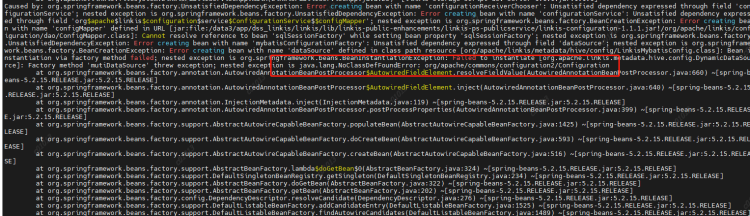
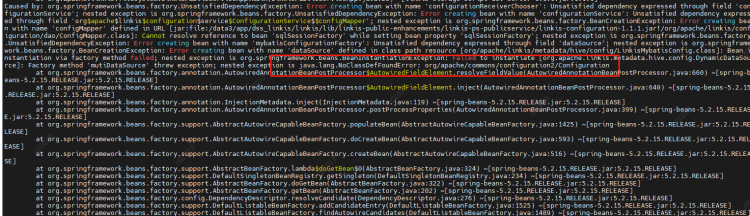
java.lang.NoClassDefFoundError:org/apache/commons/configuration2/Configuration

image

Cause: Configuration class conflict. Add a commons-configuration2-2.1.1.jar under the linkis commons module to resolve the conflict

2.2.3 Running spark, python, etc. in script reports no plugin for XXX#

Phenomenon: After modifying the version of Spark/Python in the configuration file, the startup engine reports no plugin for XXX

image

Reason: LabelCommonConfig.java and GovernanceCommonConf In scala, the version of the engine is written dead, the corresponding version is modified, and all jars containing these two classes (linkis computation governance common-1.1.1. jar and linkis label common-1.1.1. jar) in linkis and other components (including scheduleris) are replaced after compilation

2.2.4 Python engine execution error, initialization failed#

  • Modify python. py and remove the imported pandas module
  • Configure the python loading directory and modify the python engine's linkis-enginecon.properties
pythonVersion=/usr/local/bin/python3.6

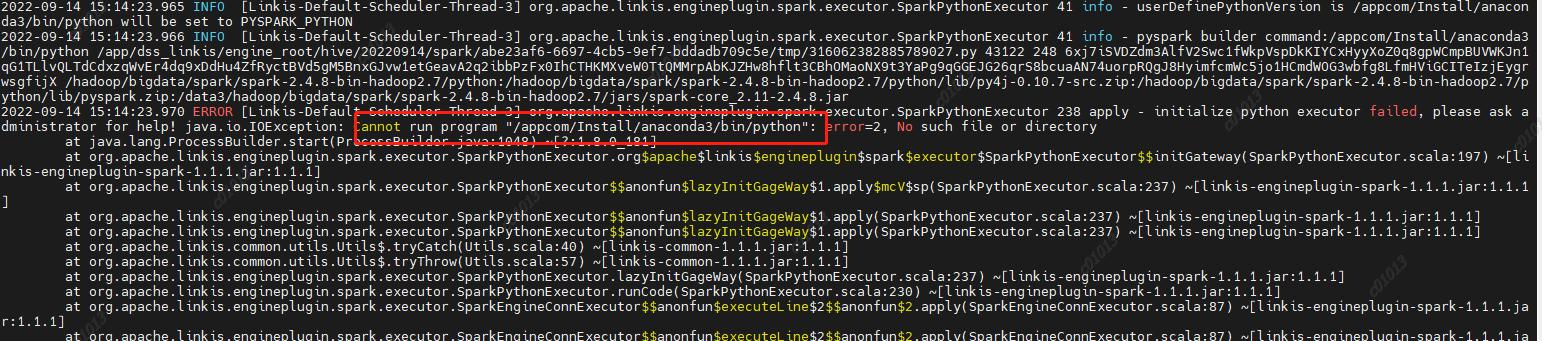
2.2.5 Failed to run the pyspark task and reported an error#

image

Reason: PYSPARK is not set_ VERSION

resolvent:

Set two parameters in/etc/profile

export PYSPARK_ PYTHON=/usr/local/bin/python3.6export PYSPARK_ DRIVER_PYTHON=/usr/local/bin/python3.6

2.2.6 Error occurs when executing the pyspark task#

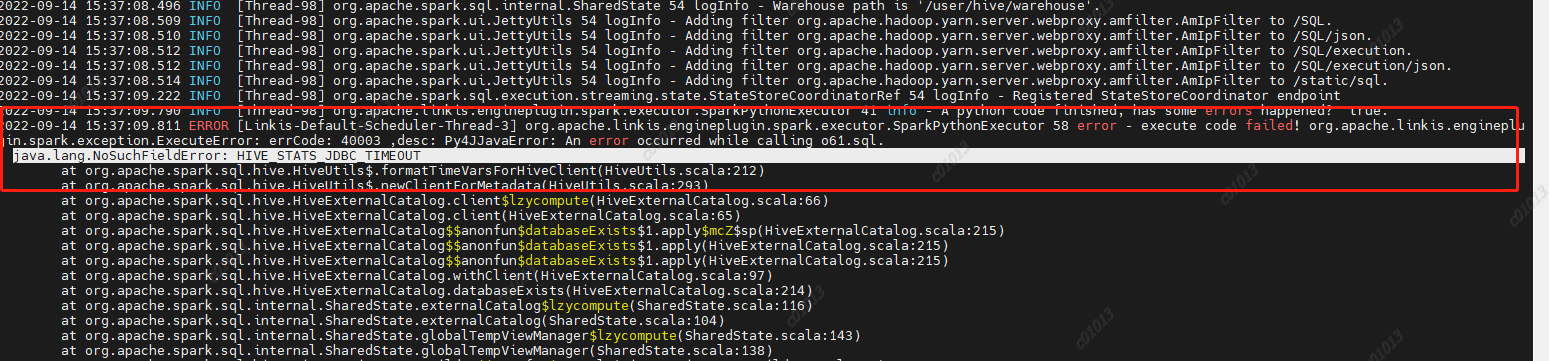
java.lang.NoSuchFieldError: HIVE STATS JDBC_ TIMEOUT

image

Reason: Spark 2.4.8 uses the hive1.2.1 package, but our hive has been upgraded to version 2.1.1. This parameter has been removed from hive2. Then the code in spark sql still calls the hive parameter, and then an error is reported,

Therefore, HIVE is deleted from the spark sql/hive code STATS JDBC TIMEOUT This parameter is recompiled and packaged to replace the spark hive in spark 2.4.8 2.11-2.4.8.jar

2.2.7 Proxy user exception during jdbc engine execution#

Phenomenon: User A is used to execute a jdbc task 1. The engine chooses to reuse it. Then I also use User B to execute a jdbc task 2. It is found that the submitter of task 2 is A

Analysis reason:

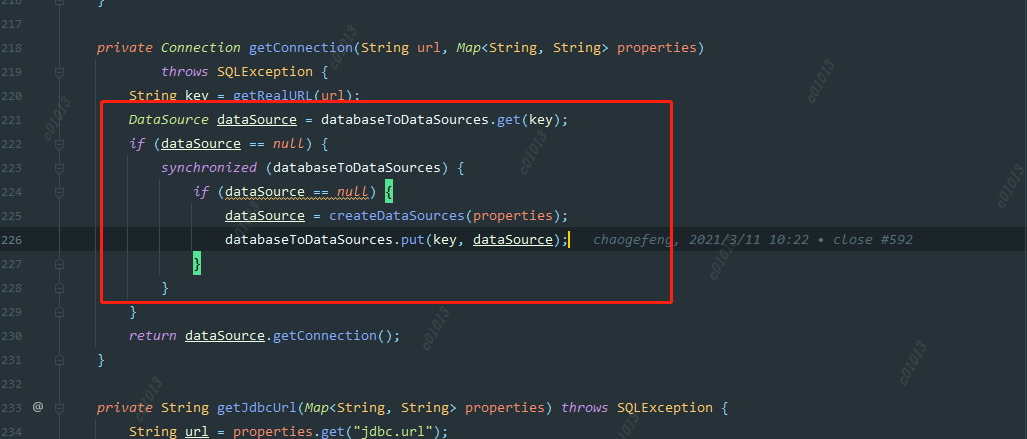
ConnectionManager::getConnection

image

When creating a datasource, we judge whether to create it according to the key. The key is a jdbc url, but this granularity may be a bit large, because different users may access the same datasource, such as hive. Their urls are the same, but their account passwords are different. So when the first user creates a datasource, the username has been specified. When the second user comes in, If the data source is found to exist, it will be used directly instead of creating a new data source. Therefore, the code submitted by user B will be executed by user A.

Solution: Reduce the key granularity of the data source cache map, and change it to jdbc. url+jdbc. user.

  1. DSS deployment The installation process refers to the official website documents for installation configuration. The following describes some issues encountered in the installation and debugging process.

3.1 The database list displayed on the left side of the DSS is incomplete#

Analysis: The database information displayed in the DSS data source module is from the hive metabase. However, because of the permission control through the Sentry in CDH6, most of the hive table metadata information does not exist in the hive metastore, so the displayed data is missing.

resolvent:

The original logic is transformed into the way of using jdbc to link hive and obtain table data display from jdbc.

Simple logic description:

The properties information of jdbc is obtained through the IDE jdbc configuration information configured on the linkis console.

DBS: Get the schema through connection. getMetaData()

TBS: connection. getMetaData(). getTables() Get the tables under the corresponding db

COLUMNS: Get the columns information of the table by executing describe table

3.2 Error jdbc is reported when executing jdbc script in DSS workflow name is empty#

Analysis: The default creator in the dss workflow is Schedulis. Because the related engine parameters of Schedulis are not configured in the management console, the parameters read are all empty.

Adding a category of Schedulis to the console gives an error, ”The Schedulis directory already exists. Because the creator in the scheduling system is schedulis, the Schedulis Category cannot be added. In order to better identify each system, the default creator in the dss workflow is changed to nod_exception. This parameter can add wds. linkis. flow. job. creator. v1=nod_execution in the dss flow execution server. properties.

· 14 min read
ruY9527

Environment and Version#

  • jdk-8 , maven-3.6.3
  • node-14.15.0(Compiling the front end requires)
  • Gradle-4.6(Compile qualitis quality service)
  • hadoop-3.1.1,Spark-3.0.1,Hive-3.1.2,Flink-1.13.2,Sqoop-1.4.7 (Apache version)
  • linkis-1.1.1
  • DataSphereStudio-1.1.0
  • Schudulis-0.7.0
  • Qualitis-0.9.2
  • Visualis-1.0.0
  • Streamis-0.2.0
  • Exchangis-1.0.0
  • Chrome recommends versions below 100

Scenarios and versions of each component#

System nameVersionscene
linkis1.1.1Engine orchestration, running and executing hive, spark, flinksql, shell, python, etc., unified data source management, etc
DataSphereStudio1.1.0Implement DAG scheduling of tasks, integrate the specifications of other systems and provide unified access, and provide sparksql based service API
Schudulis0.7.0Task scheduling, as well as scheduling details and rerouting, and provide trap data based on the selected time
Qualitis0.9.2Provide built-in SQL version and other functions, check common data quality and customizable SQL, verify some data that does not conform to the rules, and write it to the corresponding library
Exchangis1.0.0Hive to MySQL, data exchange between MySQL and hive
Streamis0.2.0Streaming development and Application Center
Visualis1.0.0Visual report display, can share external links

Deployment sequence#

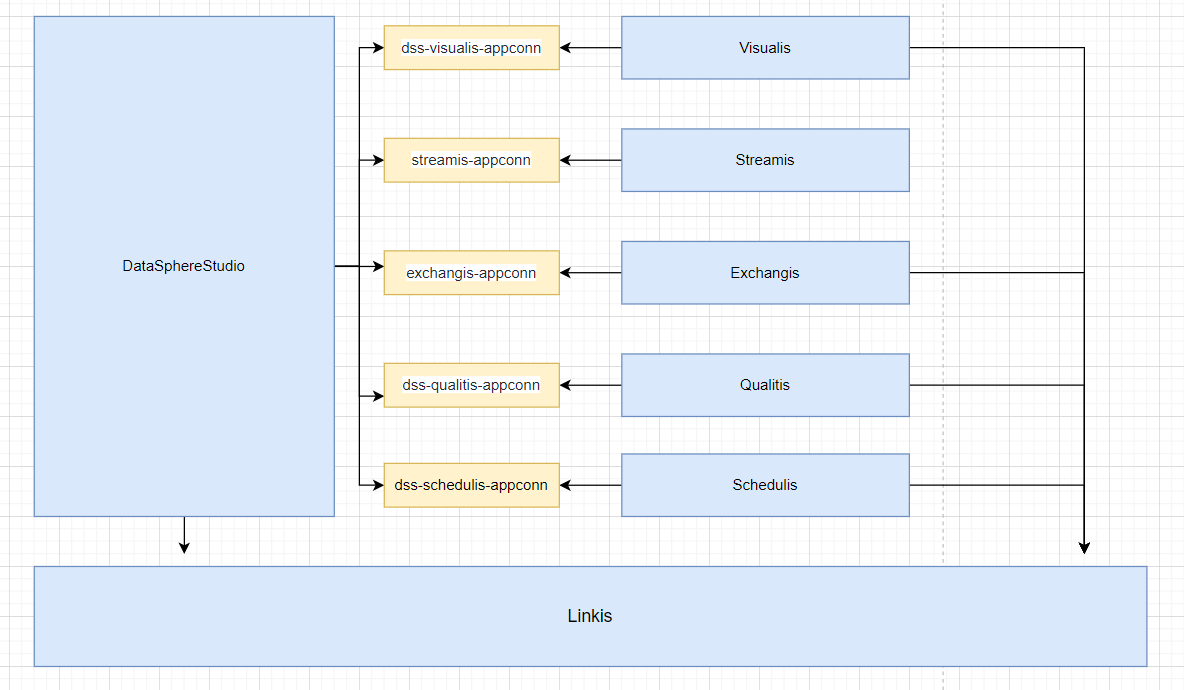
You can select and adjust the sequence after serial number 3 However, one thing to pay attention to when deploying exchangis is to copy the sqoop engine plug-in of exchangis to the engine plug-in package under lib of linkis Schedulis, qualitis, exchangis, streamis, visualis and other systems are integrated with DSS through their respective appconn. Note that after integrating the component appconn, restart the service module corresponding to DSS or restart DSS

  1. linkis
  2. DataSphereStudio
  3. Schedulis
  4. Qualitis
  5. Exchangis
  6. Streamis
  7. Visualis

image.png

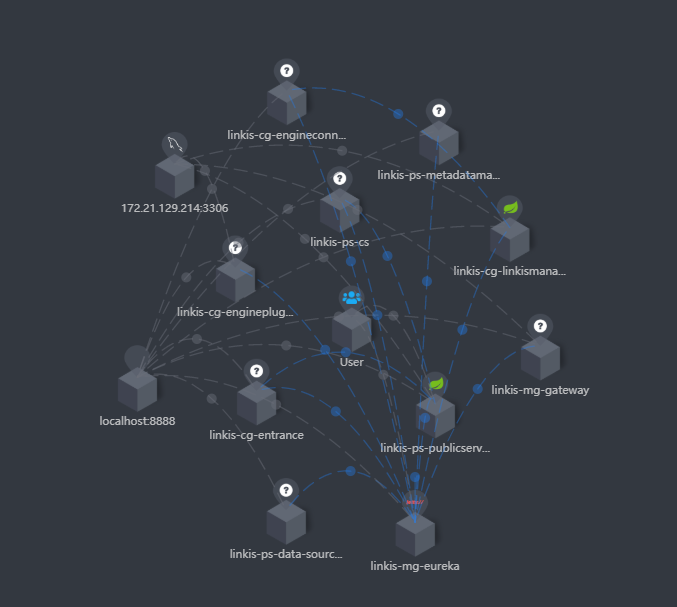
If you integrate skywalking, you can see the service status and connection status in the extended topology diagram, as shown in the following figure: image.png At the same time, you can also clearly see the call link in the trace, as shown in the following figure, which is also convenient for you to locate the error log file of the specific service image.png

Dependency adjustment and packaging#

linkis#

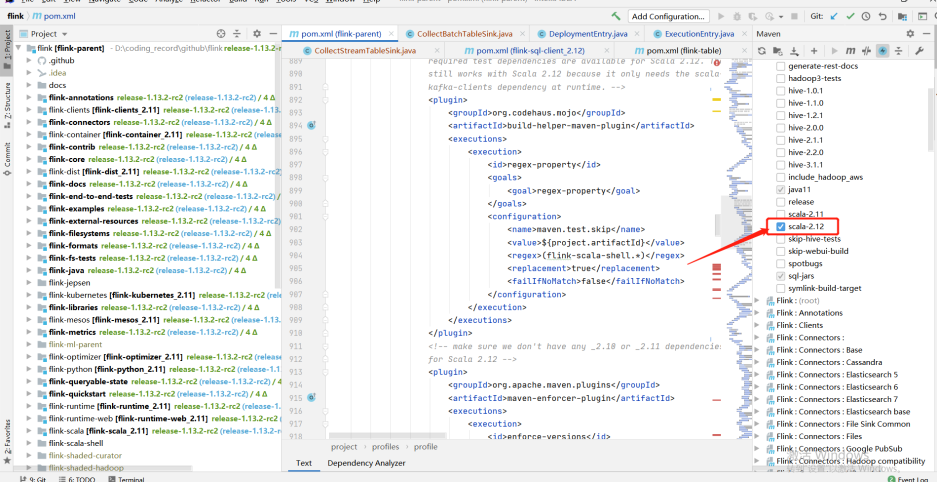
Since spark uses version 3. X, Scala also needs to be upgraded to version 12 Original project code address Adaptation modification code reference address

The pom file of linkis#

<hadoop.version>3.1.1</hadoop.version><scala.version>2.12.10</scala.version><scala.binary.version>2.12</scala.binary.version>
<!-- hadoop-hdfs replace with hadoop-hdfs-client --><dependency>    <groupId>org.apache.hadoop</groupId>    <artifactId>hadoop-hdfs-client</artifactId>    <version>${hadoop.version}</version>

The pom file of linkis-hadoop-common#

       <!-- Notice here <version>${hadoop.version}</version> , adjust according to whether you have encountered any errors -->        <dependency>            <groupId>org.apache.hadoop</groupId>            <artifactId>hadoop-hdfs-client</artifactId>            <version>${hadoop.version}</version>        </dependency>

The pom file of linkis-engineplugin-hive#

<hive.version>3.1.2</hive.version>

The pom file of linkis-engineplugin-spark#

<spark.version>3.0.1</spark.version>

The getfield method in sparkscalaexecutor needs to adjust the following code

protected def getField(obj: Object, name: String): Object = {    // val field = obj.getClass.getField(name)    val field = obj.getClass.getDeclaredField("in0")        field.setAccessible(true)        field.get(obj)  }

The pom file of linkis-engineplugin-flink#

<flink.version>1.13.2</flink.version>

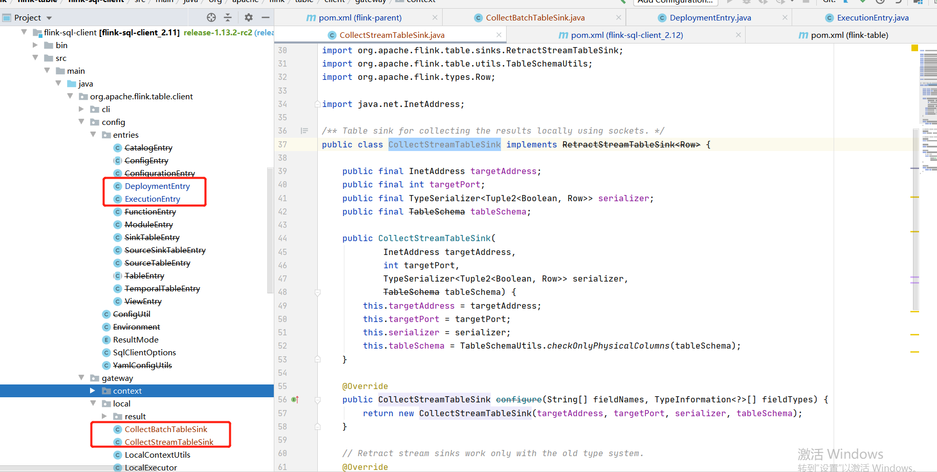
Due to the adjustment of some classes in Flink 1.12.2 and 1.13.2, we refer to the temporary "violence" method given by the community students: copy the classes in part 1.12.2 to 1.13.2, adjust the scala version to 12, and compile them by ourselves It involves the specific modules of flink: flink-sql-client_${scala.binary.version}

-- Note that the following classes are copied from 1.12.2 to 1.13.2org.apache.flink.table.client.config.entries.DeploymentEntryorg.apache.flink.table.client.config.entries.ExecutionEntryorg.apache.flink.table.client.gateway.local.CollectBatchTableSinkorg.apache.flink.table.client.gateway.local.CollectStreamTableSink

image.pngimage.png

linkis-engineplugin-python#

Reference pr If resource / Python's python In the PY file, there is import pandas as PD. If you do not want to install pandas, you need to remove it

linkis-label-common#

org.apache.linkis.manager.label.conf.LabelCommonConfig Modify the default version to facilitate the use of subsequent self compilation scheduling components

    public static final CommonVars<String> SPARK_ENGINE_VERSION =            CommonVars.apply("wds.linkis.spark.engine.version", "3.0.1");
    public static final CommonVars<String> HIVE_ENGINE_VERSION =            CommonVars.apply("wds.linkis.hive.engine.version", "3.1.2");

linkis-computation-governance-common#

org.apache.linkis.governance.common.conf.GovernanceCommonConf Modify the default version to facilitate the use of subsequent self compilation scheduling components

  val SPARK_ENGINE_VERSION = CommonVars("wds.linkis.spark.engine.version", "3.0.1")
  val HIVE_ENGINE_VERSION = CommonVars("wds.linkis.hive.engine.version", "3.1.2")

Compile#

Ensure that the above modifications and environments are available and implemented in sequence

    cd incubator-linkis-x.x.x    mvn -N  install    mvn clean install -DskipTests

Compilation error troubleshooting#

  • If there is an error when you compile, try to enter a module to compile separately to see if there is an error and adjust it according to the specific error
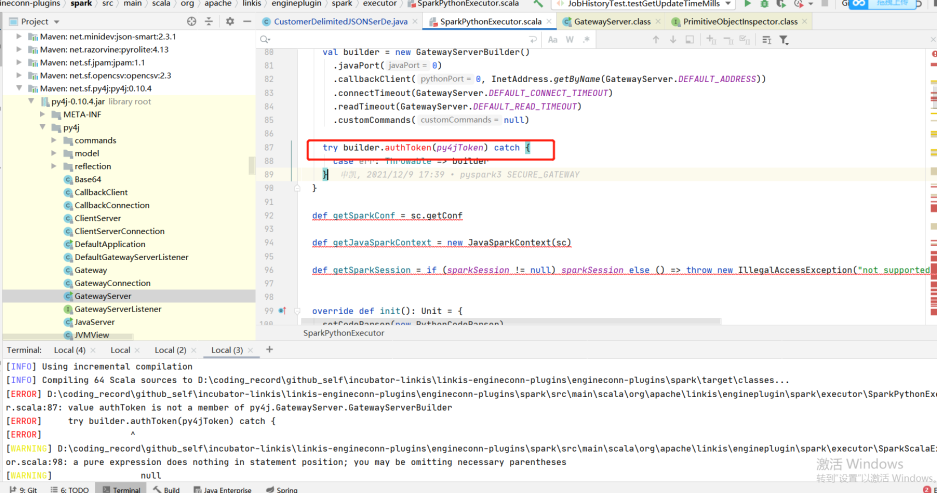
  • For example, the following example (the py4j version does not adapt when the group Friends adapt to the lower version of CDH): if you encounter this problem, you can adjust the version with the corresponding method to determine whether to adapt

image.png

DataSphereStudio#

Original project code address Adaptation modification code reference address

The pom file of DataSphereStudio#

Since DSS relies on linkis, all compilers should compile linkis before compiling DSS

<!-- scala consistent environment --><scala.version>2.12.10</scala.version>

dss-dolphinschuduler-token#

DolphinSchedulerTokenRestfulApi: Remove type conversion

responseRef.getValue("expireTime")

web tuning#

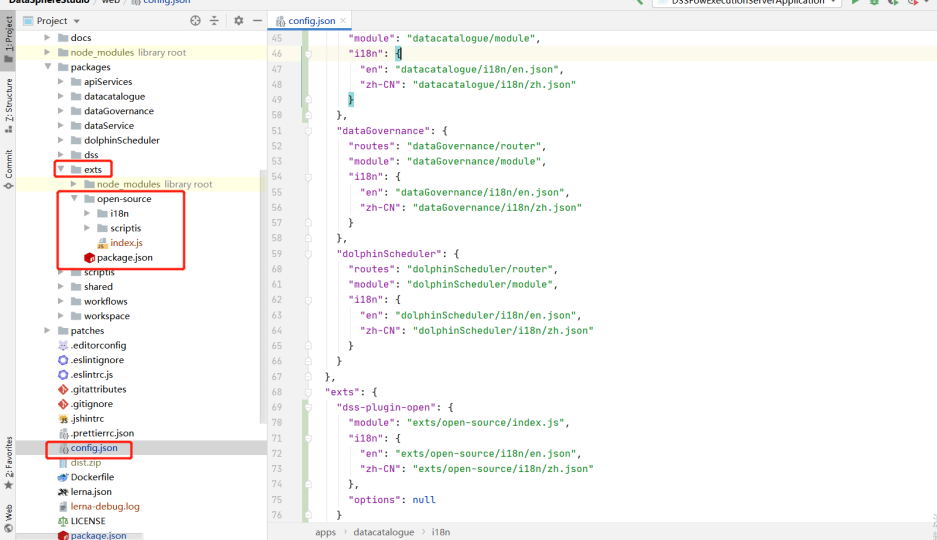
Front end compilation address Reference pr Overwrite the contents of the following directories from the master branch, or build the web based on the master branch image.png

Compile#

    cd DataSphereStudio    mvn -N  install    mvn clean install -DskipTests

Schedulis#

Original project code address Adaptation modification code reference address

The pom file of Schedulis#

       <hadoop.version>3.1.1</hadoop.version>       <hive.version>3.1.2</hive.version>       <spark.version>3.0.1</spark.version>

azkaban-jobtype#

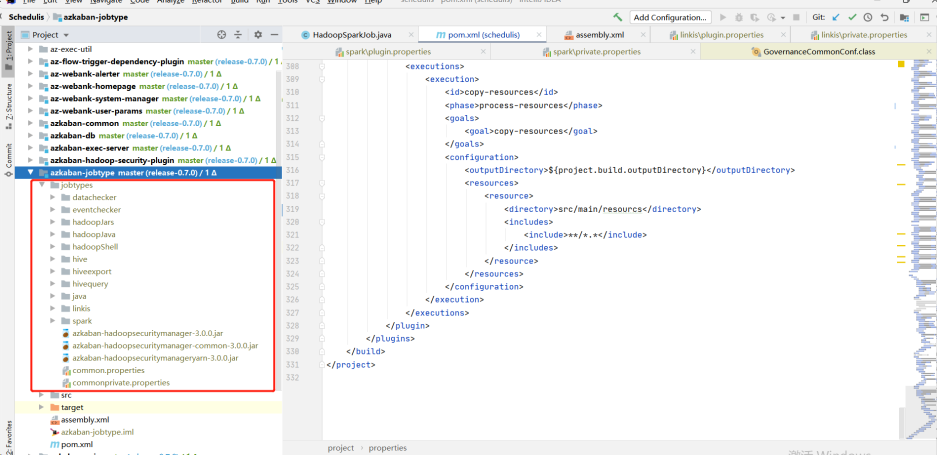
Download the jobtype file of the corresponding version (note the corresponding version): Download address: After downloading, put the entire jobtypes under jobtypes image.png

Qualitis#

Original project code address

Forgerock package download#

release地址 of release-0.9.1,after decompression, put it under. m2\repository\org

Compile#

Gradle version 4.6

cd Qualitisgradle clean distZip

After compiling, there will be a qualitis-0.9.2.zip file under qualitis image.png

dss-qualitis-appconn compile#

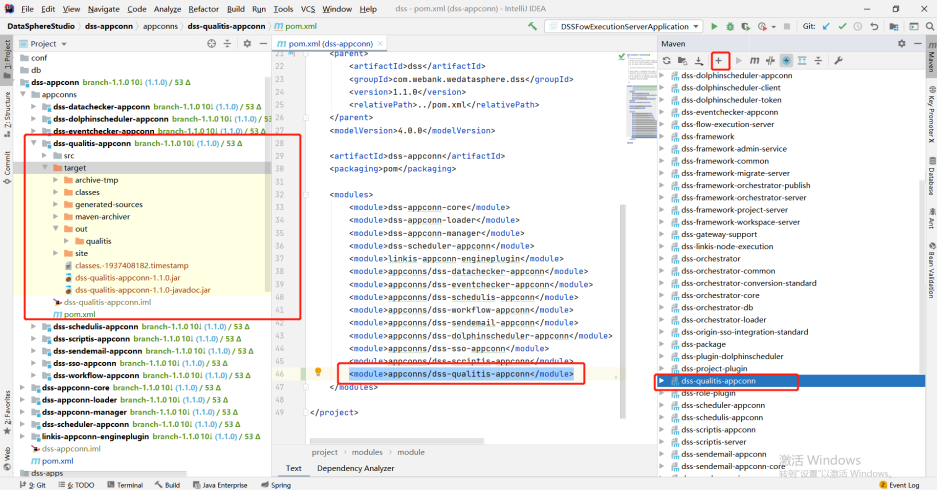
Copy the appconn to the appconns under datasphere studio (create the DSS quality appconn folder), as shown in the following figure: Compile the DSS qualitis appconn. The qualitis under out is the package of integrating qualitis with DSS image.png

Exchangis#

Original project code address Adaptation modification code reference address

The pom file of Exchangis#

<!-- scala Consistent version --><scala.version>2.12.10</scala.version>

Back end compilation#

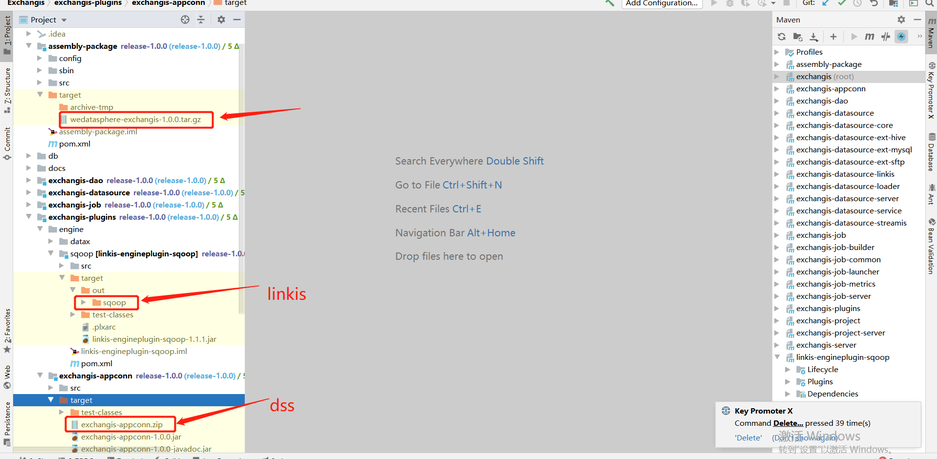
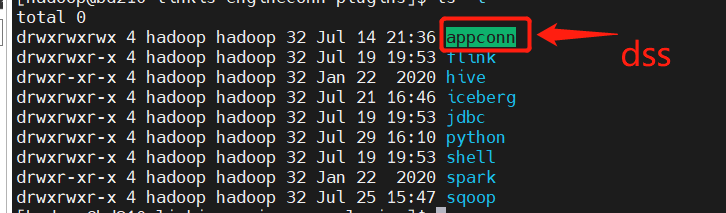
Official compiled documents In the target package of the assembly package, wedatasphere-exchangis-1.0.0.tar.gz is its own service package Linkis engineplug sqoop needs to be put into linkis (lib/linkis enginecon plugins) Exchangis-appconn.zip needs to be put into DSS (DSS appconns)

mvn clean install 

image.png

Front end compilation#

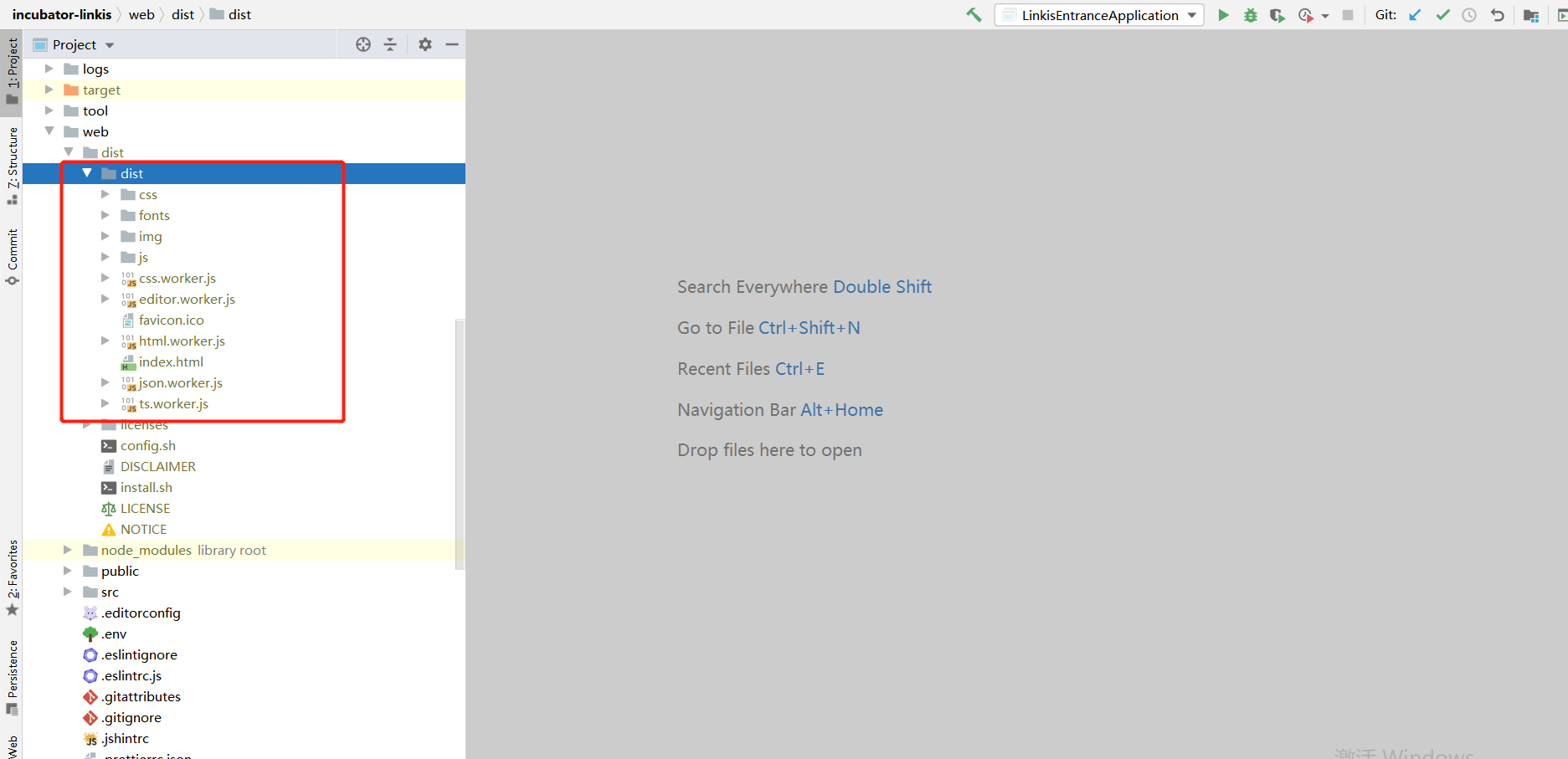
If you deploy the front-end using nginx yourself, you need to pay attention to the dist folder under dist image.png

Visualis#

Original project code address Adaptation modification code reference address

The pom file of Visualis#

<scala.version>2.12.10</scala.version>

Compile#

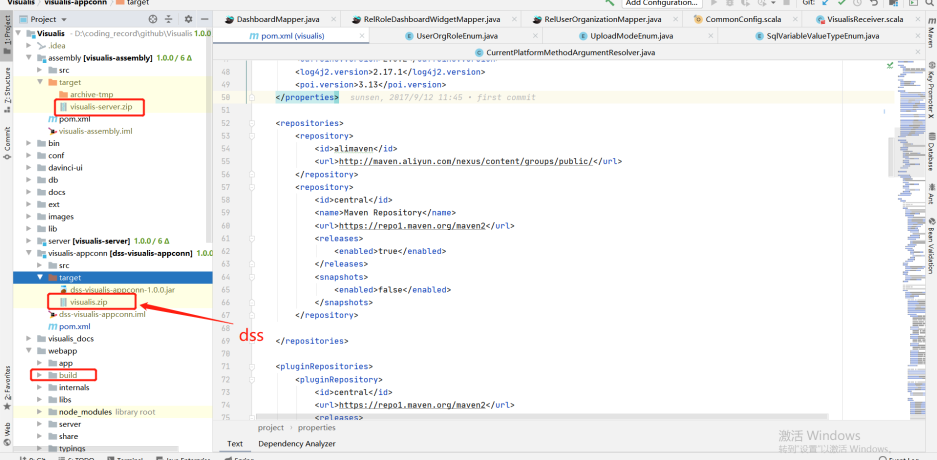
Official compiled documents In the target under assembly, visuis server zip is the package of its own service The target of visualis appconn is visualis.zip, which is the package required by DSS (DSS appconns) Build is the package printed by the front end

cd Visualismvn -N installmvn clean package -DskipTests=true

image.png

Streamis#

Original project code address Adaptation modification code reference address

The pom file of Streamis#

<scala.version>2.12.10</scala.version>

The pom file of streamis-project-server

       <!-- If you are 1.0.1 here, adjust it to ${dss.version} -->       <dependency>            <groupId>com.webank.wedatasphere.dss</groupId>            <artifactId>dss-sso-integration-standard</artifactId>            <version>${dss.version}</version>            <scope>compile</scope>        </dependency>

Compile#

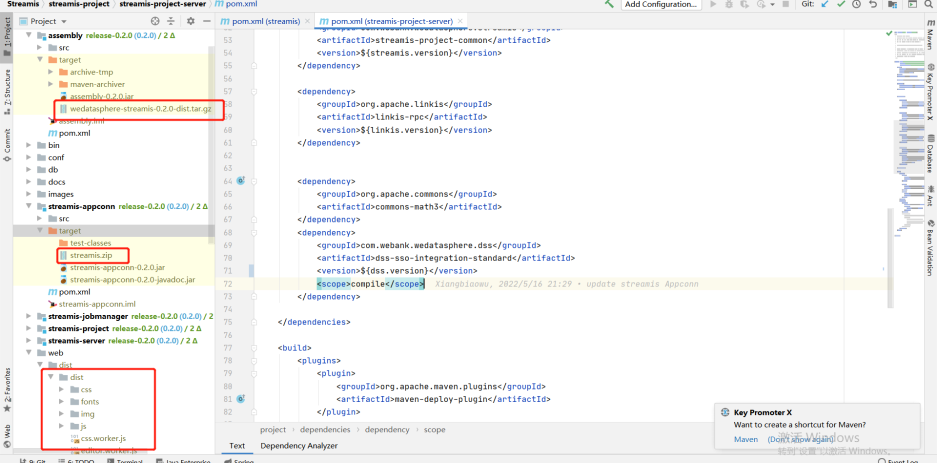
Official compiled documents Under assembly, the target package wedatasphere-streams-0.2.0-dist.tar.gz is the package of its own back-end service The stream.zip package of target under stream appconn is required by DSS (DSS appconns) dist under dist is the front-end package

cd ${STREAMIS_CODE_HOME}mvn -N installmvn clean install

image.png

Installation deployment#

Official deployment address Common error address

Path unification#

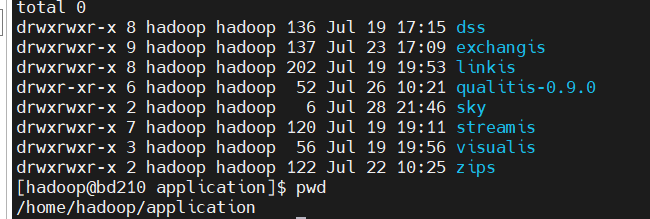
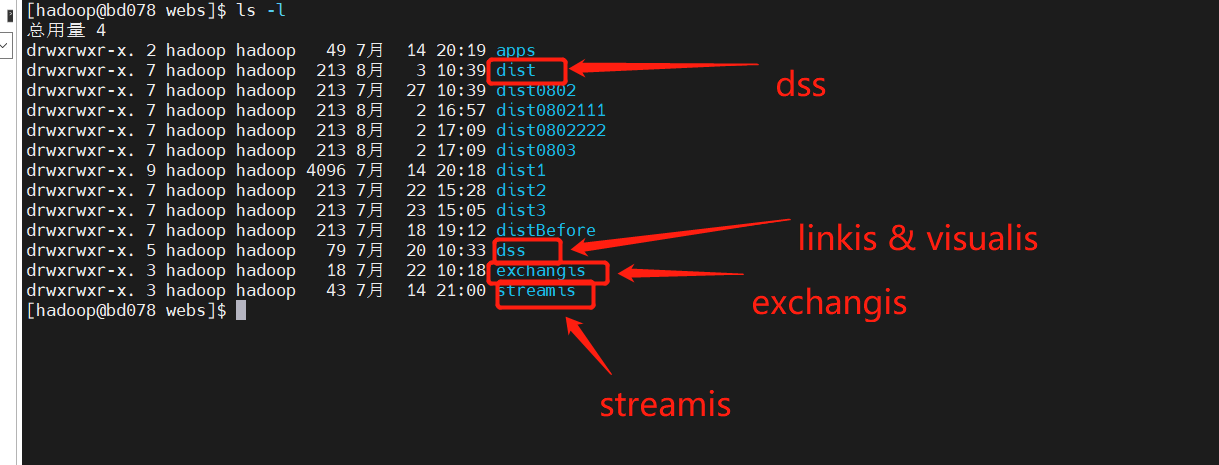
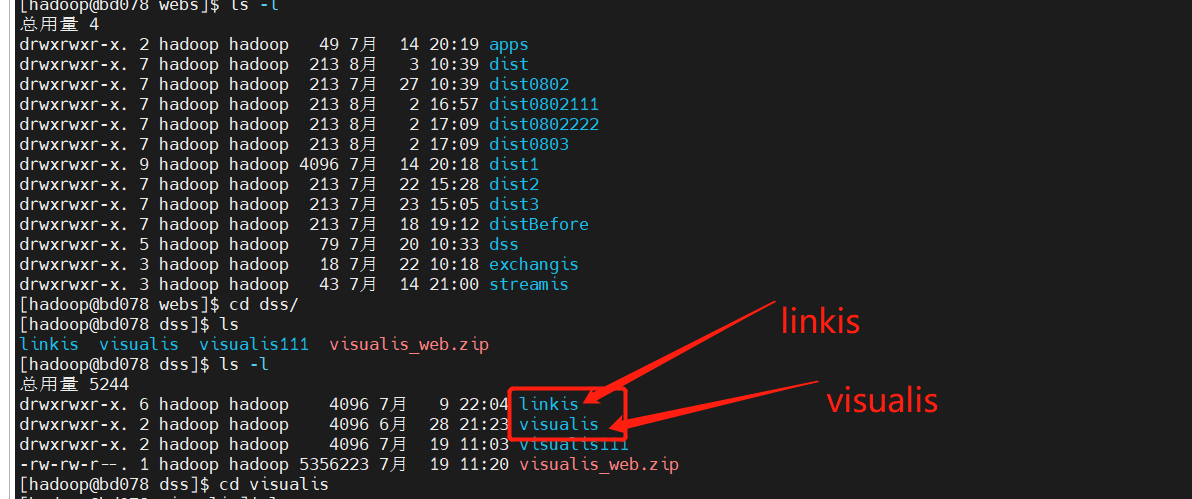
It is recommended to deploy the relevant components in the same path (for example, I unzip them all in /home/hadoop/application) image.png

Notes on linkis deployment#

Deploy config folder#

db.sh, the address of the links connection configured by mysql, and the metadata connection address of hive linkis-env.sh

-- The path to save the script script. Next time, there will be a folder with the user's name, and the script of the corresponding user will be stored in this folderWORKSPACE_USER_ROOT_PATH=file:///home/hadoop/logs/linkis-- Log files for storing materials and engine executionHDFS_USER_ROOT_PATH=hdfs:///tmp/linkis-- Log of each execution of the engine and information related to starting engineconnexec.shENGINECONN_ROOT_PATH=/home/hadoop/logs/linkis/apps-- Access address of yarn master node (active resource manager)YARN_RESTFUL_URL-- Conf address of Hadoop / hive / sparkHADOOP_CONF_DIRHIVE_CONF_DIRSPARK_CONF_DIR-- Specify the corresponding versionSPARK_VERSION=3.0.1HIVE_VERSION=3.1.2-- Specify the path after the installation of linkis. For example, I agree to specify the path under the corresponding component hereLINKIS_HOME=/home/hadoop/application/linkis/linkis-home

flink#

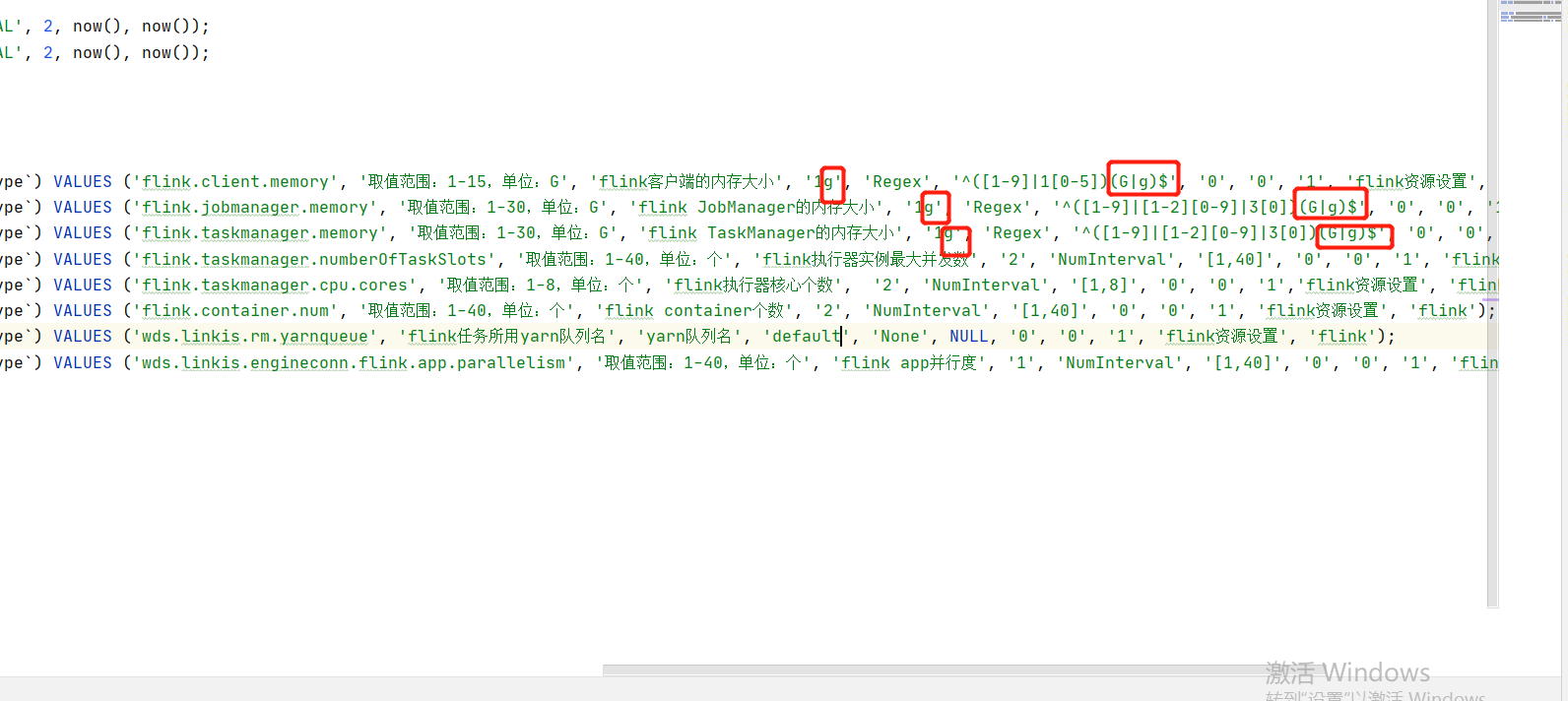
If you use Flink, you can try importing it from flink-engine.sql into the database of linkis

Need to modify @Flink_LABEL version is the corresponding version, and the queue of yarn is default by default

At the same time, in this version, if you encounter the error of "1g" converting digital types, try to remove the 1g unit and the regular check rules. Refer to the following:

flink3.png

lzo#

If your hive uses LZO, copy the corresponding LZO jar package to the hive path. For example, the following path:

lib/linkis-engineconn-plugins/hive/dist/v3.1.2/lib

Frequently asked questions and precautions#

  • The MySQL driver package must be copied to /lib/linkis-commons/public-module/ and /lib/linkis-spring-cloud-services/linkis-mg-gateway/
  • Initialization password in conf/linkis-mg-gateway.properties -> wds.linkis.admin.password
  • ps-cs in the startup script,there may be failures, if any,use sh linkis-daemon.sh ps-cs , start it separately
  • At present, if there is time to back up the log, sometimes if the previous error log cannot be found, it may be backed up to the folder of the corresponding date
  • At present lib/linkis-engineconn-plugins have only spark/shell/python/hive,If you want appconn, flink and sqoop, go to DSS, linkis and exchangis to get them
  • Configuration file version check
linkis.properties,flink see if it is usedwds.linkis.spark.engine.version=3.0.1wds.linkis.hive.engine.version=3.1.2wds.linkis.flink.engine.version=1.13.2

image.png image.png

Error record#

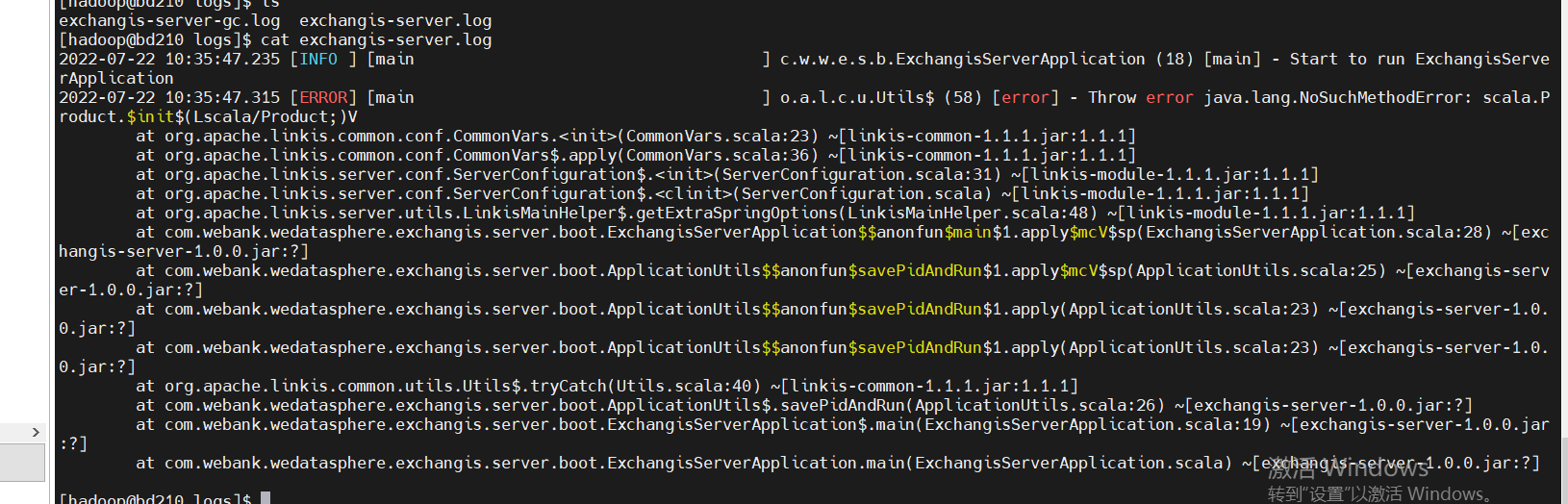
  1. Incompatible versions. If you encounter the following error, it is whether the scala version is not completely consistent. Check and compile it

1905943989d7782456c356b6ce0d72b.png

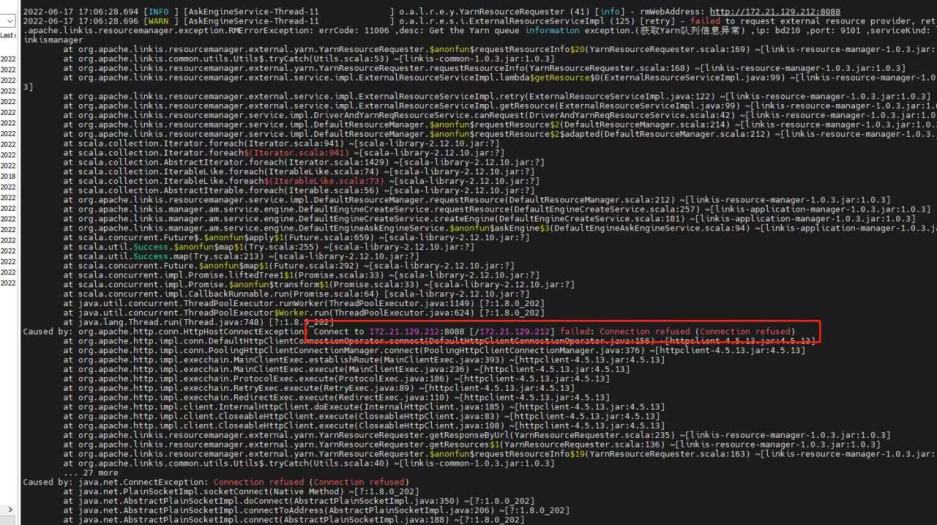
  1. Yarn configures the active node address. If the standby address is configured, the following error will appear:

1ca32f79d940016d72bf1393e4bccc8.jpg

Considerations for DSS deployment#

Official installation document

config folder#

db.sh: configure the database of DSS config.sh

-- The installation path of DSS, for example, is defined in the folder under DSSDSS_INSTALL_HOME=/home/hadoop/application/dss/dss

conf folder#

dss.properties

# Mainly check whether spark / hive and other versions are available. If not, addwds.linkis.spark.engine.version=3.0.1wds.linkis.hive.engine.version=3.1.2wds.linkis.flink.engine.version=1.13.2

dss-flow-execution-server.properties

# Mainly check whether spark / hive and other versions are available. If not, addwds.linkis.spark.engine.version=3.0.1wds.linkis.hive.engine.version=3.1.2wds.linkis.flink.engine.version=1.13.2

If you want to use dolphin scheduler for scheduling, please add the corresponding spark / hive version to this pr Reference pr

dss-appconns#

Exchangis, qualitis, streamis and visualis should be obtained from the projects of exchangis, qualitis, streamis and visualis respectively

Frequently asked questions and precautions#

  • Since we integrate scheduleis, qualitis, exchangis and other components into DSS, all the interfaces of these components will be called synchronously when creating a project, so we ensure that dss_appconn_instance configuration paths in the instance are correct and accessible
  • The Chrome browser recommends that the kernel use version 100 or below. Otherwise, there will be a problem that you can separate scdulis, qaulitis and other components, but you cannot log in successfully through DSS
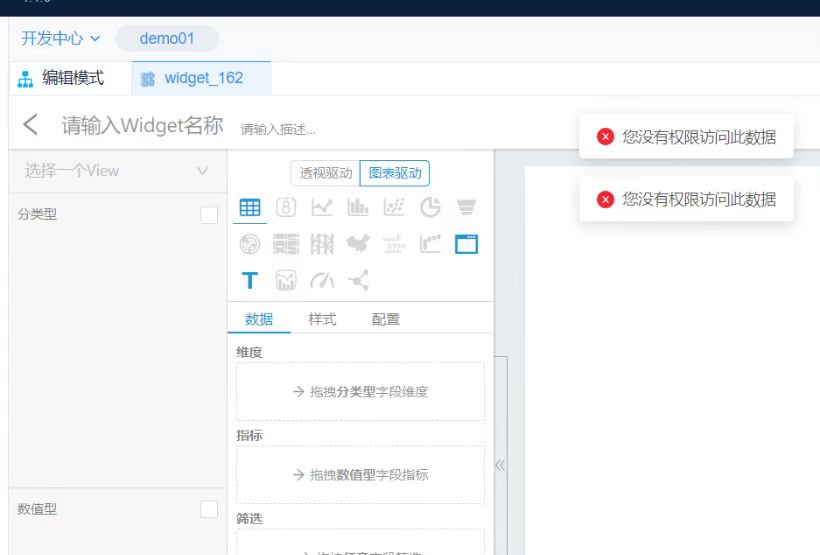
  • Hostname and IP. If IP access is used, make sure it is IP when executing appconn-install.sh installation Otherwise, when accessing other components, you will be prompted that you do not have login or permission

ec4989a817646f785c59f6802d0fab2.jpg

Schedulis deployment considerations#

Official deployment document

conf folder#

azkaban.properties

# azkaban.jobtype.plugin.dir and executor.global.properties. It's better to change the absolute path here# Azkaban JobTypes Pluginsazkaban.jobtype.plugin.dir=/home/hadoop/application/schedulis/apps/schedulis_0.7.0_exec/plugins/jobtypes
# Loader for projectsexecutor.global.properties=/home/hadoop/application/schedulis/apps/schedulis_0.7.0_exec/conf/global.properties
# Engine versionwds.linkis.spark.engine.version=3.0.1wds.linkis.hive.engine.version=3.1.2wds.linkis.flink.engine.version=1.13.2

web modular#

plugins/viewer/system/conf: Here, you need to configure the database connection address to be consistent with scheduleis azkaban.properties: Configuration of user parameters and system management

viewer.plugins=systemviewer.plugin.dir=/home/hadoop/application/schedulis/apps/schedulis_0.7.0_web/plugins/viewer

Frequently asked questions and precautions#

If there are resources or there are no static files such as CSS in the web interface, change the relevant path to an absolute path If the configuration file cannot be loaded, you can also change the path to an absolute path For example:

### web moduleweb.resource.dir=/home/hadoop/application/schedulis/apps/schedulis_0.7.0_web/web/viewer.plugin.dir=/home/hadoop/application/schedulis/apps/schedulis_0.7.0_web/plugins/viewer
### exec moduleazkaban.jobtype.plugin.dir=/home/hadoop/application/schedulis/apps/schedulis_0.7.0_exec/plugins/jobtypesexecutor.global.properties=/home/hadoop/application/schedulis/apps/schedulis_0.7.0_exec/conf/global.properties

Considerations for qualitis deployment#

Official deployment document

conf folder#

application-dev.yml

  # The correct spark version is configured here  spark:    application:      name: IDE      reparation: 50    engine:      name: spark      version: 3.0.1

Exchange deployment considerations#

Official deployment document

Frequently asked questions and precautions#

If you click the data source and there is an error that has not been published, you can try to add linkisps_dm_datasource -> published_version_id Modify the published_version_id value to 1 (if it is null)

Visualis#

Official deployment document

Frequently asked questions and precautions#

If the preview view is inconsistent, please check whether the bin / phantomjs file is uploaded completely If you can see the following results, the upload is complete

./phantomjs -v2.1.1

Streamis#

Official deployment document

dss-appconn#

Qualitis, exchangis, streams and visualis are compiled from various modules, copied to DSS appconns under DSS, and then executed appconn-install.sh under bin to install their components If you find the following SQL script errors during integration, please check whether there are comments around the wrong SQL. If so, delete the comments and try appconn install again 903ceec2f69fc1c7a2be5f309f69726.png For example, for qualitis, the following IP and host ports are determined according to their specific use
qualitis172.21.129.788090

Nginx deployment example#

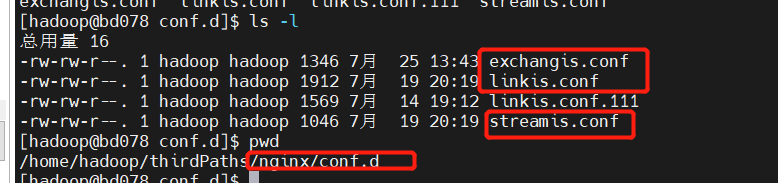
linkis.conf: dss/linkis/visualis front end exchangis.conf: exchangis front end streamis.conf: streamis front end Scheduling and Qaulitis are in their own projects Linkis / Visualis needs to change the dist or build packaged from the front end to the name of the corresponding component here image.png image.png image.png

linkis.conf#

server {listen       8089;# Access port:server_name  localhost;#charset koi8-r;#access_log  /var/log/nginx/host.access.log  main;
location /dss/visualis {# Modify to your own front-end pathroot   /home/hadoop/application/webs; # Static file directoryautoindex on;}
location /dss/linkis {# Modify to your own front-end pathroot   /home/hadoop/application/webs; # linkis Static file directory of management consoleautoindex on;}
location / {# Modify to your own front-end pathroot   /home/hadoop/application/webs/dist; # Static file directory#root /home/hadoop/dss/web/dss/linkis;index  index.html index.html;}
location /ws {proxy_pass http://172.21.129.210:9001;#Address of back-end linkisproxy_http_version 1.1;proxy_set_header Upgrade $http_upgrade;proxy_set_header Connection upgrade;}
location /api {proxy_pass http://172.21.129.210:9001; #Address of back-end linkisproxy_set_header Host $host;proxy_set_header X-Real-IP $remote_addr;proxy_set_header x_real_ipP $remote_addr;proxy_set_header remote_addr $remote_addr;proxy_set_header X-Forwarded-For $proxy_add_x_forwarded_for;proxy_http_version 1.1;proxy_connect_timeout 4s;proxy_read_timeout 600s;proxy_send_timeout 12s;proxy_set_header Upgrade $http_upgrade;proxy_set_header Connection upgrade;}
#error_page  404              /404.html;# redirect server error pages to the static page /50x.html#error_page   500 502 503 504  /50x.html;location = /50x.html {root   /usr/share/nginx/html;}}

exchangis.conf#

server {            listen       9800; # Access port: if the port is occupied, it needs to be modified            server_name  localhost;            #charset koi8-r;            #access_log  /var/log/nginx/host.access.log  main;            location / {            # Modify to own path            root   /home/hadoop/application/webs/exchangis/dist/dist; #Modify to your own path            autoindex on;            }
            location /api {            proxy_pass http://172.21.129.210:9001;  # The address of the backend link needs to be modified            proxy_set_header Host $host;            proxy_set_header X-Real-IP $remote_addr;            proxy_set_header x_real_ipP $remote_addr;            proxy_set_header remote_addr $remote_addr;            proxy_set_header X-Forwarded-For $proxy_add_x_forwarded_for;            proxy_http_version 1.1;            proxy_connect_timeout 4s;            proxy_read_timeout 600s;            proxy_send_timeout 12s;            proxy_set_header Upgrade $http_upgrade;            proxy_set_header Connection upgrade;            }
            #error_page  404              /404.html;            # redirect server error pages to the static page /50x.html            #            error_page   500 502 503 504  /50x.html;            location = /50x.html {            root   /usr/share/nginx/html;            }        }

streamis.conf#

server {    listen       9088;# Access port: if the port is occupied, it needs to be modified    server_name  localhost;    location / {    # Modify to your own path        root   /home/hadoop/application/webs/streamis/dist/dist;  #Modify to your own path        index  index.html index.html;    }    location /api {    proxy_pass http://172.21.129.210:9001;        # The address of the backend link needs to be modified    proxy_set_header Host $host;    proxy_set_header X-Real-IP $remote_addr;    proxy_set_header x_real_ipP $remote_addr;    proxy_set_header remote_addr $remote_addr;    proxy_set_header X-Forwarded-For $proxy_add_x_forwarded_for;    proxy_http_version 1.1;    proxy_connect_timeout 4s;    proxy_read_timeout 600s;    proxy_send_timeout 12s;    proxy_set_header Upgrade $http_upgrade;    proxy_set_header Connection upgrade;    }
    #error_page  404              /404.html;    # redirect server error pages to the static page /50x.html    #    error_page   500 502 503 504  /50x.html;    location = /50x.html {    root   /usr/share/nginx/html;    }}

· 3 min read
jacktao

1. Dependencies and versions

kind github:https://github.com/kubernetes-sigs/kind

kind website:kind.sigs.k8s.io/

version:

kind 0.14.0

docker 20.10.17

node v14.19.3

Note:

  1. Ensure that the front and back ends can compile properly

  2. Ensure that the component depends on the version

  3. Kind refers to the machine that uses docker container to simulate nodes. When the machine is restarted, the scheduler does not work because the container is changed.

2.Install the docker

(1)Install the tutorial

sudo yum install -y yum-utils device-mapper-persistent-data lvm2
sudo yum-config-manager --add-repo https://mirrors.aliyun.com/docker-ce/linux/centos/docker-ce.repo
sudo sed -i 's+download.docker.com+mirrors.aliyun.com/docker-ce+' /etc/yum.repos.d/docker-ce.repo
sudo yum makecache fast
sudo yum -y install docker-ce
systemctl start docker
systemctl enable docker

(2)setting image mirrors

vi /etc/docker/daemon.json
{
"registry-mirrors": ["http://hub-mirror.c.163.com"],
"insecure-registries": ["https://registry.mydomain.com","http://hub-mirror.c.163.com"]
}

3.install the kind

(1)Manually download the Kind binary

https://github.com/kubernetes-sigs/kind/releases

(2)Install kind binary

chmod +x ./kind
mv kind-linux-amd64 /usr/bin/kind

4.Install the JDK and Maven

(1)Refer to the general installation tutorial to install the following components

jdk 1.8

mavne 3.5+

5.Install the NodeJS

(1)version

node v14.19.3

(2)install the nvm

export http_proxy=http://10.0.0.150:7890
export https_proxy=http://10.0.0.150:7890
curl -o- https://raw.githubusercontent.com/nvm-sh/nvm/v0.39.1/install.sh | bash
export NVM_DIR="$HOME/.nvm"
[ -s "$NVM_DIR/nvm.sh" ] && \. "$NVM_DIR/nvm.sh"  # This loads nvm
[ -s "$NVM_DIR/bash_completion" ] && \. "$NVM_DIR/bash_completion"  # This loads nvm bash_completion

(3)install the nodejs

nvm ls-remote
nvm install v14.19.3

(4)setting NPM

npm config set registry https://registry.npmmirror.com
npm config set sass_binary_site https://registry.npmmirror.com/binary.html?path=node-sass/

(5)Compiler front-end

npm install -g yarn
yarn
yarn build
yarn 

6.Compile linkis

# 1. When compiling for the first time, execute the following command first
./mvnw -N install
# 2. make the linkis distribution package
# - Option 1: make the linkis distribution package only
./mvnw clean install -Dmaven.javadoc.skip=true -Dmaven.test.skip=true
# - Option 2: make the linkis distribution package and docker image
./mvnw clean install -Pdocker -Dmaven.javadoc.skip=true -Dmaven.test.skip=true
# - Option 3: linkis distribution package and docker image (included web)
./mvnw clean install -Pdocker -Dmaven.javadoc.skip=true -Dmaven.test.skip=true -Dlinkis.build.web=true

7.Create the cluster

dos2unix ./linkis-dist/helm/scripts/*.sh
./linkis-dist/helm/scripts/create-test-kind.sh

8.install the helm charts

 ./scripts/install-charts.sh linkis linkis-demo

9.Visit the Linkis page

kubectl port-forward -n linkis  --address=0.0.0.0 service/linkis-demo-web 8087:8087
http://10.0.2.101:8087

10.Test using the Linkis client

kubectl -n linkis exec -it linkis-demo-ps-publicservice-77d7685d9-f59ht -- bash./linkis-cli -engineType shell-1 -codeType shell -code "echo \"hello\" "  -submitUser hadoop -proxyUser hadoop

11.install the kubectl

cat <<EOF > /etc/yum.repos.d/kubernetes.repo[kubernetes]name=Kubernetesbaseurl=https://mirrors.aliyun.com/kubernetes/yum/repos/kubernetes-el7-x86_64/enabled=1gpgcheck=1repo_gpgcheck=1gpgkey=https://mirrors.aliyun.com/kubernetes/yum/doc/yum-key.gpg https://mirrors.aliyun.com/kubernetes/yum/doc/rpm-package-key.gpgEOF
yum install -y --nogpgcheck kubectl
kubectl config view  kubectl config get-contexts  kubectl cluster-info  

· 9 min read
BeaconTown

1 Summary#

As you know, continuous integration consists of many operations, such as capturing code, running tests, logging in to remote servers, publishing to third-party services, and so on. GitHub calls these operations as Actions. Many operations are similar in different projects and can be shared. GitHub noticed this and came up with a wonderful idea to allow developers to write each operation as an independent script file and store it in the code repository so that other developers can reference it. If you need an action, you don't have to write a complex script by yourself. You can directly reference the action written by others. The whole continuous integration process becomes a combination of actions. This is the most special part of GitHub Actions.

GitHub provides a Github Action Market for developers, we can find the GitHub Action we want from this market and configure it into the workflow of the repository to realize automatic operation. Of course, the GitHub Action that this market can provide is limited. In some cases, we can't find a GitHub Action that can meet our needs. I will also teach you how to write GitHub Action by yourself later in this blog.

2 Some terms#

2.1 What is continuous integration#

In short, it is an automated program. For example, every time the front-end programmer submits code to GitHub's repository, GitHub will automatically create a virtual machine (MAC / Windows / Linux) to execute one or more instructions (determined by us), for example:

npm installnpm run build

2.2 What is YAML#

The way we integrate GitHub Action is to create a Github/workflow directory, with a * yaml file - this yaml file is the file we use to configure GitHub Action. It is a very easy scripting language. For users who are not familiar with yaml, you can refer to it here.

3 Start writing the first Workflow#

3.1 How to customize the name of Workflow#

GitHub displays the name of the Workflow on the action page of the repository. If we omit name, GitHub will set it as the Workflow file path relative to the repository root directory.

name:   Say Hello

3.2 How to customize the trigger event of Workflow#

There are many events, for example, the user submits a pull request to the repository, the user submits an issue to the repository, or the user closes an issue, etc. We hope that when some events occur, the Workflow will be automatically executed, which requires the definition of trigger events. The following is an example of a custom trigger event:

name:   Say Helloon:   pull_request

The above code can trigger workflow when the user submits a pull request. For multiple events, we enclose them in square brackets, for example:

name:   Say Helloon:   [pull_request,pull]

Of course, we hope that the triggering event can be more specific, such as triggering Workflow when a pull request is closed or reopened:

name:   Say Helloon:   pull_request:    type:       [reopend,closed]

For more trigger events, please refer to document here.

3.3 How to define a job#

A Workflow is composed of one or more jobs, which means that a continuous integration run can complete multiple tasks. Here is an example:

name:   Say Helloon:   pull_requestjobs:  my_first_job:    name: My first job  my_second_job:    name: My second job

Each job must have an ID associated with it. Above my_ first_ Job and my_ second_ Job is the ID of the job.

3.4 How to specify the running environment of a job#

Specify the running environment for running jobs. The operating systems available on Workflow are:

  • Windows
  • macos
  • linux

The following is an example of a specified running environment:

# Limited by space, the previous code is omittedjobs:  my_first_job:    name: My first job  runs-on: macos-10.15

3.5 The use of step#

Each job is composed of multiple steps, which will be executed from top to bottom. Step can run commands (such as linxu commands) and actions.

The following is an example of outputting "Hello World":

# Limited by space, the previous code is omittedjobs:  my_first_job:    name: My first job  runs-on: macos-10.15  step:    - name: Print a greeting    # Define the environment variables of step      env:        FIRST_WORD: Hello        SECOND_WORD: WORD      # Run instructions: output environment variables      run: |        echo $FIRST_WORD $SECOND_WORD.

Next is the use of action, which is actually a command. For example, GitHub officially gives us some default commands. We can directly use these commands to reduce the amount of Workflow code in the repository. The most common action is Checkout, it can clone the latest code in the repository into the Workflow workspace.

# Limited by space, the previous code is omitted  step:    - name: Check out git repository       uses: actions/checkout@v2

Some actions require additional parameters to be passed in. Generally, with is used to set the parameter value:

# Limited by space, the previous code is omitted  step:    - name: Check out git repository       uses: actions/checkout@v2      uses: actions/setup-node@v2.2.0        with:          node-version: 14

4 How to write your own action#

4.1 Configuration of action.yml#

When we can't find the action we want in the GitHub Action Market, we can write an action to meet our needs by ourselves. The customized action needs to be created a new "actions" directory under the ".gitHub/workflow" directory, and then create a directory with a custom action name. Each action needs an action configuration file: action.yml. The runs section of action.yml specifies the starting mode of the operation. There are three startup methods: node.js Script, Docker Image, and Composite Script. The common parameters of action.yml are described below:

  • name: Customize the name of the action
  • description: Declare the parameters or outputs that need to be passed in for action
  • inputs: Customize the parameters to be input
  • outputs: Output variables
  • runs: Startup mode

The following is a configuration example of action.yml

name: "example action"
description: "This is an example action"
inputs:  param1:    description: "The first param of this action"    required: true  #Required parameters must be set to true
  param2:    description: "The second param of this action"    required: true
outputs:  out1:    description: "The outputs of this action"
runs:  using: node16  main: dist/index.js  post: dist/index.js

Setting runs.using to node16 or node12 can be specified as the starting node.js script. The script file named main is the startup file. The way to start is similar to running the command node main.js directly. Therefore, dependency will not be installed from package.json. During development, we usually use the packaging tool to package the dependencies together, output a separate JS file, and then use this file as the entry point. The runs.post can specify the cleanup work, and the content here will be run at the end of the Workflow.

4.2 Using Docker Image#

If Docker is used, we need to modify the runs in action.yml to:

runs:  using: docker  image: Dockerfile

runs.image specifies the dockerfile required for image startup, which is specified here as the dockerfile under the project root directory. In the dockerfile, specify the startup script with ENTRYPOINT or CMD. For example, define a program that runs scripts in Python:

FROM python:3
RUN pip install --no-cache-dir requests
COPY . .
CMD [ "python", "/main.py"]

Here we can see the advantages of using docker: you can customize the running environment, and you can use other program languages.

5 GitHub Action project practice#

In this section, I will describe how to write your own GitHub Action with a specific example.

Problem#

Assuming that there are many issues to be processed in our GitHub repository, each pull request submitted by the user may be associated with an issue. If you have to manually close an issue after merging a pull request, it will be quite cumbersome.

Resolve#

Then workflow comes in handy. We can listen to the closed event of pull request and determine whether the closed event is closed by merged or non merged. If it is merged, the associated issue will be closed.

But there is still a problem here, how to obtain the associated issue? We can ask the user to add the issue that needs to be associated in the description part when submitting the pull request, such as #345, and then extract the issue number of 345. How to realize this function? We can write GitHub Action by ourselves. In order to make the GitHub Action program more concise, here I use docker to start GitHub Action. First, prepare action.yml:

# The name of Github Action name: "Auto_close_associate_issue"# The description of actiondescription: "Auto close an issue which associate with a PR."
# Define parameters to be inputinputs:  # The name of first param is prbody  prbody:     # The definition of the param    description: "The body of the PR to search for related issues"    # Required param    required: true
outputs:  #The name of output param  issurNumber:    description: "The issue number"
runs:  # Using Docker Image  using: "docker"  image: "Dockerfile"

The next step is to write script files, where I use node.js. The idea of this script is: first obtain the variable value from the environment, extract the issue number, and then output it to the environment. The corresponding script (named main.js) is as follows:

// Get environment variables. All parameters passed to GitHub Action are capitalized and the prefix INPUT_ is required, which is specified by GitHublet body = process.env['INPUT_PRBODY']; // Extract the number of issue by regular expressionlet pattern = /#\d+/;let issueNumber = body.match(pattern)[0].replace('#', '');// Output the issue number to the environmentconsole.log(`::set-output name=issueNumber::${issueNumber}`);

Next is the image file of Docker (the file name is Dockerfile):

FROM node:10.15
COPY . .
CMD [ "node", "/main.js"]

Finally, action.yml, Dockerfile and main.js is under the directory .github/actions/Auto_close_associate_issue, and the writing of an action is over.

The last step is to write Workflow. The configuration of Workflow is described in detail in Start Writing the First Workflow, so I won't repeat it here. The specific configuration is as follows:

name: Auto close issue when PR is merged
on:  pull_request_target:    types: [ closed ]
jobs:  close-issue:    runs-on: ubuntu-latest    steps:      - uses: actions/checkout@v2
      - name: "Auto issue closer"        uses: ./.github/actions/Auto_close_associate_issue/        id: Closer        with:          prbody: ${{ github.event.pull_request.body }}
      - name: Close Issue        uses: peter-evans/close-issue@v2        if: ${{ github.event.pull_request.merged }}        with:          issue-number: ${{ steps.Closer.outputs.issueNumber }}          comment: The associated PR has been merged, this issue is automatically closed, you can reopend if necessary.        env:          Github_Token: ${{ secrets.GITHUB_TOKEN }}          PRNUM: ${{ github.event.pull_request.number }}