With the development of business and the update and iteration of community products, we found that Linkis1. X has greatly improved its performance in terms of resource management and engine management, which can better meet the requirements of the construction of data middle stations. Compared with version 0.9.3 and the platform we used before, the user experience has also been greatly improved, and the problems such as the inability to view details on the task failure page have also been improved. Therefore, we decided to upgrade Linkis and the WDS suite. The following are the specific practical operations, which we hope will give you a reference.
2.1 Compile code or release installation package?#
This installation deployment adopts the release installation package method. In order to adapt to the company's CDH6.3.2 version, the dependency packages of hadoop and hive need to be replaced with the CDH6.3.2 version. Here, the installation package is directly replaced. The dependent packages and modules to be replaced are shown in the following list.
// List of cdh packages that need to be replaced./lib/linkis-engineconn-plugins/spark/dist/v2.4.8/lib/hive-shims-0.23-2.1.1-cdh6.3.2.jar./lib/linkis-engineconn-plugins/spark/dist/v2.4.8/lib/hive-shims-scheduler-2.1.1-cdh6.3.2.jar./lib/linkis-engineconn-plugins/spark/dist/v2.4.8/lib/hadoop-annotations-3.0.0-cdh6.3.2.jar./lib/linkis-engineconn-plugins/spark/dist/v2.4.8/lib/hadoop-auth-3.0.0-cdh6.3.2.jar./lib/linkis-engineconn-plugins/spark/dist/v2.4.8/lib/hadoop-common-3.0.0-cdh6.3.2.jar./lib/linkis-engineconn-plugins/spark/dist/v2.4.8/lib/hadoop-hdfs-3.0.0-cdh6.3.2.jar./lib/linkis-engineconn-plugins/spark/dist/v2.4.8/lib/hadoop-hdfs-client-3.0.0-cdh6.3.2.jar./lib/linkis-engineconn-plugins/hive/dist/v2.1.1/lib/hadoop-client-3.0.0-cdh6.3.2.jar./lib/linkis-engineconn-plugins/hive/dist/v2.1.1/lib/hadoop-mapreduce-client-common-3.0.0-cdh6.3.2.jar./lib/linkis-engineconn-plugins/hive/dist/v2.1.1/lib/hadoop-mapreduce-client-jobclient-3.0.0-cdh6.3.2.jar./lib/linkis-engineconn-plugins/hive/dist/v2.1.1/lib/hadoop-yarn-api-3.0.0-cdh6.3.2.jar./lib/linkis-engineconn-plugins/hive/dist/v2.1.1/lib/hadoop-yarn-client-3.0.0-cdh6.3.2.jar./lib/linkis-engineconn-plugins/hive/dist/v2.1.1/lib/hadoop-yarn-server-common-3.0.0-cdh6.3.2.jar./lib/linkis-engineconn-plugins/hive/dist/v2.1.1/lib/hadoop-hdfs-client-3.0.0-cdh6.3.2.jar./lib/linkis-engineconn-plugins/hive/dist/v2.1.1/lib/hadoop-mapreduce-client-core-3.0.0-cdh6.3.2.jar./lib/linkis-engineconn-plugins/hive/dist/v2.1.1/lib/hadoop-mapreduce-client-shuffle-3.0.0-cdh6.3.2.jar./lib/linkis-engineconn-plugins/hive/dist/v2.1.1/lib/hadoop-yarn-common-3.0.0-cdh6.3.2.jar./lib/linkis-engineconn-plugins/flink/dist/v1.12.2/lib/hadoop-annotations-3.0.0-cdh6.3.2.jar./lib/linkis-engineconn-plugins/flink/dist/v1.12.2/lib/hadoop-auth-3.0.0-cdh6.3.2.jar./lib/linkis-engineconn-plugins/flink/dist/v1.12.2/lib/hadoop-mapreduce-client-core-3.0.0-cdh6.3.2.jar./lib/linkis-engineconn-plugins/flink/dist/v1.12.2/lib/hadoop-yarn-api-3.0.0-cdh6.3.2.jar./lib/linkis-engineconn-plugins/flink/dist/v1.12.2/lib/hadoop-yarn-client-3.0.0-cdh6.3.2.jar./lib/linkis-engineconn-plugins/flink/dist/v1.12.2/lib/hadoop-yarn-common-3.0.0-cdh6.3.2.jar./lib/linkis-commons/public-module/hadoop-annotations-3.0.0-cdh6.3.2.jar./lib/linkis-commons/public-module/hadoop-auth-3.0.0-cdh6.3.2.jar./lib/linkis-commons/public-module/hadoop-common-3.0.0-cdh6.3.2.jar./lib/linkis-commons/public-module/hadoop-hdfs-client-3.0.0-cdh6.3.2.jar./lib/linkis-computation-governance/linkis-cg-linkismanager/hadoop-annotations-3.0.0-cdh6.3.2.jar./lib/linkis-computation-governance/linkis-cg-linkismanager/hadoop-auth-3.0.0-cdh6.3.2.jar./lib/linkis-computation-governance/linkis-cg-linkismanager/hadoop-yarn-api-3.0.0-cdh6.3.2.jar./lib/linkis-computation-governance/linkis-cg-linkismanager/hadoop-yarn-client-3.0.0-cdh6.3.2.jar./lib/linkis-computation-governance/linkis-cg-linkismanager/hadoop-yarn-common-3.0.0-cdh6.3.2.jar
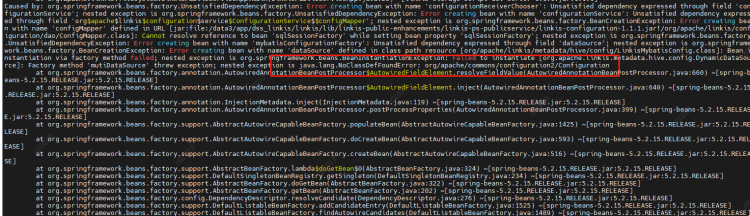
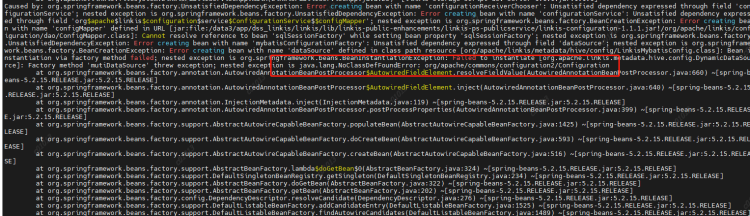
Cause: Configuration class conflict. Add a commons-configuration2-2.1.1.jar under the linkis commons module to resolve the conflict
2.2.3 Running spark, python, etc. in script reports no plugin for XXX#
Phenomenon: After modifying the version of Spark/Python in the configuration file, the startup engine reports no plugin for XXX
Reason: LabelCommonConfig.java and GovernanceCommonConf In scala, the version of the engine is written dead, the corresponding version is modified, and all jars containing these two classes (linkis computation governance common-1.1.1. jar and linkis label common-1.1.1. jar) in linkis and other components (including scheduleris) are replaced after compilation
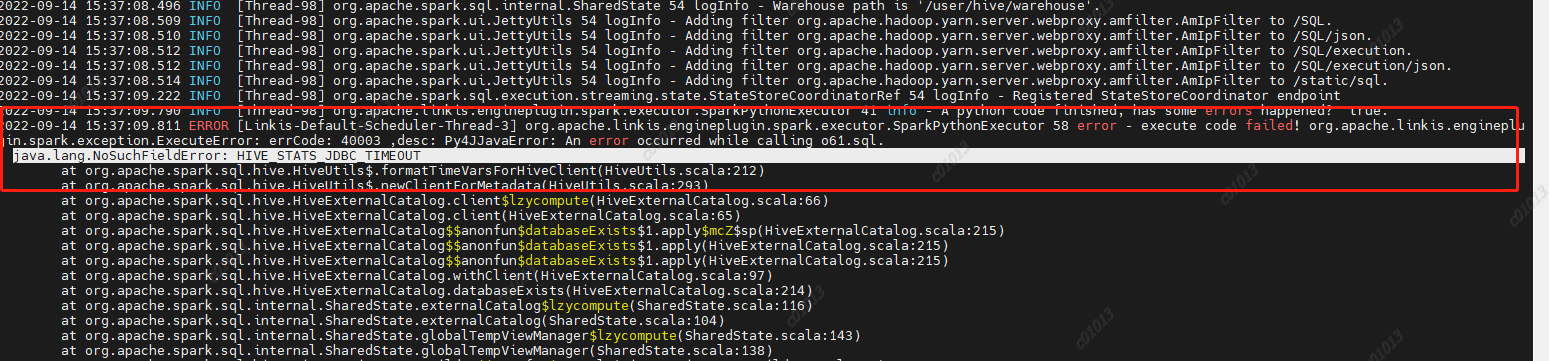
Reason: Spark 2.4.8 uses the hive1.2.1 package, but our hive has been upgraded to version 2.1.1. This parameter has been removed from hive2. Then the code in spark sql still calls the hive parameter, and then an error is reported,
Therefore, HIVE is deleted from the spark sql/hive code STATS JDBC TIMEOUT This parameter is recompiled and packaged to replace the spark hive in spark 2.4.8 2.11-2.4.8.jar
2.2.7 Proxy user exception during jdbc engine execution#
Phenomenon: User A is used to execute a jdbc task 1. The engine chooses to reuse it. Then I also use User B to execute a jdbc task 2. It is found that the submitter of task 2 is A
Analysis reason:
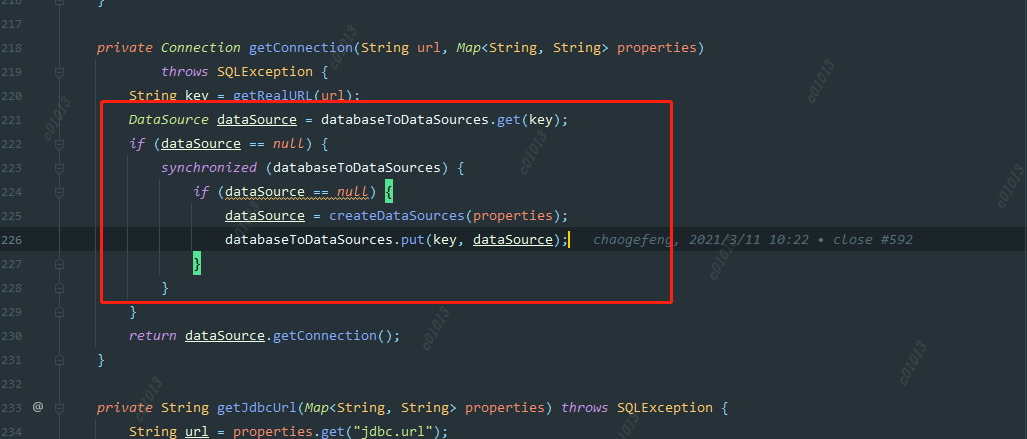
ConnectionManager::getConnection
When creating a datasource, we judge whether to create it according to the key. The key is a jdbc url, but this granularity may be a bit large, because different users may access the same datasource, such as hive. Their urls are the same, but their account passwords are different. So when the first user creates a datasource, the username has been specified. When the second user comes in, If the data source is found to exist, it will be used directly instead of creating a new data source. Therefore, the code submitted by user B will be executed by user A.
Solution: Reduce the key granularity of the data source cache map, and change it to jdbc. url+jdbc. user.
DSS deployment
The installation process refers to the official website documents for installation configuration. The following describes some issues encountered in the installation and debugging process.
3.1 The database list displayed on the left side of the DSS is incomplete#
Analysis: The database information displayed in the DSS data source module is from the hive metabase. However, because of the permission control through the Sentry in CDH6, most of the hive table metadata information does not exist in the hive metastore, so the displayed data is missing.
resolvent:
The original logic is transformed into the way of using jdbc to link hive and obtain table data display from jdbc.
Simple logic description:
The properties information of jdbc is obtained through the IDE jdbc configuration information configured on the linkis console.
DBS: Get the schema through connection. getMetaData()
TBS: connection. getMetaData(). getTables() Get the tables under the corresponding db
COLUMNS: Get the columns information of the table by executing describe table
3.2 Error jdbc is reported when executing jdbc script in DSS workflow name is empty#
Analysis: The default creator in the dss workflow is Schedulis. Because the related engine parameters of Schedulis are not configured in the management console, the parameters read are all empty.
Adding a category of Schedulis to the console gives an error, ”The Schedulis directory already exists. Because the creator in the scheduling system is schedulis, the Schedulis Category cannot be added. In order to better identify each system, the default creator in the dss workflow is changed to nod_exception. This parameter can add wds. linkis. flow. job. creator. v1=nod_execution in the dss flow execution server. properties.
Engine orchestration, running and executing hive, spark, flinksql, shell, python, etc., unified data source management, etc
DataSphereStudio
1.1.0
Implement DAG scheduling of tasks, integrate the specifications of other systems and provide unified access, and provide sparksql based service API
Schudulis
0.7.0
Task scheduling, as well as scheduling details and rerouting, and provide trap data based on the selected time
Qualitis
0.9.2
Provide built-in SQL version and other functions, check common data quality and customizable SQL, verify some data that does not conform to the rules, and write it to the corresponding library
Exchangis
1.0.0
Hive to MySQL, data exchange between MySQL and hive
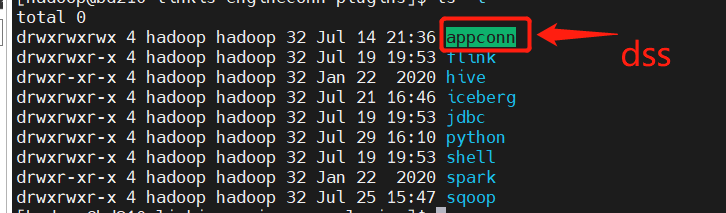
You can select and adjust the sequence after serial number 3 However, one thing to pay attention to when deploying exchangis is to copy the sqoop engine plug-in of exchangis to the engine plug-in package under lib of linkis
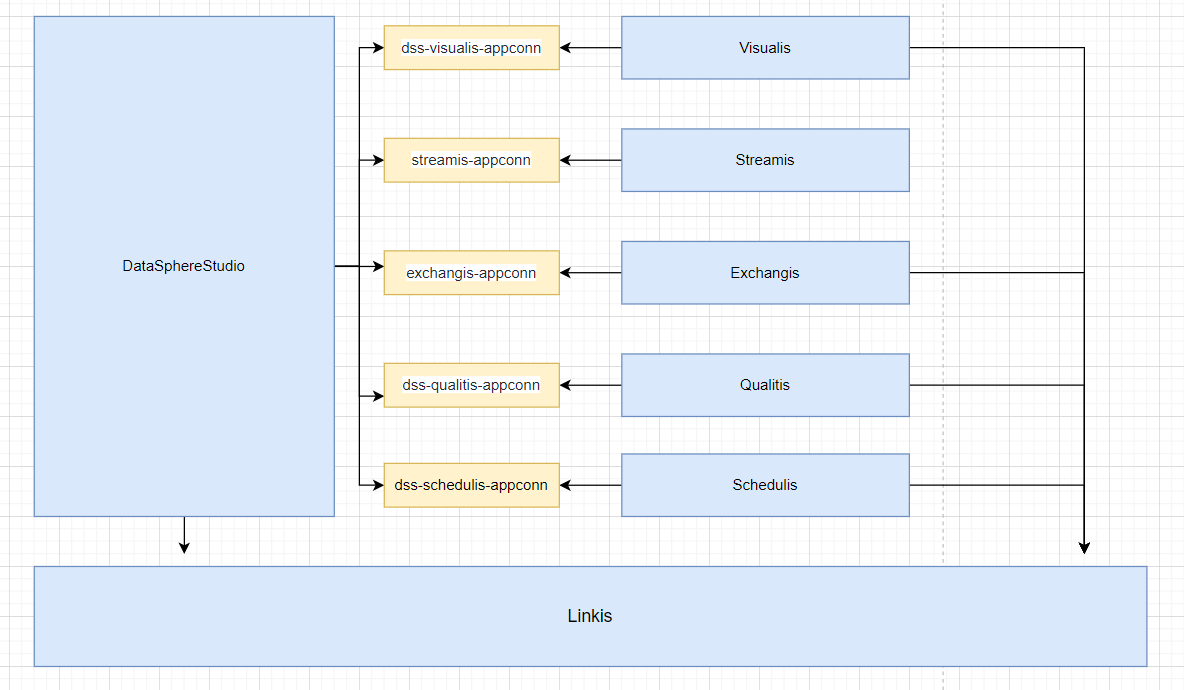
Schedulis, qualitis, exchangis, streamis, visualis and other systems are integrated with DSS through their respective appconn. Note that after integrating the component appconn, restart the service module corresponding to DSS or restart DSS
linkis
DataSphereStudio
Schedulis
Qualitis
Exchangis
Streamis
Visualis
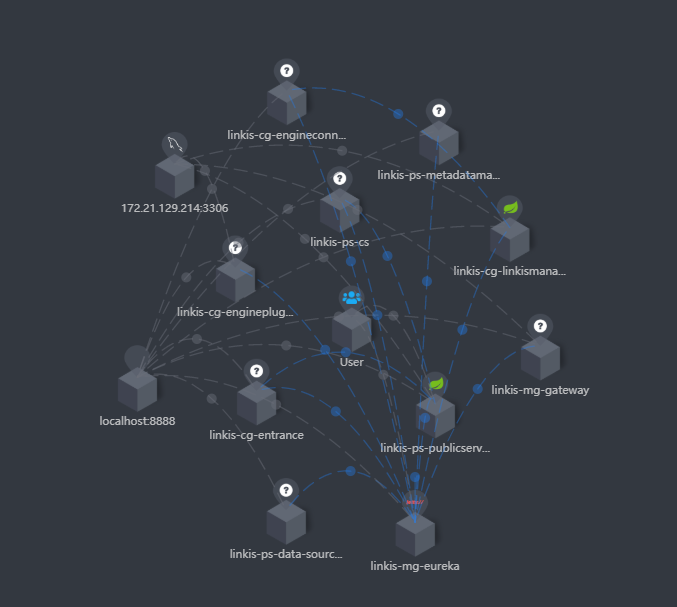
If you integrate skywalking, you can see the service status and connection status in the extended topology diagram, as shown in the following figure:
At the same time, you can also clearly see the call link in the trace, as shown in the following figure, which is also convenient for you to locate the error log file of the specific service
<!-- Notice here <version>${hadoop.version}</version> , adjust according to whether you have encountered any errors --><dependency><groupId>org.apache.hadoop</groupId><artifactId>hadoop-hdfs-client</artifactId><version>${hadoop.version}</version></dependency>
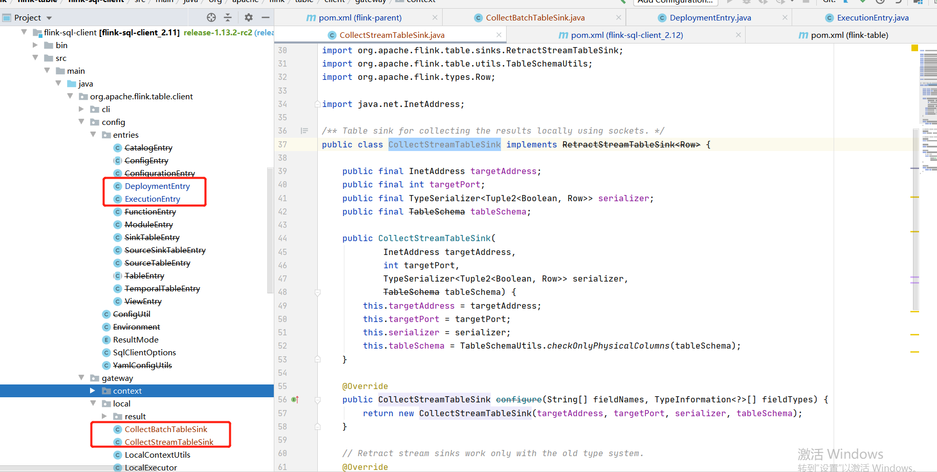
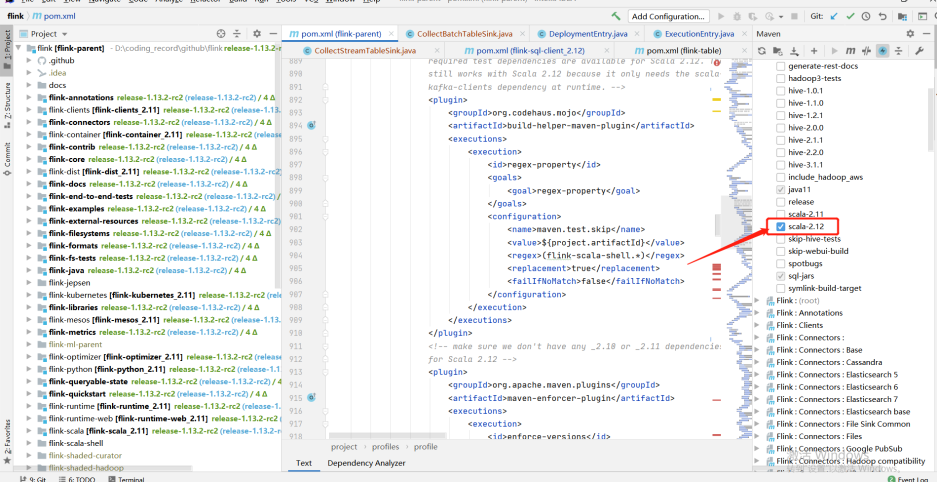
Due to the adjustment of some classes in Flink 1.12.2 and 1.13.2, we refer to the temporary "violence" method given by the community students: copy the classes in part 1.12.2 to 1.13.2, adjust the scala version to 12, and compile them by ourselves
It involves the specific modules of flink: flink-sql-client_${scala.binary.version}
-- Note that the following classes are copied from 1.12.2 to 1.13.2org.apache.flink.table.client.config.entries.DeploymentEntryorg.apache.flink.table.client.config.entries.ExecutionEntryorg.apache.flink.table.client.gateway.local.CollectBatchTableSinkorg.apache.flink.table.client.gateway.local.CollectStreamTableSink
org.apache.linkis.manager.label.conf.LabelCommonConfig
Modify the default version to facilitate the use of subsequent self compilation scheduling components
    public static final CommonVars<String> SPARK_ENGINE_VERSION =            CommonVars.apply("wds.linkis.spark.engine.version", "3.0.1");
    public static final CommonVars<String> HIVE_ENGINE_VERSION =            CommonVars.apply("wds.linkis.hive.engine.version", "3.1.2");
org.apache.linkis.governance.common.conf.GovernanceCommonConf
Modify the default version to facilitate the use of subsequent self compilation scheduling components
  val SPARK_ENGINE_VERSION = CommonVars("wds.linkis.spark.engine.version", "3.0.1")
  val HIVE_ENGINE_VERSION = CommonVars("wds.linkis.hive.engine.version", "3.1.2")
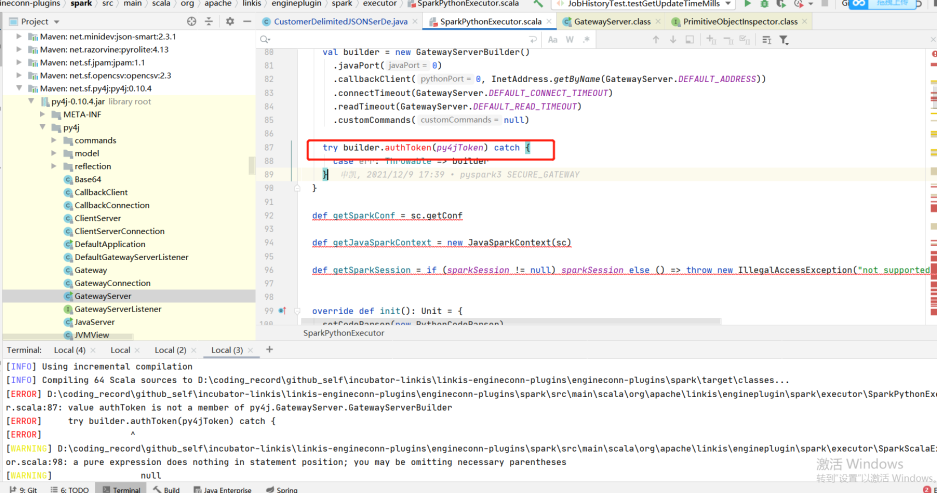
If there is an error when you compile, try to enter a module to compile separately to see if there is an error and adjust it according to the specific error
For example, the following example (the py4j version does not adapt when the group Friends adapt to the lower version of CDH): if you encounter this problem, you can adjust the version with the corresponding method to determine whether to adapt
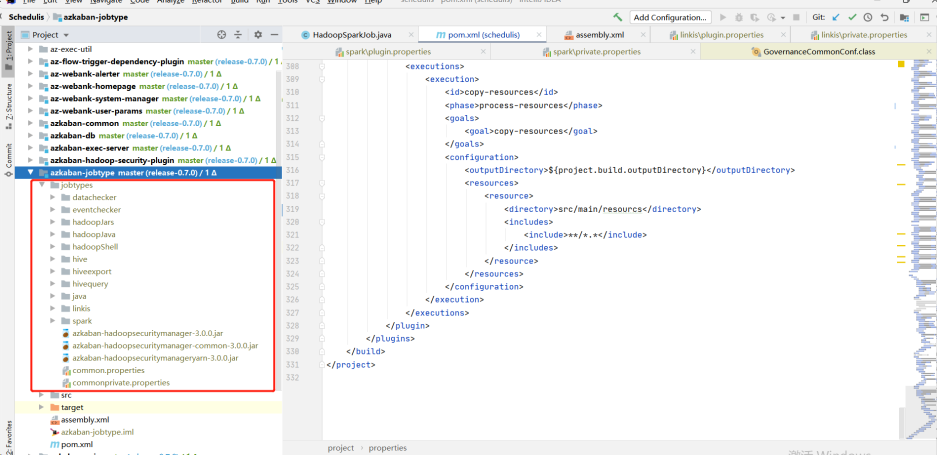
Download the jobtype file of the corresponding version (note the corresponding version): Download address:
After downloading, put the entire jobtypes under jobtypes
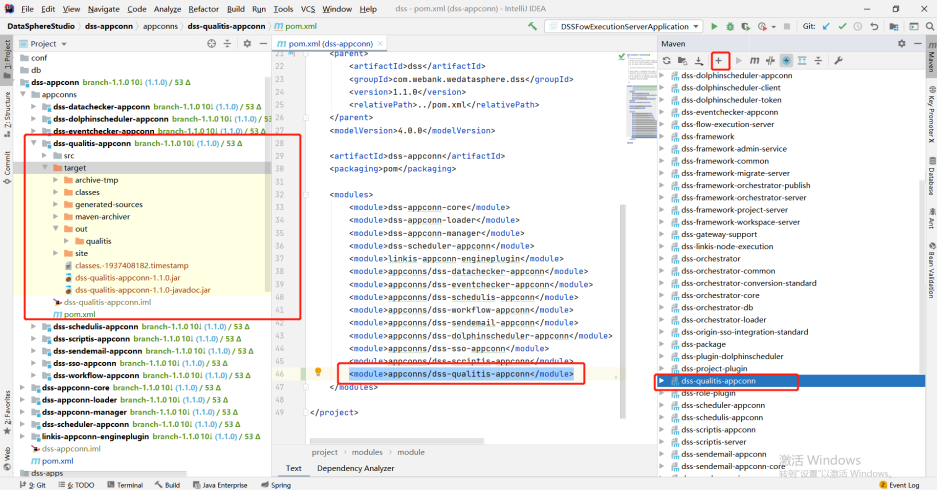
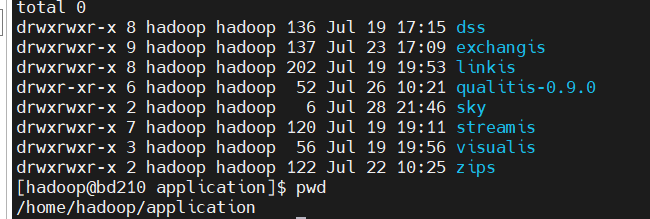
Copy the appconn to the appconns under datasphere studio (create the DSS quality appconn folder), as shown in the following figure:
Compile the DSS qualitis appconn. The qualitis under out is the package of integrating qualitis with DSS
Official compiled documents
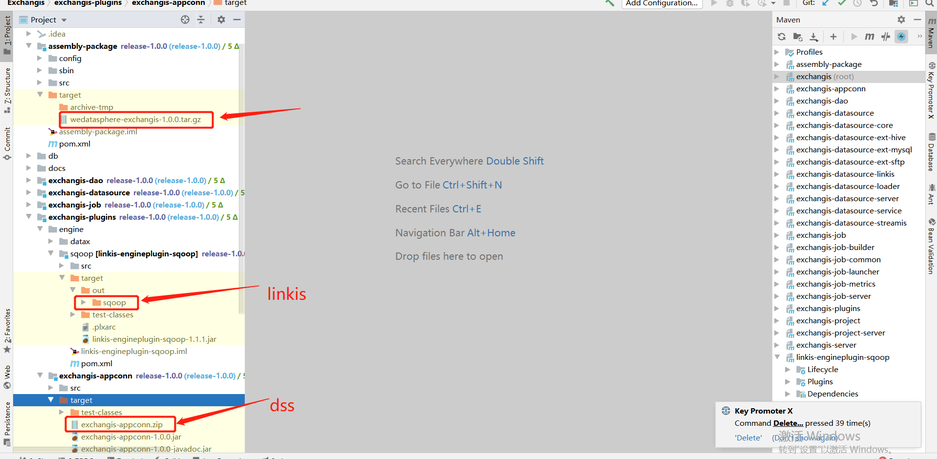
In the target package of the assembly package, wedatasphere-exchangis-1.0.0.tar.gz is its own service package
Linkis engineplug sqoop needs to be put into linkis (lib/linkis enginecon plugins)
Exchangis-appconn.zip needs to be put into DSS (DSS appconns)
Official compiled documents
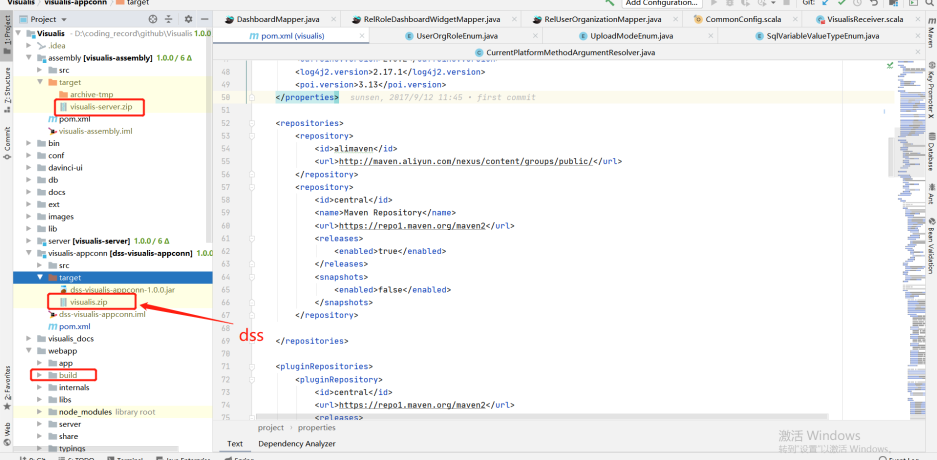
In the target under assembly, visuis server zip is the package of its own service
The target of visualis appconn is visualis.zip, which is the package required by DSS (DSS appconns)
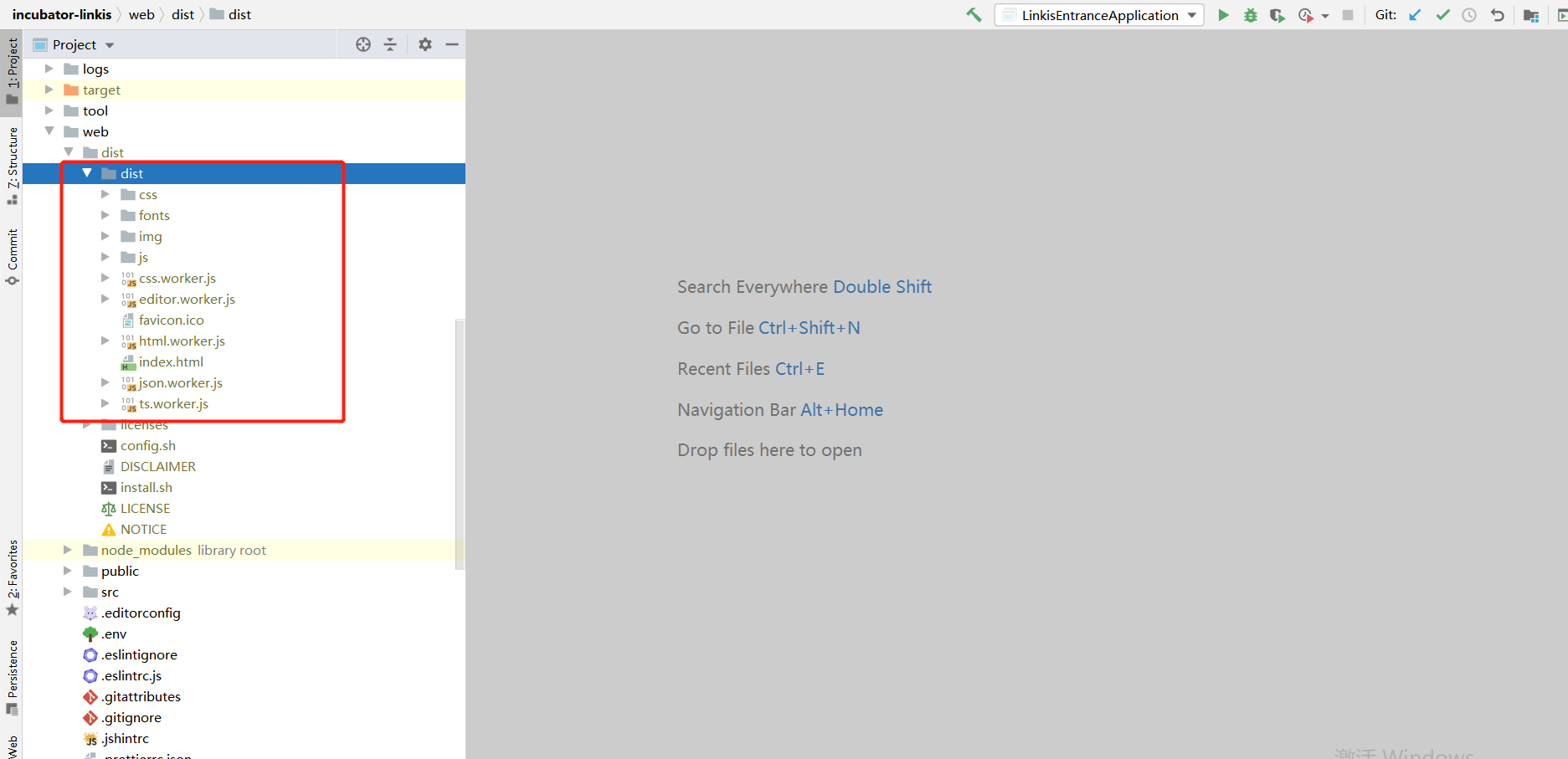
Build is the package printed by the front end
cd Visualismvn -N installmvn clean package -DskipTests=true
<!-- If you are 1.0.1 here, adjust it to ${dss.version} --><dependency><groupId>com.webank.wedatasphere.dss</groupId><artifactId>dss-sso-integration-standard</artifactId><version>${dss.version}</version><scope>compile</scope></dependency>
Official compiled documents
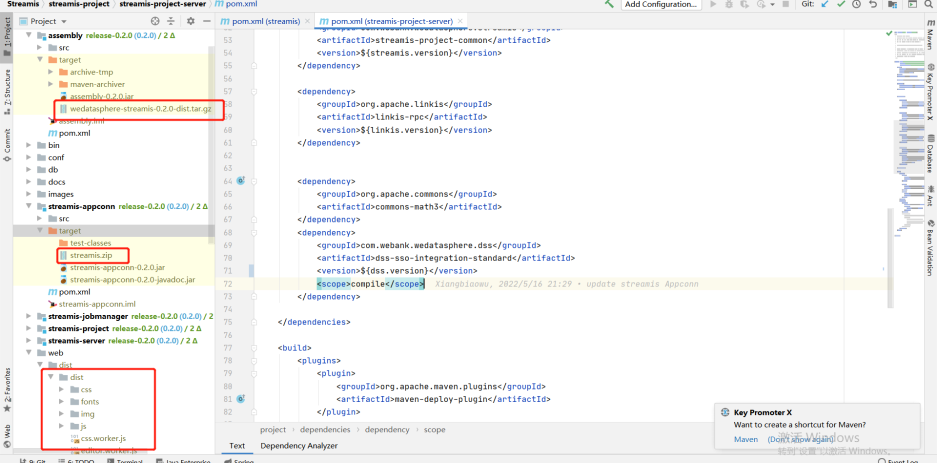
Under assembly, the target package wedatasphere-streams-0.2.0-dist.tar.gz is the package of its own back-end service
The stream.zip package of target under stream appconn is required by DSS (DSS appconns)
dist under dist is the front-end package
cd ${STREAMIS_CODE_HOME}mvn -N installmvn clean install
db.sh, the address of the links connection configured by mysql, and the metadata connection address of hive
linkis-env.sh
-- The path to save the script script. Next time, there will be a folder with the user's name, and the script of the corresponding user will be stored in this folderWORKSPACE_USER_ROOT_PATH=file:///home/hadoop/logs/linkis-- Log files for storing materials and engine executionHDFS_USER_ROOT_PATH=hdfs:///tmp/linkis-- Log of each execution of the engine and information related to starting engineconnexec.shENGINECONN_ROOT_PATH=/home/hadoop/logs/linkis/apps-- Access address of yarn master node(active resource manager)YARN_RESTFUL_URL-- Conf address of Hadoop / hive / sparkHADOOP_CONF_DIRHIVE_CONF_DIRSPARK_CONF_DIR-- Specify the corresponding versionSPARK_VERSION=3.0.1HIVE_VERSION=3.1.2-- Specify the path after the installation of linkis. For example, I agree to specify the path under the corresponding component hereLINKIS_HOME=/home/hadoop/application/linkis/linkis-home
If you use Flink, you can try importing it from flink-engine.sql into the database of linkis
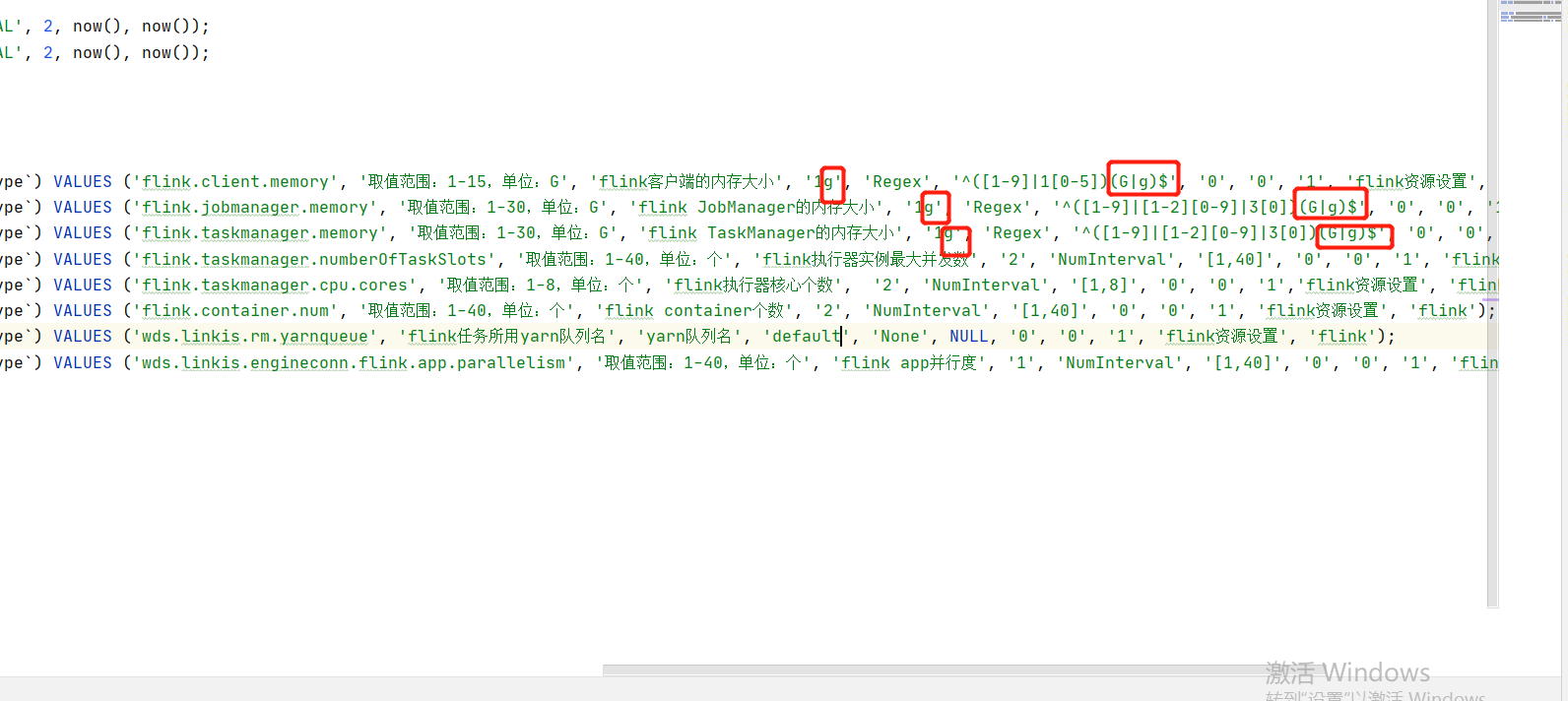
Need to modify @Flink_LABEL version is the corresponding version, and the queue of yarn is default by default
At the same time, in this version, if you encounter the error of "1g" converting digital types, try to remove the 1g unit and the regular check rules. Refer to the following:
The MySQL driver package must be copied to /lib/linkis-commons/public-module/ and /lib/linkis-spring-cloud-services/linkis-mg-gateway/
Initialization password in conf/linkis-mg-gateway.properties -> wds.linkis.admin.password
ps-cs in the startup script,there may be failures, if any,use sh linkis-daemon.sh ps-cs , start it separately
At present, if there is time to back up the log, sometimes if the previous error log cannot be found, it may be backed up to the folder of the corresponding date
At present lib/linkis-engineconn-plugins have only spark/shell/python/hive,If you want appconn, flink and sqoop, go to DSS, linkis and exchangis to get them
Configuration file version check
linkis.properties,flink see if it is usedwds.linkis.spark.engine.version=3.0.1wds.linkis.hive.engine.version=3.1.2wds.linkis.flink.engine.version=1.13.2
# Mainly check whether spark / hive and other versions are available. If not, addwds.linkis.spark.engine.version=3.0.1wds.linkis.hive.engine.version=3.1.2wds.linkis.flink.engine.version=1.13.2
dss-flow-execution-server.properties
# Mainly check whether spark / hive and other versions are available. If not, addwds.linkis.spark.engine.version=3.0.1wds.linkis.hive.engine.version=3.1.2wds.linkis.flink.engine.version=1.13.2
If you want to use dolphin scheduler for scheduling, please add the corresponding spark / hive version to this pr
Reference pr
Since we integrate scheduleis, qualitis, exchangis and other components into DSS, all the interfaces of these components will be called synchronously when creating a project, so we ensure that dss_appconn_instance configuration paths in the instance are correct and accessible
The Chrome browser recommends that the kernel use version 100 or below. Otherwise, there will be a problem that you can separate scdulis, qaulitis and other components, but you cannot log in successfully through DSS
Hostname and IP. If IP access is used, make sure it is IP when executing appconn-install.sh installation Otherwise, when accessing other components, you will be prompted that you do not have login or permission
# azkaban.jobtype.plugin.dir and executor.global.properties. It's better to change the absolute path here# Azkaban JobTypes Pluginsazkaban.jobtype.plugin.dir=/home/hadoop/application/schedulis/apps/schedulis_0.7.0_exec/plugins/jobtypes# Loader for projectsexecutor.global.properties=/home/hadoop/application/schedulis/apps/schedulis_0.7.0_exec/conf/global.properties# Engine versionwds.linkis.spark.engine.version=3.0.1wds.linkis.hive.engine.version=3.1.2wds.linkis.flink.engine.version=1.13.2
plugins/viewer/system/conf: Here, you need to configure the database connection address to be consistent with scheduleis
azkaban.properties: Configuration of user parameters and system management
If there are resources or there are no static files such as CSS in the web interface, change the relevant path to an absolute path
If the configuration file cannot be loaded, you can also change the path to an absolute path
For example:
### web moduleweb.resource.dir=/home/hadoop/application/schedulis/apps/schedulis_0.7.0_web/web/viewer.plugin.dir=/home/hadoop/application/schedulis/apps/schedulis_0.7.0_web/plugins/viewer### exec moduleazkaban.jobtype.plugin.dir=/home/hadoop/application/schedulis/apps/schedulis_0.7.0_exec/plugins/jobtypesexecutor.global.properties=/home/hadoop/application/schedulis/apps/schedulis_0.7.0_exec/conf/global.properties
If you click the data source and there is an error that has not been published, you can try to add linkisps_dm_datasource -> published_version_id Modify the published_version_id value to 1 (if it is null)
If the preview view is inconsistent, please check whether the bin / phantomjs file is uploaded completely
If you can see the following results, the upload is complete
Qualitis, exchangis, streams and visualis are compiled from various modules, copied to DSS appconns under DSS, and then executed appconn-install.sh under bin to install their components
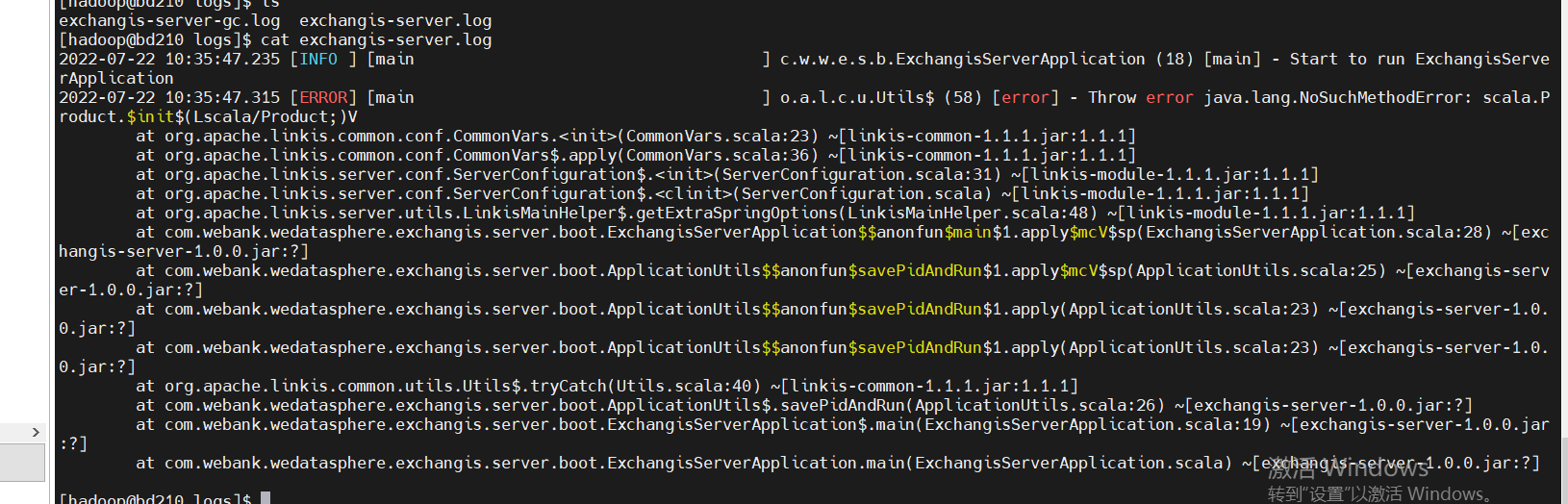
If you find the following SQL script errors during integration, please check whether there are comments around the wrong SQL. If so, delete the comments and try appconn install again
For example, for qualitis, the following IP and host ports are determined according to their specific use
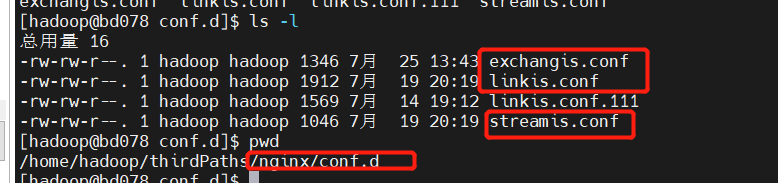
linkis.conf: dss/linkis/visualis front end
exchangis.conf: exchangis front end
streamis.conf: streamis front end
Scheduling and Qaulitis are in their own projects
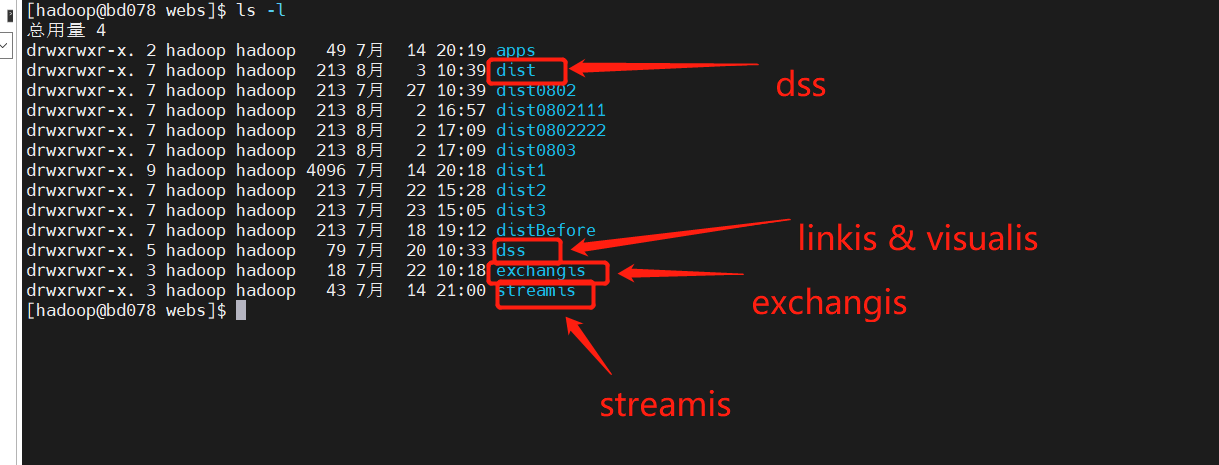
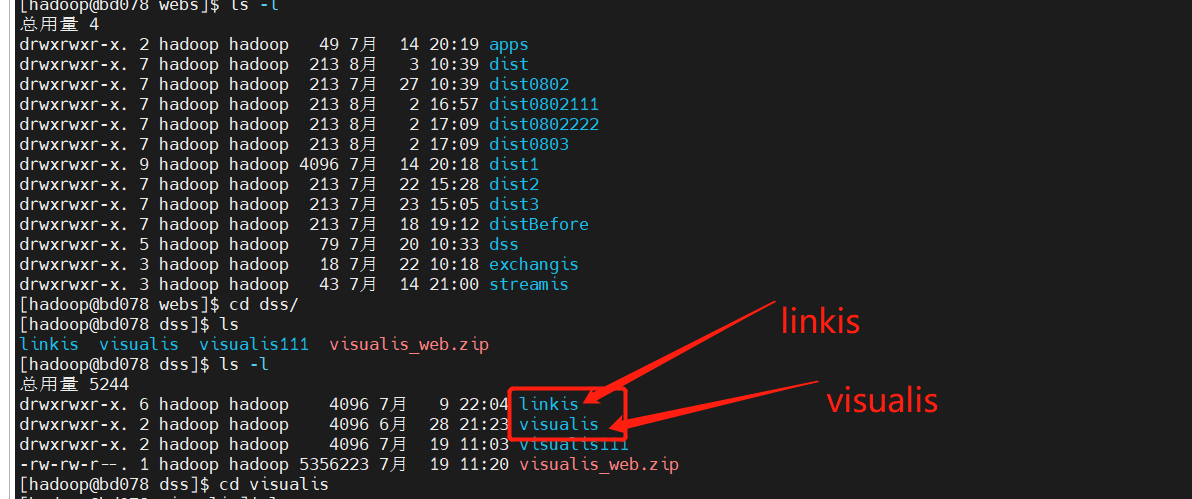
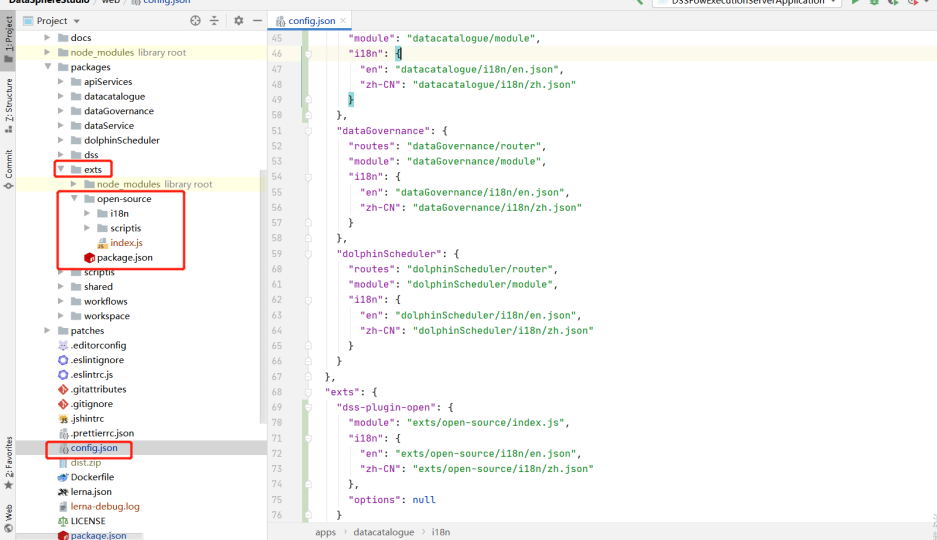
Linkis / Visualis needs to change the dist or build packaged from the front end to the name of the corresponding component here
server {    listen       9088;# Access port: if the port is occupied, it needs to be modified    server_name  localhost;    location / {    # Modify to your own path        root   /home/hadoop/application/webs/streamis/dist/dist;  #Modify to your own path        index  index.html index.html;    }    location /api {    proxy_pass http://172.21.129.210:9001;        # The address of the backend link needs to be modified    proxy_set_header Host $host;    proxy_set_header X-Real-IP $remote_addr;    proxy_set_header x_real_ipP $remote_addr;    proxy_set_header remote_addr $remote_addr;    proxy_set_header X-Forwarded-For $proxy_add_x_forwarded_for;    proxy_http_version 1.1;    proxy_connect_timeout 4s;    proxy_read_timeout 600s;    proxy_send_timeout 12s;    proxy_set_header Upgrade $http_upgrade;    proxy_set_header Connection upgrade;    }
    #error_page  404              /404.html;    # redirect server error pages to the static page /50x.html    #    error_page   500 502 503 504  /50x.html;    location = /50x.html {    root   /usr/share/nginx/html;    }}


 At the same time, you can also clearly see the call link in the trace, as shown in the following figure, which is also convenient for you to locate the error log file of the specific service



 For example, for qualitis, the following IP and host ports are determined according to their specific use