Presto 引擎
本文主要介绍在 Linkis 中,Presto 引擎插件的安装、使用和配置。
1. 前置工作#
1.1 引擎安装#
如果您希望在您的 Linkis 服务上使用 Presto 引擎,您需要安装 Presto 服务并保证服务可用。
1.2 服务验证#
# 准备 presto-cliwget https://repo1.maven.org/maven2/com/facebook/presto/presto-cli/0.234/presto-cli-0.234-executable.jarmv presto-cli-0.234-executable.jar presto-clichmod +x presto-cli
#  执行任务./presto-cli --server localhost:8082 --execute 'show tables from system.jdbc'
# 得到如下输出代表服务可用"attributes""catalogs""columns""procedure_columns""procedures""pseudo_columns""schemas""super_tables""super_types""table_types""tables""types""udts"2. 引擎插件部署#
2.1 引擎插件准备(二选一)非默认引擎#
方式一:直接下载引擎插件包
方式二:单独编译引擎插件(需要有 maven 环境)
# 编译cd ${linkis_code_dir}/linkis-engineconn-plugins/presto/mvn clean install# 编译出来的引擎插件包,位于如下目录中${linkis_code_dir}/linkis-engineconn-plugins/presto/target/out/2.2 引擎插件的上传和加载#
将 2.1 中的引擎包上传到服务器的引擎目录下
${LINKIS_HOME}/lib/linkis-engineplugins上传后目录结构如下所示
linkis-engineconn-plugins/├── presto│ ├── dist│ │ └── v0.234│ │ ├── conf│ │ └── lib│ └── plugin│ └── 0.2342.3 引擎刷新#
2.3.1 重启刷新#
通过重启 linkis-cg-linkismanager 服务刷新引擎
cd ${LINKIS_HOME}/sbinsh linkis-daemon.sh restart cg-linkismanager2.3.2 检查引擎是否刷新成功#
可以查看数据库中的 linkis_engine_conn_plugin_bml_resources 这张表的last_update_time 是否为触发刷新的时间。
#登陆到 `linkis` 的数据库 select * from linkis_cg_engine_conn_plugin_bml_resources;3 引擎的使用#
3.1 通过 Linkis-cli 提交任务#
sh ./bin/linkis-cli -engineType presto-0.234 \ -codeType psql -code 'show tables;' \ -submitUser hadoop -proxyUser hadoop如果管理台,任务接口,配置文件,均未配置(配置方式见 4.2 )时可在 Linkis-cli 客户端中通过 -runtimeMap 属性进行配置
sh ./bin/linkis-cli -engineType presto-0.234 \-codeType tsql -code 'show tables;' \-runtimeMap wds.linkis.presto.url=http://127.0.0.1:8080 \-runtimeMap wds.linkis.presto.catalog=hive \-runtimeMap wds.linkis.presto.schema=default \-runtimeMap wds.linkis.presto.catalog=hive \-submitUser hadoop -proxyUser hadoop更多 Linkis-Cli 命令参数参考: Linkis-Cli 使用
4. 引擎配置说明#
4.1 默认配置说明#
| 配置 | 默认值 | 说明 | 是否必须 |
|---|---|---|---|
| wds.linkis.presto.url | http://127.0.0.1:8080 | Presto 集群连接 | true |
| wds.linkis.presto.username | default | Presto 集群用户名 | false |
| wds.linkis.presto.password | 无 | Presto 集群密码 | false |
| wds.linkis.presto.catalog | system | 查询的 Catalog | true |
| wds.linkis.presto.schema | 无 | 查询的 Schema | true |
| wds.linkis.presto.source | global | 查询使用的 source | false |
| presto.session.query_max_total_memory | 8GB | 查询使用最大的内存 | false |
| wds.linkis.presto.http.connectTimeout | 60 | Presto 客户端的 connect timeout(单位:秒) | false |
| wds.linkis.presto.http.readTimeout | 60 | Presto 客户端的 read timeout(单位:秒) | false |
| wds.linkis.engineconn.concurrent.limit | 100 | Presto 引擎最大并发数 | false |
4.2 配置修改#
如果默认参数不满足时,有如下几中方式可以进行一些基础参数配置
4.2.1 管理台配置#
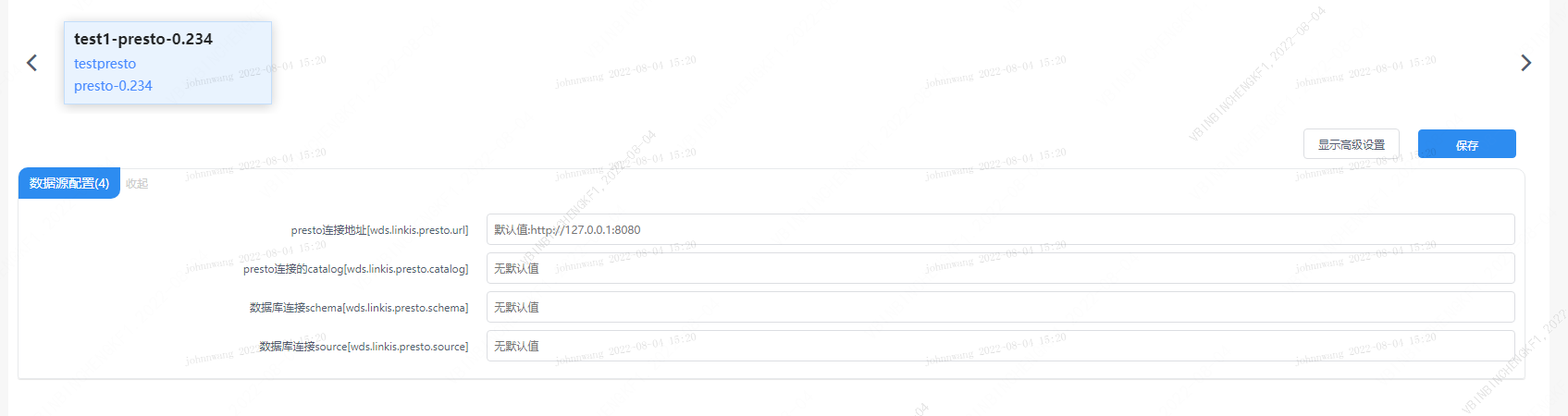
注意: 修改 IDE 标签下的配置后需要指定 -creator IDE 才会生效(其它标签类似),如:
sh ./bin/linkis-cli -creator IDE \-engineType presto-0.234 -codeType tsql \-code 'show tables;' \-submitUser hadoop -proxyUser hadoop4.2.2 任务接口配置#
提交任务接口,通过参数 params.configuration.runtime 进行配置
http 请求参数示例 { "executionContent": {"code": "show teblas;", "runType": "psql"}, "params": { "variable": {}, "configuration": { "runtime": { "wds.linkis.presto.url":"http://127.0.0.1:9090", "wds.linkis.presto.catalog ":"hive", "wds.linkis.presto.schema ":"default", "wds.linkis.presto.source ":"" } } }, "source": {"scriptPath": "file:///mnt/bdp/hadoop/1.sql"}, "labels": { "engineType": "presto-0.234", "userCreator": "hadoop-IDE" }}4.2.3 文件配置#
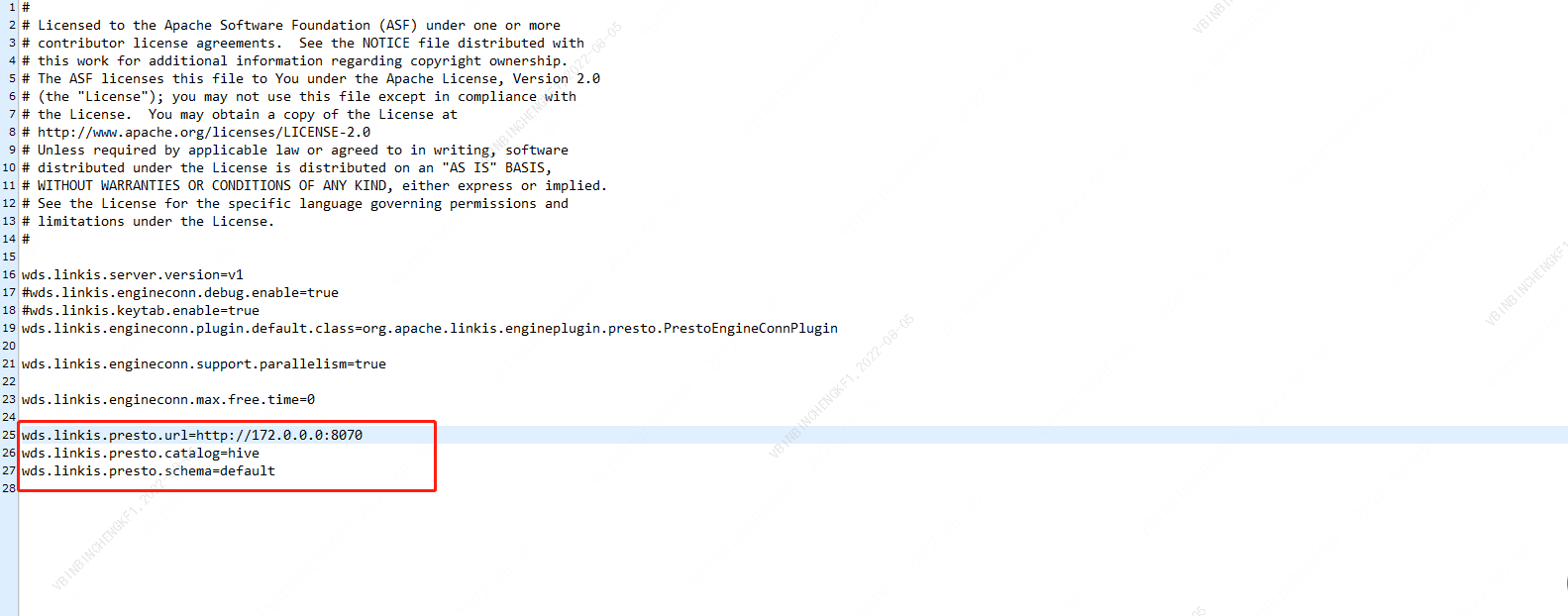
通过修改目录 install path/lib/linkis-engineconn-plugins/presto/dist/v0.234/conf/ 中的 linkis-engineconn.properties 文件进行配置,如下图:
4.3 引擎相关数据表#
Linkis 是通过引擎标签来进行管理的,所涉及的数据表信息如下所示。
linkis_ps_configuration_config_key: 插入引擎的配置参数的key和默认valueslinkis_cg_manager_label:插入引擎label如:presto-0.234linkis_ps_configuration_category: 插入引擎的目录关联关系linkis_ps_configuration_config_value: 插入引擎需要展示的配置linkis_ps_configuration_key_engine_relation:配置项和引擎的关联关系表中与引擎相关的初始数据如下
-- set variableSET @PRESTO_LABEL="presto-0.234";SET @PRESTO_ALL=CONCAT('*-*,',@PRESTO_LABEL);SET @PRESTO_IDE=CONCAT('*-IDE,',@PRESTO_LABEL);SET @PRESTO_NAME="presto";
-- engine labelinsert into `linkis_cg_manager_label` (`label_key`, `label_value`, `label_feature`, `label_value_size`, `update_time`, `create_time`) VALUES ('combined_userCreator_engineType',@PRESTO_ALL, 'OPTIONAL', 2, now(), now());insert into `linkis_cg_manager_label` (`label_key`, `label_value`, `label_feature`, `label_value_size`, `update_time`, `create_time`) VALUES ('combined_userCreator_engineType',@PRESTO_IDE, 'OPTIONAL', 2, now(), now());
select @label_id := id from `linkis_cg_manager_label` where `label_value` = @PRESTO_IDE;insert into `linkis_ps_configuration_category` (`label_id`, `level`) VALUES (@label_id, 2);
-- configuration keyINSERT INTO `linkis_ps_configuration_config_key` (`key`, `description`, `name`, `default_value`, `validate_type`, `validate_range`, `engine_conn_type`, `is_hidden`, `is_advanced`, `level`, `treeName`) VALUES ('wds.linkis.presto.url', 'Presto 集群连接', 'presto连接地址', 'http://127.0.0.1:8080', 'None', NULL, @PRESTO_NAME, 0, 0, 1, '数据源配置');INSERT INTO `linkis_ps_configuration_config_key` (`key`, `description`, `name`, `default_value`, `validate_type`, `validate_range`, `engine_conn_type`, `is_hidden`, `is_advanced`, `level`, `treeName`) VALUES ('wds.linkis.presto.catalog', '查询的 Catalog ', 'presto连接的catalog', 'hive', 'None', NULL, @PRESTO_NAME, 0, 0, 1, '数据源配置');INSERT INTO `linkis_ps_configuration_config_key` (`key`, `description`, `name`, `default_value`, `validate_type`, `validate_range`, `engine_conn_type`, `is_hidden`, `is_advanced`, `level`, `treeName`) VALUES ('wds.linkis.presto.schema', '查询的 Schema ', '数据库连接schema', '', 'None', NULL, @PRESTO_NAME, 0, 0, 1, '数据源配置');INSERT INTO `linkis_ps_configuration_config_key` (`key`, `description`, `name`, `default_value`, `validate_type`, `validate_range`, `engine_conn_type`, `is_hidden`, `is_advanced`, `level`, `treeName`) VALUES ('wds.linkis.presto.source', '查询使用的 source ', '数据库连接source', '', 'None', NULL, @PRESTO_NAME, 0, 0, 1, '数据源配置');
-- key engine relationinsert into `linkis_ps_configuration_key_engine_relation` (`config_key_id`, `engine_type_label_id`)(select config.id as `config_key_id`, label.id AS `engine_type_label_id` FROM linkis_ps_configuration_config_key configINNER JOIN linkis_cg_manager_label label ON config.engine_conn_type = @PRESTO_NAME and label_value = @PRESTO_ALL);
-- engine default configurationinsert into `linkis_ps_configuration_config_value` (`config_key_id`, `config_value`, `config_label_id`)(select `relation`.`config_key_id` AS `config_key_id`, '' AS `config_value`, `relation`.`engine_type_label_id` AS `config_label_id` FROM linkis_ps_configuration_key_engine_relation relationINNER JOIN linkis_cg_manager_label label ON relation.engine_type_label_id = label.id AND label.label_value = @PRESTO_ALL);