OpenLooKeng 引擎
本文主要介绍openLooKeng(>=1.1.1版本支持)引擎的配置、部署和使用。
1 环境要求#
如果您希望部署使用openLooKeng引擎,您需要准备一套可用的openLooKeng环境。
2 配置和部署#
2.1 版本的选择和编译#
注意: 编译openLooKeng引擎之前需要进行linkis项目全量编译
目前openLooKeng引擎,客户端默认使用的版本为 io.hetu.core:presto-client:1.5.0
发布的安装部署包中默认不包含此引擎插件, 你可以按此指引部署安装 https://linkis.apache.org/zh-CN/blog/2022/04/15/how-to-download-engineconn-plugin ,或者按以下流程,手动编译部署
单独编译openLooKeng
${linkis_code_dir}/linkis-enginepconn-pugins/engineconn-plugins/openlookeng/mvn clean install2.2 物料的部署和加载#
将 2.1 步编译出来的引擎包,位于
${linkis_code_dir}/linkis-engineconn-plugins/engineconn-plugins/openlookeng/target/out/openlookeng上传到服务器的引擎目录下
${LINKIS_HOME}/lib/linkis-engineplugins并重启linkis-engineplugin(或则通过引擎接口进行刷新)
cd ${LINKIS_HOME}/sbinsh linkis-daemon.sh restart cg-engineplugin2.3 引擎的标签#
Linkis1.X是通过标签来进行的,所以需要在我们数据库中插入数据,插入的方式如下文所示。
3 引擎的使用#
准备操作#
如果默认参数不满足时,可以通过管理台的参数配置页面,进行一些基础参数配置
openlookeng的服务连接信息,默认使用地址是http://127.0.0.1:8080
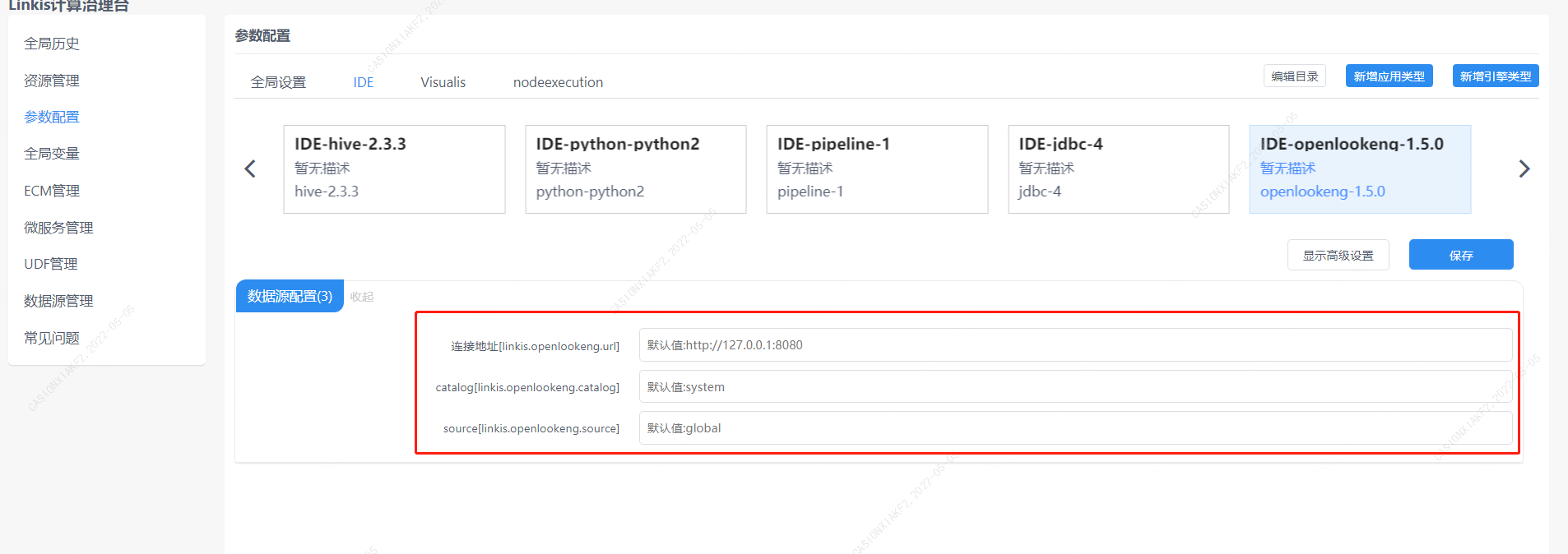
图3-1 openlookeng配置信息
您也可以在提交任务接口,通过参数params.configuration.runtime进行配置
http 请求参数示例 { "executionContent": {"code": "show databases;", "runType": "sql"}, "params": { "variable": {}, "configuration": { "runtime": { "linkis.openlookeng.url":"http://127.0.0.1:9090" } } }, "source": {"scriptPath": "file:///mnt/bdp/hadoop/1.sql"}, "labels": { "engineType": "openlookeng-1.5.0", "userCreator": "hadoop-IDE" }}3.1 通过Linkis SDK进行使用#
Linkis提供了Java和Scala 的SDK向Linkis服务端提交任务. 具体可以参考 JAVA SDK Manual. 对于openlookeng任务您只需要修改Demo中的EngineConnType和CodeType参数即可:
Map<String, Object> labels = new HashMap<String, Object>(); labels.put(LabelKeyConstant.ENGINE_TYPE_KEY, "openlookeng-1.5.0"); // required engineType Label labels.put(LabelKeyConstant.USER_CREATOR_TYPE_KEY, "hadoop-IDE");// required execute user and creator labels.put(LabelKeyConstant.CODE_TYPE_KEY, "sql"); // required codeType3.2 通过Linkis-cli进行任务提交#
Linkis 1.0后提供了cli的方式提交任务,我们只需要指定对应的EngineConn和CodeType标签类型即可,openlookeng的使用如下:
sh ./bin/linkis-cli -engineType openlookeng-1.5.0 -codeType sql -code 'show databases;' -submitUser hadoop -proxyUser hadoop具体使用可以参考: Linkis CLI Manual.