Development & Debugging with Kubernetes
Preface#
This document describes how to use Kubernetes technology to simplify the development and debugging of Linkis projects. Before the introduction of Kubernetes tools, debugging Linkis was a very tedious and complex task, and sometimes it might be necessary to set up a Hadoop cluster for test. To improve this problem, we introduce an alternative approach , using Kubernetes technology, to create a Hadoop cluster on the development machine and pull up all Linkis services, which is a distributed environment and can be pulled up and destroyed at any time, and the developer connects to these services to performs step-by-step debugging through the JVM remote debugger. Here we use the following technologies:
- Docker: A containerization technology to support the creation and use of Linux containers;
- Kubernetes: An open source platform that automates the deployment and management of Linux containers, Kubernetes also integrates networking, storage, security, telemetry and other services to provide a comprehensive container-based infrastructure;
- KinD: A tool that uses Docker containers as "Kubernetes nodes" to run local Kubernetes clusters;
- Helm: An open source package management tool on Kubernetes that manages user resources on Kubernetes via the Helm command line tool and installation package (Chart);
Introduction to Dependency Tools#
Version Requirements#
- Docker, minimum version v20.10.8+
- Kubernetes, minimum version v1.21.0+
- Helm, minimum version v3.0.0+.
- KinD, minimum version v0.11.0+.
Introduction to Helm Charts#
Helm is an open source package management tool on Kubernetes. Helm's original goal was to provide users with a better way to manage all Kubernetes YAML files created on Kubernetes. When using Charts, the user provides a variable file, Helm uses the variables defined in this variable file to render the corresponding Chart, produce a Kubernetes YAML file, and then invoke the Kubernetes api to create the resources. Each Charts released to Kubernetes is called a Release, and a Chart can typically be installed multiple times into the same cluster, with a new Release being created each time it is installed.
Helm is relatively simple to install, please refer to the official documentation for installation: Installing Helm
Introduction to KinD#
Creating a Kubernetes test environment locally is a very common requirement, and the Kubernetes community offers a variety of solutions, such as MiniKube or MicroK8s. KinD, as the name suggests (Kubernetes in Docker), it uses Docker container to host nodes to create a test-oriented Kubernetes cluster.
KinD Architecture
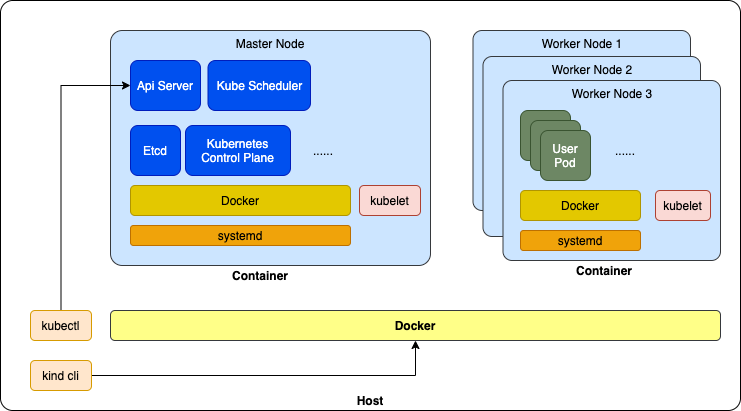
Deploying KinD is also very easy, please refer to the official deployment documentation: KinD Installation, please install Docker before install KinD.
⚠️ Note: KinD is a tool for testing purposes and cannot be used for production deployments. For example, KinD clusters cannot be used after the development machine is rebooted and need to be recreated (because KinD performs a series of initialization tasks after the Node container is created, which cannot be automatically reverted after the machine is rebooted).
Linkis Containerized Components#
Linkis Images#
Linkis provides several images, all of which have their Dockerfile and related scripts in the linkis-dist/docker directory. Linkis images include the following.
linkis: The Linkis service image, which contains binary packages of all components of Apache Linkis and various scripts.linkis-web: Linkis Web console image, which contains the binary packages and various scripts of the Apache Linkis Web console, using nginx as the web server.linkis-ldh: LDH is a test-oriented image, LDH image provides a complete, pseudo-distributed mode Apache Hadoop runtime environment, including HDFS, YARN, HIVE, Spark, Flink and Zookeeper, can be easily pulled up in the development environment of a fully real Hadoop environment to test the functionality of Linkis.
For details, please refer to: Linkis Docker Image Package.
Linkis Helm Chart#
Linkis Helm Chart is a Helm installation package developed according to the Helm Chart specification and is located in the linkis-dist/helm directory. The module directory structure is as follows:
linkis-dist/helm├── charts # Charts directory, currently only contains Linkis Helm Chart│ └── linkis # Linkis Helm Chart directory│ ├── Chart.yaml # - Chart metadata│ ├── templates # - Chart template file containing Kubernetes YAML templates for all linkis components│ │ ├── NOTES.txt # - Chart notes│ │ ├── _helpers.tpl # - Chart variable helper templates│ │ ├── configmap-init-sql.yaml # - Database initialization SQL script template│ │ ├── configmap-linkis-config.yaml # - Linkis service configuration file template│ │ ├── configmap-linkis-web-config.yaml # - Linkis Web Console configuration file template│ │ ├── jobs.yaml # - Kubernetes Job template, currently only includes a database initialization job, the database| | | # initialization SQL script will be executed by the job│ │ ├── linkis-cg-engineconnmanager.yaml # - Linkis EngineConnManager deployment template, which is a Kubernetes Deployment type workload│ │ ├── linkis-cg-engineplugin.yaml # - Linkis EngineConn deployment template, a Kubernetes Deployment type workload│ │ ├── linkis-cg-entrance.yaml # - Linkis Entrance deployment template, a Kubernetes Deployment type workload│ │ ├── linkis-cg-linkismanager.yaml # - Linkis Manager deployment template, a Kubernetes Deployment type workload│ │ ├── linkis-mg-eureka.yaml # - Linkis Eureka deployment template, a Kubernetes Statefulset type workload│ │ ├── linkis-mg-gateway.yaml # - Linkis Gateway deployment template, a Kubernetes Deployment type workload│ │ ├── linkis-ps-publicservice.yaml # - Linkis PublicService deployment template, a Kubernetes Deployment type workload│ │ ├── linkis-web.yaml # - Linkis Web Console deployment template, a Kubernetes Deployment type workload│ │ └── serviceaccount.yaml # - Linkis related Kubernetes Service Account template│ └── values.yaml # - Linkis Helm Chart variable file, which provides Linkis Local schema related variables by default├── scripts # Some tool scripts to simplify development and debugging│ ├── common.sh # - public scripts, defining some public methods and variables│ ├── create-kind-cluster.sh # - Creates KinD clusters│ ├── install-charts-with-ldh.sh # - Deploy Linkis service on KinD cluster, using On-LDH deployment method, calling install-linkis.sh│ ├── install-charts.sh # - Deploy Linkis service on KinD cluster, use Local deployment method, call install-linkis.sh│ ├── install-ldh.sh # - Deploy LDH deployments on KinD clusters│ ├── install-linkis.sh # - Deploy the Linkis service on the KinD cluster, either in Local or On-LDH mode│ ├── install-mysql.sh # - Deploy a MySQL instance on the KinD cluster│ ├── login-pod.sh # - Login to a Pod and open Bash for interaction│ ├── remote-debug-proxy.sh # - Turn on the JVM remote debug proxy│ └── resources # - some resource files│ ├── kind-cluster.yaml # - KinD cluster configuration, default is single Node │ ├── ldh # - LDH related resource files│ │ │ ├── configmaps # - LDH configuration files for each component│ │ │ │ ├── configmap-flink.yaml # - Flink configuration file│ │ │ │ ├── configmap-hadoop.yaml # - Hdfs & Yarn configuration file│ │ │ ├── configmap-hive.yaml # - Hive configuration file│ │ │ ├── configmap-spark.yaml # - Spark configuration file│ │ │ └── configmap-zookeeper.yaml # - Zookeeper configuration file│ │ └── ldh.yaml # - LDH Kubernetes YAML, used to deploy LDH instances on KinD│ └── mysql.yaml # - MySQL Kubernetes YAML, for deploying MySQL instances on KinD
This project provides a set of tool scripts for quickly creating a Linkis environment for development testing. For production deployment, you need to modify the values.yaml file according to the actual cluster, and then deploy it using the Helm CLI. There are two common approaches to deploying with the Helm CLI:
- deploy directly using the
helm installcommand. This is suitable for non-customized deployments. - use the
helm templatecommand to generate Kubernetes YAML files, then manually modify these files, add custom configuration, and then deploy using thekubectl applycommand. For advanced users who need to customize Kubernetes features that are not supported by Linkis Helm Charts, such as the need to use specific StorageClass or PVs.
LDH#
LDH is a Hadoop cluster image for testing purposes, which provides a pseudo-distributed hadoop cluster for quick testing of On Hadoop deployment mode. This image contains the following hadoop components, and the default mode of the engine in LDH is on-yarn.
- Hadoop 2.7.2 , included HDFS and YARN
- Hive 2.3.3
- Spark 2.4.3
- Flink 1.12.2
- ZooKeeper 3.5.9
LDH will start some initialization operations, such as format hdfs, create the initialization directory on HDFS, etc., these operations are defined in linkis-dist/docker/scripts/entry-point-ldh.sh file, add, modify, delete some initialization operations need to recreate LDH image to take effect.
In addition, the Hive component in LDH depends on external MySQL instance, you need to deploy MySQL instance first before you can use the Hive component in LDH.
# Create a KinD cluster and deploy Linkis and LDH instances$> sh ./scripts/create-kind-cluster.sh \   && sh ./scripts/install-mysql.sh \   && sh ./scripts/install-ldh.sh
# Quick Experience on LDH$> kubectl exec -it -n ldh $(kubectl get pod -n ldh -o jsonpath='{.items[0].metadata.name}') -- bash
[root@ldh-96bdc757c-dnkbs /]# hdfs dfs -ls /Found 4 itemsdrwxrwxrwx   - root supergroup          0 2022-07-31 02:48 /completed-jobsdrwxrwxrwx   - root supergroup          0 2022-07-31 02:48 /spark2-historydrwxrwxrwx   - root supergroup          0 2022-07-31 02:49 /tmpdrwxrwxrwx   - root supergroup          0 2022-07-31 02:48 /user
[root@ldh-96bdc757c-dnkbs /]# beeline -u jdbc:hive2://ldh.ldh.svc.cluster.local:10000/ -n hadoopConnecting to jdbc:hive2://ldh.ldh.svc.cluster.local:10000/Connected to: Apache Hive (version 2.3.3)Driver: Hive JDBC (version 2.3.3)Transaction isolation: TRANSACTION_REPEATABLE_READBeeline version 2.3.3 by Apache Hive0: jdbc:hive2://ldh.ldh.svc.cluster.local:100> create database demo;No rows affected (1.306 seconds)0: jdbc:hive2://ldh.ldh.svc.cluster.local:100> use demo;No rows affected (0.046 seconds)0: jdbc:hive2://ldh.ldh.svc.cluster.local:100> create table t1 (id int, data string);No rows affected (0.709 seconds)0: jdbc:hive2://ldh.ldh.svc.cluster.local:100> insert into t1 values(1, 'linikis demo');WARNING: Hive-on-MR is deprecated in Hive 2 and may not be available in the future versions. Consider using a different execution engine (i.e. spark, tez) or using Hive 1.X releases.No rows affected (5.491 seconds)0: jdbc:hive2://ldh.ldh.svc.cluster.local:100> select * from t1;+--------+---------------+| t1.id  |    t1.data    |+--------+---------------+| 1      | linikis demo  |+--------+---------------+1 row selected (0.39 seconds)0: jdbc:hive2://ldh.ldh.svc.cluster.local:100> !q
[root@ldh-96bdc757c-dnkbs /]# spark-sql22/07/31 02:53:18 INFO hive.metastore: Trying to connect to metastore with URI thrift://ldh.ldh.svc.cluster.local:908322/07/31 02:53:18 INFO hive.metastore: Connected to metastore....22/07/31 02:53:19 INFO spark.SparkContext: Running Spark version 2.4.322/07/31 02:53:19 INFO spark.SparkContext: Submitted application: SparkSQL::10.244.0.6...22/07/31 02:53:27 INFO yarn.Client: Submitting application application_1659235712576_0001 to ResourceManager22/07/31 02:53:27 INFO impl.YarnClientImpl: Submitted application application_1659235712576_000122/07/31 02:53:27 INFO cluster.SchedulerExtensionServices: Starting Yarn extension services with app application_1659235712576_0001 and attemptId None22/07/31 02:53:28 INFO yarn.Client: Application report for application_1659235712576_0001 (state: ACCEPTED)...22/07/31 02:53:36 INFO yarn.Client: Application report for application_1659235712576_0001 (state: RUNNING)...Spark master: yarn, Application Id: application_1659235712576_000122/07/31 02:53:46 INFO thriftserver.SparkSQLCLIDriver: Spark master: yarn, Application Id: application_1659235712576_0001spark-sql> use demo;Time taken: 0.074 seconds22/07/31 02:58:02 INFO thriftserver.SparkSQLCLIDriver: Time taken: 0.074 secondsspark-sql> select * from t1;...1       linikis demo2       linkis demo spark sqlTime taken: 3.352 seconds, Fetched 2 row(s)spark-sql> quit;
[root@ldh-96bdc757c-dnkbs /]# zkCli.shConnecting to localhost:2181Welcome to ZooKeeper!JLine support is enabledWATCHER::
WatchedEvent state:SyncConnected type:None path:null
[zk: localhost:2181(CONNECTED) 0] get -s /zookeeper/quota
cZxid = 0x0ctime = Thu Jan 01 00:00:00 UTC 1970mZxid = 0x0mtime = Thu Jan 01 00:00:00 UTC 1970pZxid = 0x0cversion = 0dataVersion = 0aclVersion = 0ephemeralOwner = 0x0dataLength = 0numChildren = 0[zk: localhost:2181(CONNECTED) 1] quit
# Start a Flink job in per-job cluster mode[root@ldh-96bdc757c-dnkbs /]# HADOOP_CLASSPATH=`hadoop classpath` flink run -t yarn-per-job /opt/ldh/current/flink/examples/streaming/TopSpeedWindowing.jar# Start Flink jobs in session mode,# Flink session is started when LDH Pod starts.[root@ldh-96bdc757c-dnkbs /]# flink run /opt/ldh/current/flink/examples/streaming/TopSpeedWindowing.jarExecuting TopSpeedWindowing example with default input data set.Use --input to specify file input.Printing result to stdout. Use --output to specify output path....KinD Cluster#
The default KinD cluster description file used by the Linkis project is linkis-dist/helm/scripts/resources/kind-cluster.yaml, which creates a KinD cluster with one node by default. Multiple nodes can be added by remove the comments.
⚠️Note that KinD clusters are for testing purposes only.
# linkis-dist/helm/scripts/resources/kind-cluster.yamlkind: ClusterapiVersion: kind.x-k8s.io/v1alpha4nodes: - role: control-plane extraMounts: - hostPath: ${KIND_CLUSTER_HOST_PATH} # Points to a directory on the development machine. This directory # is mapped to the `/data` directory in the Kind Node container, which # Linkis Helm Charts uses by default as the data directory to mount into # the Pod of each Linkis component. When Linkis is deployed in Local mode, # all components actually use the same directory on the development machine # as if they were on the same machine, thus emulating the behavior of Local # mode. When deployed in On-Hadoop mode, this directory is not used. containerPath: /data# - role: worker # Remove comments to add 2 KinD nodes. Adding KinD nodes increases the time # it takes to load Docker images to the KinD cluster, so it is not turned on # by default. # extraMounts:# - hostPath: ${KIND_CLUSTER_HOST_PATH}# containerPath: /data# - role: worker# extraMounts:# - hostPath: ${KIND_CLUSTER_HOST_PATH}# containerPath: /data
Developing and Debugging with Linkis Containerized Components#
The following steps describe how to develop and debug using Linkis containerized components (currently only supported for Linux and MacOS). Please confirm the following before proceeding.
- whether the Docker engine is already installed on the development machine
- whether Helm is installed on the development machine
- whether KinD has been installed on the development machine
- whether the Linkis image has been created as described in Linkis Docker image packaging
Create Debugging Environment#
This step will create a KinD cluster and deploy MySQL, Linkis and LDH instances on it.
$> cd linkis-dist/helm$> sh ./scripts/create-kind-cluster.sh \>    && sh ./scripts/install-mysql.sh \>    && sh ./scripts/install-ldh.sh \>    && sh ./scripts/install-charts-with-ldh.sh
# Creating KinD cluster ...- kind cluster config: /var/folders/9d/bb6ggdm177j25q40yf5d50dm0000gn/T/kind-XXXXX.Fc2dFJbG/kind-cluster.yaml...kind: ClusterapiVersion: kind.x-k8s.io/v1alpha4nodes:  - role: control-plane    extraMounts:      - hostPath: /var/folders/9d/bb6ggdm177j25q40yf5d50dm0000gn/T/kind-XXXXX.Fc2dFJbG/data        containerPath: /data...Creating cluster "test-helm" ... ✓ Ensuring node image (kindest/node:v1.21.1) 🖼  ✓ Preparing nodes 📦   ✓ Writing configuration 📜  ✓ Starting control-plane 🕹️  ✓ Installing CNI 🔌  ✓ Installing StorageClass 💾 Set kubectl context to "kind-test-helm"You can now use your cluster with:
kubectl cluster-info --context kind-test-helm
Have a nice day! 👋# Loading MySQL image ...Image: "mysql:5.7" with ID "sha256:3147495b3a5ce957dee2319099a8808c1418e0b0a2c82c9b2396c5fb4b688509" not yet present on node "test-helm-control-plane", loading...# Deploying MySQL ...namespace/mysql createdservice/mysql createddeployment.apps/mysql created# LDH version: dev# Loading LDH image ...Image: "linkis-ldh:dev" with ID "sha256:aa3bde0a31bf704413fb75673fc2894b03a0840473d8fe15e2d7f7dd22f1f854" not yet present on node "test-helm-control-plane", loading...# Deploying LDH ...namespace/ldh createdconfigmap/flink-conf createdconfigmap/hadoop-conf createdconfigmap/hive-conf createdconfigmap/spark-conf createdconfigmap/zookeeper-conf createdservice/ldh createddeployment.apps/ldh created# Loading Linkis image ...Image: "linkis:dev" with ID "sha256:0dfa7882c4216305a80cf57efa8cfb483d006bae5ba931288ffb8025e1db4e58" not yet present on node "test-helm-control-plane", loading...Image: "linkis-web:dev" with ID "sha256:1dbe0e9319761dbe0e93197665d38077cb2432b8b755dee834928694875c8a22" not yet present on node "test-helm-control-plane", loading...# Installing linkis, image tag=dev,local mode=false ...NAME: linkis-demoNAMESPACE: linkisSTATUS: deployedREVISION: 1TEST SUITE: NoneNOTES:...
---Welcome to Apache Linkis (v1.3.0)!
.___    .___ .______  .____/\ .___ .________|   |   : __|:      \ :   /  \: __||    ___/|   |   | : ||       ||.  ___/| : ||___    \|   |/\ |   ||   |   ||     \ |   ||       /|   /  \|   ||___|   ||      \|   ||__:___/|______/|___|    |___||___\  /|___|   : v1.3.0                           \/
Linkis builds a layer of computation middleware between upper applications and underlying engines.Please visit https://linkis.apache.org/ for details.
Enjoy!configmap/flink-conf createdconfigmap/hadoop-conf createdconfigmap/hive-conf createdconfigmap/spark-conf createdconfigmap/zookeeper-conf created
$> kubectl get pods -n ldh -o wideNAME                   READY   STATUS    RESTARTS   AGE     IP           NODE                      NOMINATED NODE   READINESS GATESldh-6648554447-ml2bn   1/1     Running   0          6m25s   10.244.0.6   test-helm-control-plane   <none>           <none>
$> kubectl get pods -n linkis -o wideNAME                                                READY   STATUS             RESTARTS   AGE     IP            NODE                      NOMINATED NODE   READINESS GATESinit-db-bcp85                                       0/1     Completed          0          4m52s   10.244.0.14   test-helm-control-plane   <none>           <none>linkis-demo-cg-engineconnmanager-659bf85689-ddvhw   1/1     Running            1          4m52s   10.244.0.7    test-helm-control-plane   <none>           <none>linkis-demo-cg-engineplugin-98bd6945-tsgjl          1/1     Running            1          4m52s   10.244.0.10   test-helm-control-plane   <none>           <none>linkis-demo-cg-entrance-858f74c868-xrd82            1/1     Running            0          4m52s   10.244.0.12   test-helm-control-plane   <none>           <none>linkis-demo-cg-linkismanager-6f96f69b8b-ns6st       1/1     Running            0          4m52s   10.244.0.11   test-helm-control-plane   <none>           <none>linkis-demo-mg-eureka-0                             1/1     Running            0          4m52s   10.244.0.13   test-helm-control-plane   <none>           <none>linkis-demo-mg-gateway-68ddb8c547-xgvhn             1/1     Running            0          4m52s   10.244.0.15   test-helm-control-plane   <none>           <none>linkis-demo-ps-publicservice-6bbf99fcd7-sc922       1/1     Running            0          4m52s   10.244.0.8    test-helm-control-plane   <none>           <none>linkis-demo-web-554bd7659f-nmdjl                    1/1     Running            0          4m52s   10.244.0.9    test-helm-control-plane   <none>           <none>
Debugging Components#
Enable Port Forwarding#
Each component has a JVM remote debug port of 5005 within the container, and these ports are mapped to different ports on the host as follows.
- mg-eureka: 5001
- mg-gateway: 5002
- ps-publicservice: 5004
- cg-linkismanager: 5007
- cg-entrance: 5008
- cg-engineconnmanager: 5009
- cg-engineplugin: 5010
In addition, the Web Console is mapped to port 8087 on the host, which can be accessed by typing http://localhost:8087 in your browser.
$> ./scripts/remote-debug-proxy.sh start      - starting port-forwad for [web] with mapping [local->8087:8087->pod] ...- starting port-forwad for [mg-eureka] with mapping [local->5001:5005->pod] ...- starting port-forwad for [mg-gateway] with mapping [local->5002:5005->pod] ...- starting port-forwad for [ps-publicservice] with mapping [local->5004:5005->pod] ...- starting port-forwad for [cg-linkismanager] with mapping [local->5007:5005->pod] ...- starting port-forwad for [cg-entrance] with mapping [local->5008:5005->pod] ...- starting port-forwad for [cg-engineconnmanager] with mapping [local->5009:5005->pod] ...- starting port-forwad for [cg-engineplugin] with mapping [local->5010:5005->pod] ..
$> ./scripts/remote-debug-proxy.sh list user            10972   0.0  0.1  5052548  31244 s001  S    12:57AM   0:00.10 kubectl port-forward -n linkis pod/linkis-demo-cg-engineplugin-98bd6945-tsgjl 5010:5005 --address=0.0.0.0user            10970   0.0  0.1  5053060  30988 s001  S    12:57AM   0:00.12 kubectl port-forward -n linkis pod/linkis-demo-cg-engineconnmanager-659bf85689-ddvhw 5009:5005 --address=0.0.0.0user            10968   0.0  0.1  5054084  30428 s001  S    12:57AM   0:00.10 kubectl port-forward -n linkis pod/linkis-demo-cg-entrance-858f74c868-xrd82 5008:5005 --address=0.0.0.0user            10966   0.0  0.1  5053316  30620 s001  S    12:57AM   0:00.11 kubectl port-forward -n linkis pod/linkis-demo-cg-linkismanager-6f96f69b8b-ns6st 5007:5005 --address=0.0.0.0user            10964   0.0  0.1  5064092  31152 s001  S    12:57AM   0:00.10 kubectl port-forward -n linkis pod/linkis-demo-ps-publicservice-6bbf99fcd7-sc922 5004:5005 --address=0.0.0.0user            10962   0.0  0.1  5051012  31244 s001  S    12:57AM   0:00.12 kubectl port-forward -n linkis pod/linkis-demo-mg-gateway-68ddb8c547-xgvhn 5002:5005 --address=0.0.0.0user            10960   0.0  0.1  5053060  31312 s001  S    12:57AM   0:00.13 kubectl port-forward -n linkis pod/linkis-demo-mg-eureka-0 5001:5005 --address=0.0.0.0
...
# After debugging is complete, you can stop port forwarding with the following command$> ./scripts/remote-debug-proxy.sh stop - stopping port-forward for [web] with mapping [local->8087:8087->pod] ...- stopping port-forward for [mg-eureka] with mapping [local->5001:5005->pod] ...- stopping port-forward for [mg-gateway] with mapping [local->5002:5005->pod] ...- stopping port-forward for [ps-publicservice] with mapping [local->5004:5005->pod] ...- stopping port-forward for [cg-linkismanager] with mapping [local->5007:5005->pod] ...- stopping port-forward for [cg-entrance] with mapping [local->5008:5005->pod] ...- stopping port-forward for [cg-engineconnmanager] with mapping [local->5009:5005->pod] ...- stopping port-forward for [cg-engineplugin] with mapping [local->5010:5005->pod] ...Configure the IDE for Remote Debugging#
Configure the IDE as follows to enable remote debugging:
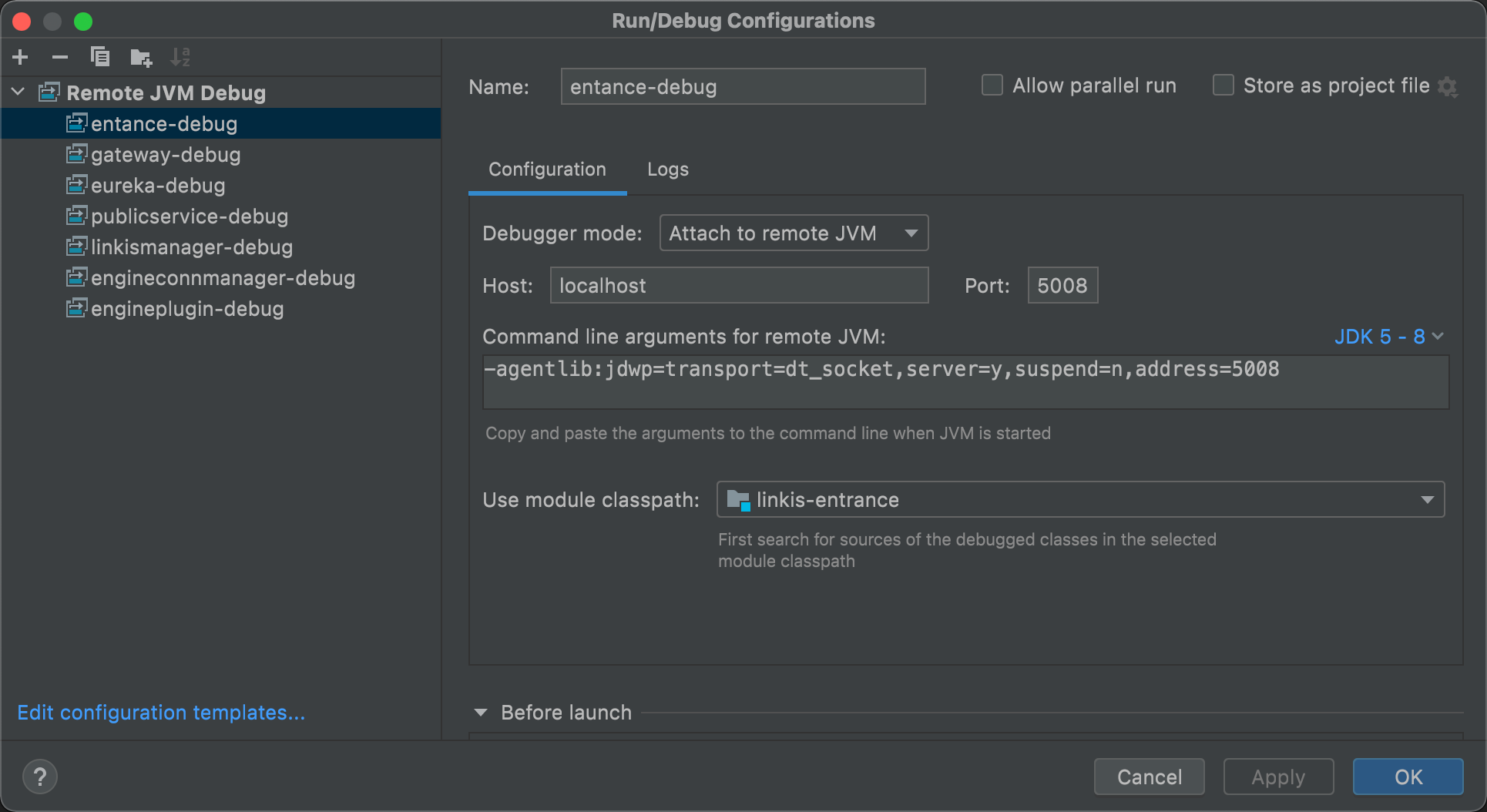
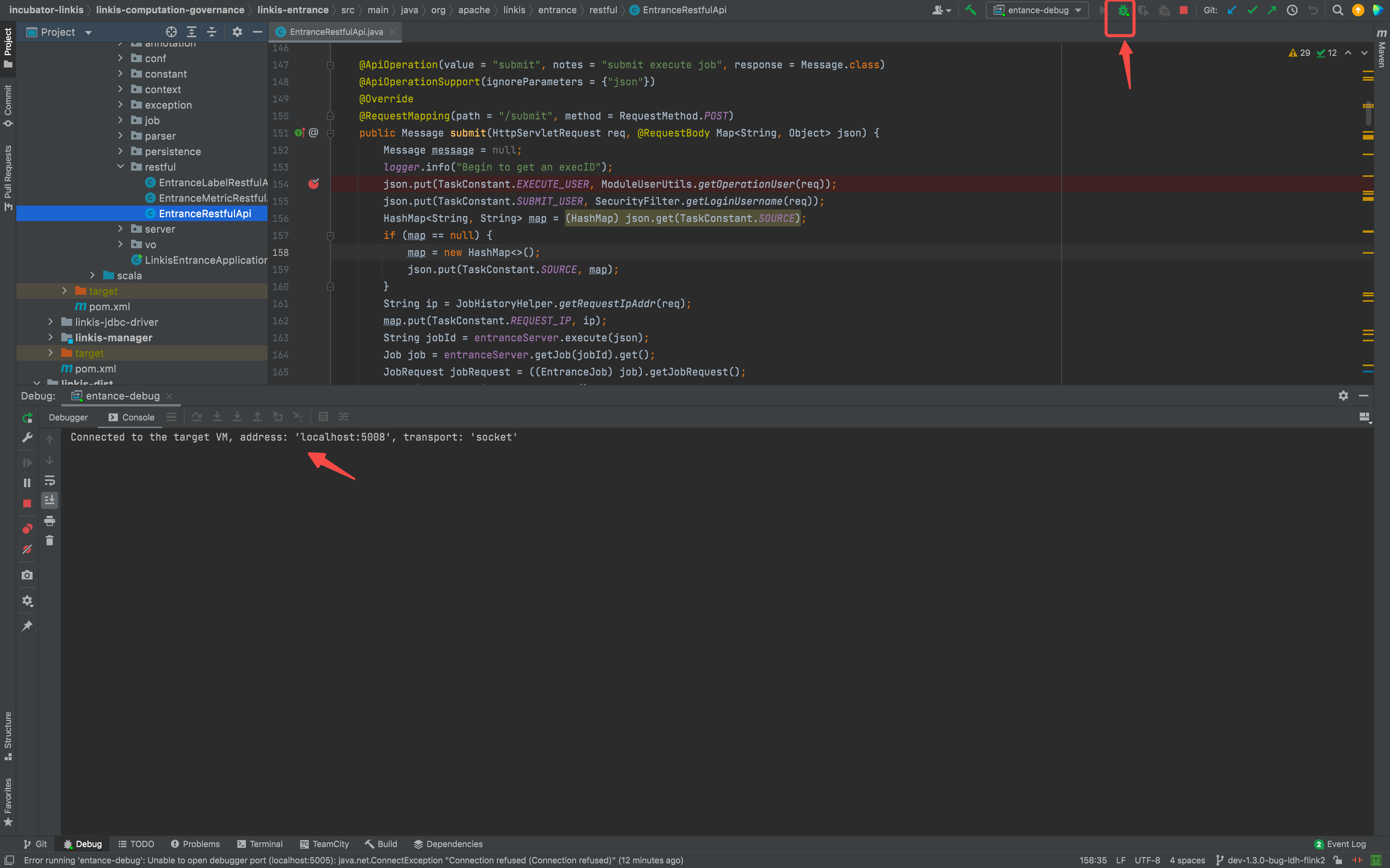
Turn on remote debugger
Set a breakpoint and submit a job for debugging
$> ./scripts/login-pod.sh mg-gateway
- login [mg-gateway]'s bash ...bash-4.2$ ./bin/./linkis-cli -engineType shell-1 -codeType shell -code "echo \"hello\" "  -submitUser hadoop -proxyUser hadoop=====Java Start Command=====exec /etc/alternatives/jre/bin/java -server -Xms32m -Xmx2048m -XX:+HeapDumpOnOutOfMemoryError -XX:HeapDumpPath=/opt/linkis/logs/linkis-cli -XX:ErrorFile=/opt/linkis/logs/linkis-cli/ps_err_pid%p.log -XX:+UseConcMarkSweepGC -XX:CMSInitiatingOccupancyFraction=80 -XX:+DisableExplicitGC    -classpath /opt/linkis/conf/linkis-cli:/opt/linkis/lib/linkis-computation-governance/linkis-client/linkis-cli/*:/opt/linkis/lib/linkis-commons/public-module/*: -Dconf.root=/etc/linkis-conf -Dconf.file=linkis-cli.properties -Dlog.path=/opt/linkis/logs/linkis-cli -Dlog.file=linkis-client..log.20220925171540947077800  org.apache.linkis.cli.application.LinkisClientApplication '-engineType shell-1 -codeType shell -code echo "hello"  -submitUser hadoop -proxyUser hadoop'...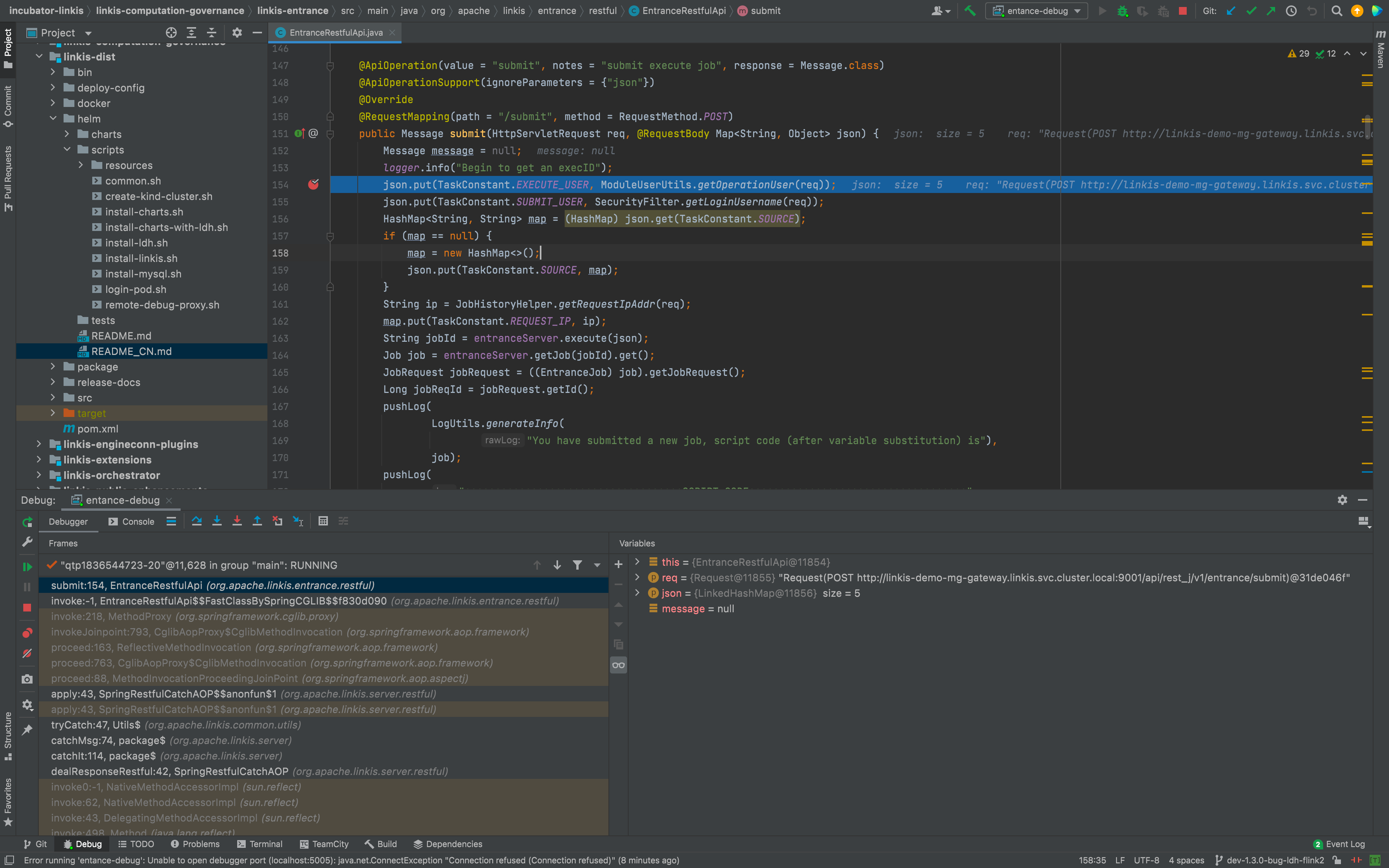
Clean Up the Environment#
After debugging, you can use the following command to clean up the entire environment:
$> kind delete clusters test-helm Deleted clusters: ["test-helm"]Other Useful Operations#
Fetch Logs#
$> kubectl logs -n linkis linkis-demo-cg-engineconnmanager-659bf85689-ddvhw -f
+ RUN_IN_FOREGROUND=true+ /opt/linkis/sbin/linkis-daemon.sh start cg-engineconnmanagerStart to check whether the cg-engineconnmanager is runningStart server, startup script: /opt/linkis/sbin/ext/linkis-cg-engineconnmanager=====Java Start Command=====java -DserviceName=linkis-cg-engineconnmanager -Xmx512M -XX:+UseG1GC -Xloggc:/var/logs/linkis/linkis-cg-engineconnmanager-gc.log -agentlib:jdwp=transport=dt_socket,server=y,suspend=n,address=5005 -cp /etc/linkis-conf:/opt/linkis/lib/linkis-commons/public-module/*:/opt/linkis/lib/linkis-computation-governance/linkis-cg-engineconnmanager/* org.apache.linkis.ecm.server.LinkisECMApplication --eureka.instance.prefer-ip-address=true --eureka.instance.instance-id=${spring.cloud.client.ip-address}:${spring.application.name}:${server.port} 2>&1OpenJDK 64-Bit Server VM warning: If the number of processors is expected to increase from one, then you should configure the number of parallel GC threads appropriately using -XX:ParallelGCThreads=NListening for transport dt_socket at address: 500516:32:41.101 [main] INFO org.apache.linkis.common.conf.BDPConfiguration$ - ******************* Notice: The Linkis configuration file is linkis.properties ! *******************16:32:41.130 [main] INFO org.apache.linkis.common.conf.BDPConfiguration$ - *********************** Notice: The Linkis serverConf file is linkis-cg-engineconnmanager.properties ! ******************16:32:41.222 [main] INFO org.apache.linkis.LinkisBaseServerApp - Ready to start linkis-cg-engineconnmanager with args: --eureka.instance.prefer-ip-address=true--eureka.instance.instance-id=${spring.cloud.client.ip-address}:${spring.application.name}:${server.port}...Entry into the Component Pod#
Use . /scripts/login-pod.sh <component name> to access the component's Pod to open a Bash for interactive operation, where the component name can be :
- cg-engineconnmanager
- cg-engineplugin
- cg-entrance
- cg-linkismanager
- mg-eureka
- mg-gateway
- ps-publicservice
- web
$> ./scripts/login-pod.sh cg-engineconnmanager- login [cg-engineconnmanager]'s bash ...bash-4.2$ pwd/opt/linkisbash-4.2$ env |grep LINKISLINKIS_DEMO_PS_PUBLICSERVICE_SERVICE_HOST=10.96.93.45LINKIS_DEMO_CG_LINKISMANAGER_PORT_9101_TCP_PROTO=tcpLINKIS_DEMO_WEB_PORT_8087_TCP_PORT=8087...LINKIS_CLIENT_CONF_DIR=/etc/linkis-confbash-4.2$ ps aux |grep linkishadoop 1 0.0 0.0 11708 2664 ? Ss 16:32 0:00 /bin/bash /opt/linkis/sbin/linkis-daemon.sh start cg-engineconnmanagerhadoop 10 0.0 0.0 11708 2624 ? S 16:32 0:00 sh /opt/linkis/sbin/ext/linkis-cg-engineconnmanagerhadoop 11 0.0 0.0 11712 2536 ? S 16:32 0:00 sh /opt/linkis/sbin/ext/linkis-common-starthadoop 12 4.0 3.2 4146404 400084 ? Sl 16:32 0:35 java -DserviceName=linkis-cg-engineconnmanager -Xmx512M -XX:+UseG1GC -Xloggc:/var/logs/linkis/linkis-cg-engineconnmanager-gc.log -agentlib:jdwp=transport=dt_socket,server=y,suspend=n,address=5005 -cp /etc/linkis-conf:/opt/linkis/lib/linkis-commons/public-module/*:/opt/linkis/lib/linkis-computation-governance/linkis-cg-engineconnmanager/* org.apache.linkis.ecm.server.LinkisECMApplication --eureka.instance.prefer-ip-address=true --eureka.instance.instance-id=${spring.cloud.client.ip-address}:${spring.application.name}:${server.port}bash-4.2$ exitexit