pipeline engine
This article mainly introduces the configuration, deployment and use of pipeline (>=1.1.0 version support) engine.
1 Configuration and deployment#
1.1 Version selection and compilation#
Note: before compiling the pipelineengine, you need to compile the linkis project in full
Currently, the pipeline engine needs to be installed and deployed by itself
This engine plug-in is not included in the published installation and deployment package by default, You can follow this guide to deploy the installation https://linkis.apache.org/zh-CN/blog/2022/04/15/how-to-download-engineconn-plugin Or manually compile the deployment according to the following process
Compile separatelypipeline
${linkis_code_dir}/linkis-enginepconn-pugins/engineconn-plugins/pipeline/mvn clean install1.2 Material deployment and loading#
将 1.1 The engine package compiled in step, located in
${linkis_code_dir}/linkis-engineconn-plugins/engineconn-plugins/pipeline/target/out/pipelineUpload to the engine directory of the server
${LINKIS_HOME}/lib/linkis-enginepluginsAnd restart the linkis engineplugin to refresh the engine
cd ${LINKIS_HOME}/sbinsh linkis-daemon.sh restart cg-enginepluginOr refresh through the engine interface. After the engine is placed in the corresponding directory, send a refresh request to the linkis CG engineconplugin service through the HTTP interface.
Interface
http://${engineconn-plugin-server-IP}:${port}/api/rest_j/v1/rpc/receiveAndReplyRequest mode
POST
{ "method": "/enginePlugin/engineConn/refreshAll"}Check whether the engine is refreshed successfully: if you encounter problems during the refresh process and need to confirm whether the refresh is successful, you can view thelinkis_engine_conn_plugin_bml_resourcesOf this tablelast_update_timeWhether it is the time when the refresh is triggered.
#Log in to the database of linkisselect * from linkis_cg_engine_conn_plugin_bml_resources1.3 Engine label#
Linkis1.XIt is carried out through labels, so it is necessary to insert data into our database. The insertion method is shown below.
EngineConnPlugin Engine plug-in installation
2 Use of engine#
2.1 Task submission via linkis cli#
Link 1.0 provides cli to submit tasks. We only need to specify the corresponding enginecon and codetype tag types. The use of pipeline is as follows:
- Note that the enginetype pipeline-1 engine version setting is prefixed. If the pipeline version is V1 , it is set to pipeline-1
sh bin/linkis-cli -submitUser hadoop -engineType pipeline-1 -codeType pipeline -code "from hdfs:///000/000/000/A.dolphin to file:///000/000/000/B.csv"from hdfs:///000/000/000/A.dolphin to file:///000/000/000/B.csv 3.3 Explained
For specific use, please refer to: Linkis CLI Manual.
becausepipelineThe engine is mainly used to import and export files. Now let's assume that importing files from a to B is the most introduced case
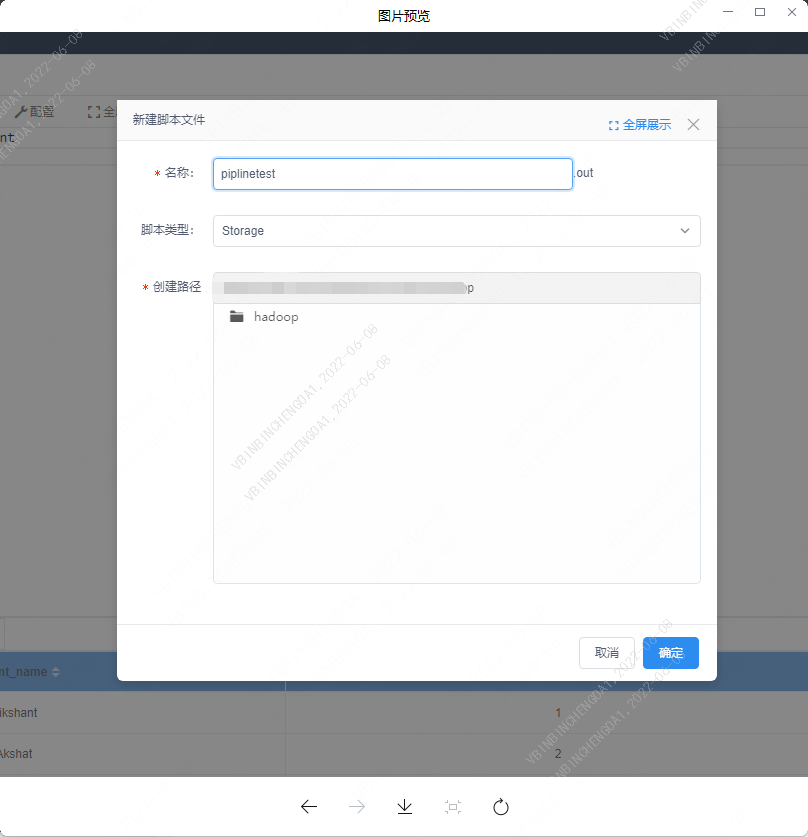
2.2 New script#
Right click the workspace module and select Create a new workspace of typestorageScript for
2.3 Script#
Syntax is:from path to path#
The syntax is file copy rule:dolphinSuffix type files are result set files that can be converted to.csvType and.xlsxType file, other types can only be copied from address a to address B, referred to as handling
#dolphin typefrom hdfs:///000/000/000/A.dolphin to file:///000/000/000/B.csvfrom hdfs:///000/000/000/A.dolphin to file:///000/000/000/B.xlsx
#Other typesfrom hdfs:///000/000/000/A.txt to file:///000/000/000/B.txtA file importing script to B folder
from hdfs:///000/000/000/A.csv to file:///000/000/B/fromgrammar,to:grammarhdfs:///000/000/000/A.csv:Input file pathfile:///000/000/B/: Output path
file B is exported as file A
from hdfs:///000/000/000/B.csv to file:///000/000/000/A.CSVhdfs:///000/000/000/B.csv: Input file pathfile:///000/000/000/A.CSV: Output file path
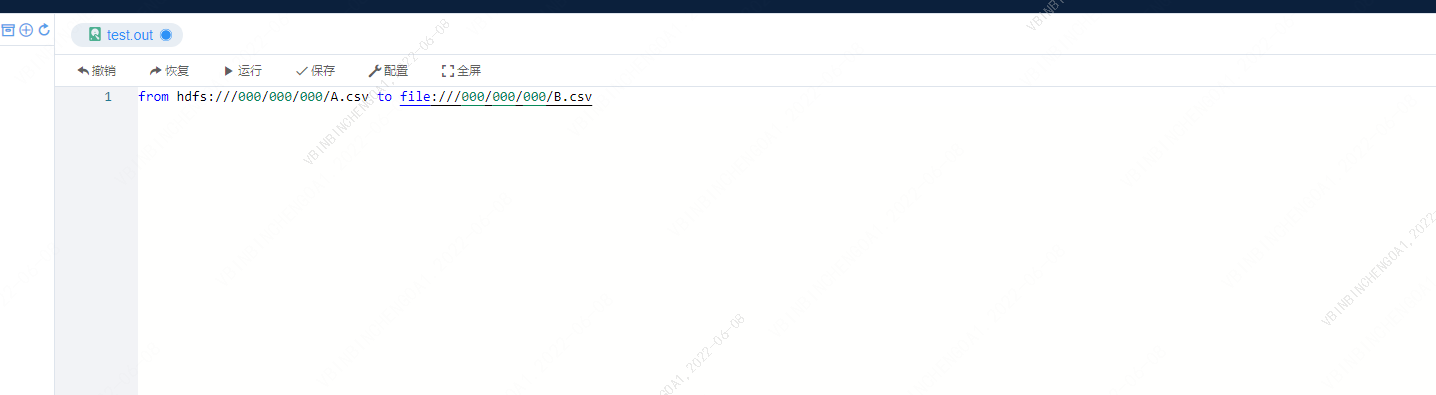
Note: no semicolon is allowed at the end of the syntax; Otherwise, the syntax is incorrect.
2.4 result#
speed of progress

historical information
