OpenLookEng Engine
This article mainly introduces the configuration, deployment and use of the openlookeng (>=1.1.1 version support) engine.
1 Environmental Requirements#
If you want to deploy the openlookeng engine, you need to prepare an available openlookeng environment.
2 Configuration and Deployment#
2.1 version selection and compilation#
Currently the openlookeng engine, the default version used by the client is io.hetu.core:presto-client:1.5.0
This engine plug-in is not included in the released installation deployment package by default. You can follow this guide to deploy and install https://linkis.apache.org/zh-CN/blog/2022/04/15/how-to-download-engineconn-plugin , or follow the process below to manually compile and deploy
Compile openlookeng separately
${linkis_code_dir}/linkis-enginepconn-lugins/engineconn-plugins/openlookeng/mvn clean install2.2 Deployment and loading of materials#
The engine package compiled in step 2.1 is located in
${linkis_code_dir}/linkis-engineconn-plugins/engineconn-plugins/openlookeng/target/out/openlookengUpload to the engine directory of the server
${LINKIS_HOME}/lib/linkis-enginepluginsAnd restart linkis-engineplugin (or refresh through the engine interface)
cd ${LINKIS_HOME}/sbinsh linkis-daemon restart cg-engineplugin2.3 Engine tags#
Linkis1.X is done through tags, so we need to insert data into our database, and the insertion method is as follows.
EngineConnPlugin engine plugin installation
3 The use of the engine#
Prepare for operation#
If the default parameters are not satisfied, you can configure some basic parameters through the parameter configuration page of the management console
The service connection information of openlookeng, the default address is http://127.0.0.1:8080
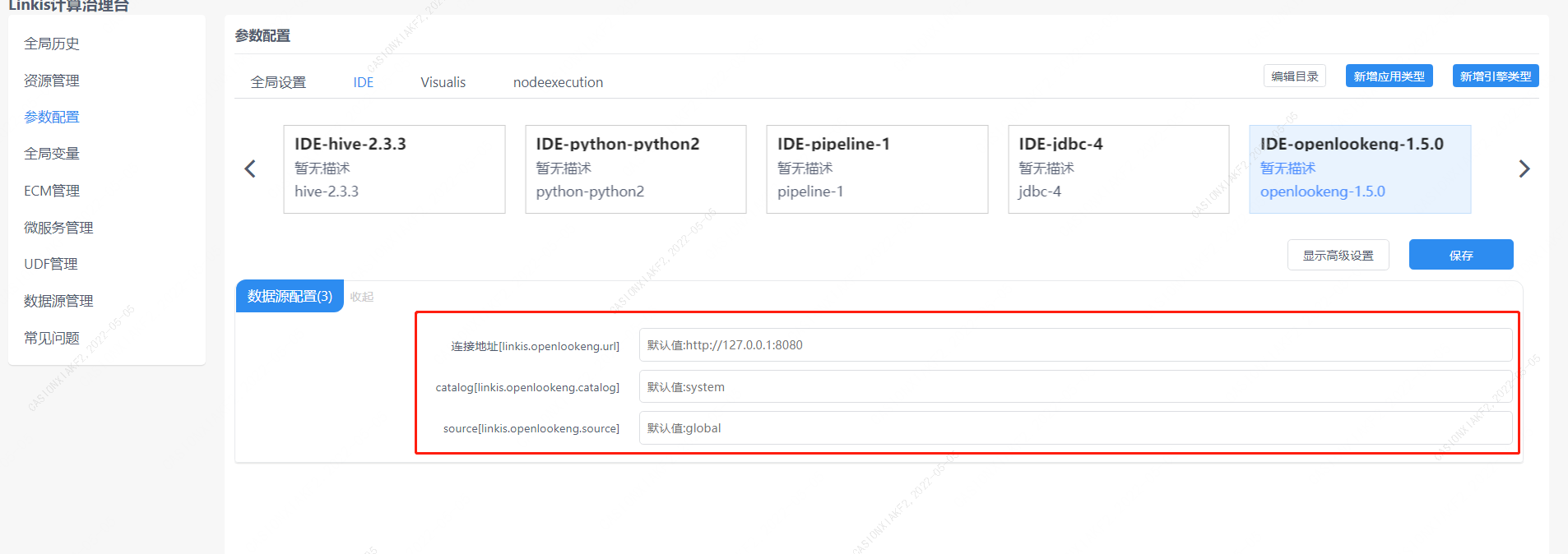
Figure 3-1 openlookeng configuration information
You can also configure it through the parameter params.configuration.runtime in the submit task interface
Example of http request parameters{ "executionContent": {"code": "show databases;", "runType": "sql"}, "params": { "variable": {}, "configuration": { "runtime": { "linkis.openlookeng.url":"http://127.0.0.1:9090" } } }, "source": {"scriptPath": "file:///mnt/bdp/hadoop/1.sql"}, "labels": { "engineType": "openlookeng-1.5.0", "userCreator": "hadoop-IDE" }}3.1 Using Linkis SDK#
Linkis provides Java and Scala SDKs to submit tasks to the Linkis server. For details, please refer to JAVA SDK Manual. For the openlookeng task, you only need to modify the EngineConnType and CodeType parameters in the Demo:
Map<String, Object> labels = new HashMap<String, Object>(); labels.put(LabelKeyConstant.ENGINE_TYPE_KEY, "openlookeng-1.5.0"); // required engineType Label labels.put(LabelKeyConstant.USER_CREATOR_TYPE_KEY, "hadoop-IDE");// required execute user and creator labels.put(LabelKeyConstant.CODE_TYPE_KEY, "sql"); // required codeType3.2 Task submission via Linkis-cli#
After Linkis 1.0, the cli method is provided to submit tasks. We only need to specify the corresponding EngineConn and CodeType tag types. The use of openlookeng is as follows:
sh ./bin/linkis-cli -engineType openlookeng-1.5.0 -codeType sql -code 'show databases;' -submitUser hadoop -proxyUser hadoopFor specific usage, please refer to: Linkis CLI Manual.